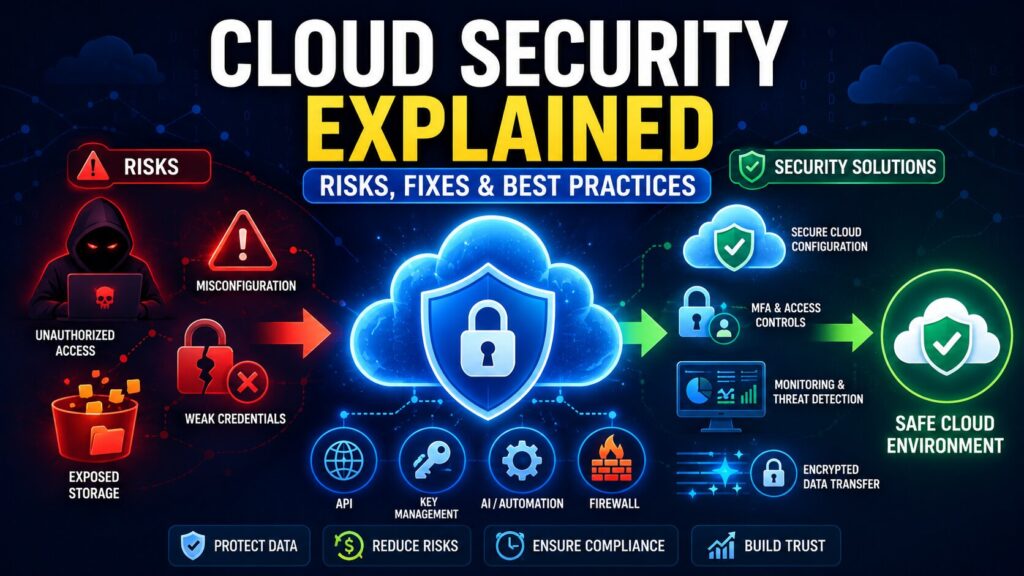
Cloud security is one of those phrases that sounds neat and tidy until you’re the one responsible for it. Then you realize “the cloud” isn’t a single place you can lock with one big key. It’s storage buckets, databases, Kubernetes clusters, SaaS tools, CI/CD pipelines, service accounts, third‑party integrations, and a long list of people who need access “just for a minute.”
The good news: most cloud security failures aren’t Hollywood-level hacks. They’re everyday mistakes, something left open, a permission that’s too broad, or a secret copied into the wrong place, combined with the fact that cloud environments change fast. If you understand the common risks and build a few habits, you can dramatically reduce the chance of a bad day.
First, what makes cloud security different?
On-prem security used to revolve around the idea of a perimeter: the office network, the firewall, and the “inside vs. outside” boundary. Cloud doesn’t really work like that.
In cloud environments:
- You can spin up infrastructure in minutes (and tear it down just as quickly).
- Access is controlled mostly by identities and permissions, not office walls.
- Logs and monitoring are optional at first… until you really need them.
- Your provider secures the underlying infrastructure, but you still control how safely you use it.
That last part is the shared responsibility model. It’s not just a slogan. It’s the reason companies get surprised: “But we’re on AWS/Azure/GCP; shouldn’t that be secure?” The provider secures their side. You still have to secure yours.
The biggest cloud security risks (in plain language)
1) Misconfigurations: the #1 repeat offender
Cloud platforms are powerful, and that power comes with many switches and dials. One wrong setting can make a storage bucket public, allow a database to be reachable from the internet, or turn a test environment into a real attack path.
Usually it’s not carelessness. It’s speed. Someone needed to debug, opened access temporarily, and moved on.
2) Identity sprawl and “permission creep”
Cloud security is identity security. And identity gets messy over time:
- old contractors still have access
- service accounts never get cleaned up
- admin permissions are handed out “temporarily.”
- API keys live longer than they should
Attackers don’t always break in by exploiting servers. Often they simply log in with stolen credentials and look like a normal user until it’s too late.
3) Exposed APIs and risky integrations
Cloud apps talk to everything: payment providers, CRMs, analytics, internal microservices, and marketing tools. Every connection brings tokens, keys, webhooks, and permissions.
If an API is missing proper authentication, rate limiting, or input validation, it becomes a soft target. Same story if secrets are stored in code or shared in chat.
4) Data leaks through the “boring” places
Everyone thinks about production databases. Fewer people think about:
- backups and snapshots
- exports to shared storage
- log files that accidentally contain customer details
- test environments using real data
That’s how sensitive information tends to leak through side routes, not the main door.
5) Shadow IT (especially with AI and automation tools)
Even if your core cloud setup is solid, employees may still upload data into tools you didn’t approve, like file sharing, browser extensions, AI assistants, and automation apps. People usually do this to save time, not to break rules. But the risk is the same.
Solutions that help without turning into a “never-ending security project”
You can absolutely drown in security tooling. The trick is to choose cloud security solutions that reduce human error and give you visibility because clarity is what you lose first in the cloud.
Here are the categories that tend to deliver real value:
Cloud Security Posture Management (CSPM)
Think of CSPM as “cloud configuration hygiene.” It flags obvious dangers like public storage, overly open security groups, missing encryption, weak IAM policies, and disabled logging.
Identity and Access (IAM) + MFA + conditional access
This step is where you get the biggest win for the least effort:
- enforce MFA
- remove stale accounts
- adopt least privilege
- use short-lived credentials where possible
Secrets management
If keys and passwords are living in code, spreadsheets, or random scripts, it’s only a matter of time. A secrets manager helps you store, rotate, and audit secrets properly.
Workload protection (CWPP) and vulnerability management
This area focuses on protecting what you run: VMs, containers, Kubernetes, and workloads. It helps catch vulnerabilities and suspicious runtime behavior.
Central logging + SIEM (or at least a good logging strategy)
Logs are your “security memory.” If you don’t have them, every investigation turns into “we think an incident happened.” With them, you can answer the following: Who accessed what, when, from where, and what changed?
Best practices that actually work (and don’t require perfection)
1) Make “least privilege” the default, not the goal
Most companies intend to implement least privilege, but admin access sneaks in because it’s convenient. Try this:
- role-based access for common jobs
- time-limited admin access for exceptions
- quarterly access reviews (simple is fine)
2) Stop making important changes only in dashboards
Dashboards are convenient, but they’re also how random exceptions get introduced. Infrastructure-as-code (IaC) gives you version control, peer review, and rollback. Even better: add automated checks so insecure changes fail before they deploy.
3) Turn on logging early and test it
“Logging is enabled” can mean a hundred different things. Pick a few critical services and confirm:
- logs are being generated
- they’re centralized
- retention is long enough
- alerts are set for obvious red flags (new admin users, public exposure changes, mass downloads)
4) Encrypt everything, then get serious about keys
Encryption at rest and in transit is a baseline. The next step is key discipline:
- restrict key access
- rotate keys regularly
- monitor key usage for anomalies
5) Reduce what’s publicly exposed
A surprising number of resources don’t need to be public. Keep internal services private. Put admin panels behind VPN/zero trust access. Use WAF + rate limiting for public endpoints. “Public by default” is the cloud version of leaving doors unlocked.
6) Have a simple incident plan before you need it
You don’t need a giant binder. You do need answers to:
- Who is responsible when something looks wrong?
- How do we revoke/rotate credentials fast?
- How do we isolate affected systems?
- Where are backups and how quickly can we restore?
Final takeaway
Cloud security isn’t about being flawless. It’s about removing easy opportunities for attackers and making mistakes harder to ship. If you nail the basics like identity controls, logging, secrets management, configuration hygiene, and sensible exposure, then you’ll be in a strong place.
And if you pair those habits with the right cloud security solutions, you can keep moving quickly in the cloud without constantly feeling like