Most growing SaaS companies don’t suffer from a lack of tools — they suffer from a lack of intentional stack design.
By the time you hit a few million in ARR, it’s common to be running 40–80 tools across product, go‑to‑market, support, data, and operations… and still feel under-equipped where it actually matters: activation, retention, and revenue. The pattern is familiar: a founder or VP signs up for “just one more” point solution to fix a local problem, nobody owns the rollout, adoption stalls, and six months later you’re paying for a tool that shows up in exactly zero weekly rituals.
In 2026, the winning companies are moving in the opposite direction: fewer tools that do more, strong integrations, and very clear ownership for each system. AI-native features and usage-based pricing make it easier than ever to add “one more thing” to the stack — and easier than ever to quietly rack up spend without improving core metrics. Tools now ship copilot experiences by default (support, sales, PM, ops), but the value only shows up if those agents sit on top of good data and well-designed workflows, not a tangled mess of overlapping products.
This guide walks through the essential layers every scaling SaaS company should have covered, with concrete 2026 tool options, selection criteria, and upgrade triggers. Treat it as a pragmatic baseline: if a tool or category isn’t clearly improving activation, retention, revenue, or efficiency, it’s a candidate for removal — not a badge of maturity.
Principles for a 2026 Stack
Before you pick tools, decide how you’ll think about the stack.
-
Prefer depth over breadth.
A lightly used dozen tools are worth less than three systems your teams live in daily. A product analytics tool that shows up in every feature kickoff is more valuable than five dashboards nobody trusts. -
Prioritize tools that move core metrics.
Your stack should map cleanly to activation, retention, expansion, and efficiency. Product analytics, CRM, billing, and support platforms that directly influence these numbers deserve investment; anything that doesn’t clearly tie back is optional.b2b-saas-tool-hub. -
Design for integration and data flow.
In 2026, the warehouse (BigQuery, Snowflake, Databricks) and/or your CRM are your practical sources of truth. You want tools that:-
Sync reliably to the warehouse (for analytics and AI),
-
Sync reliably to CRM (for GTM),
-
Expose clear APIs or webhook events for automation.
-
-
Avoid shiny objects without an owner and success metric.
No tool gets added without:-
A named business owner (not IT alone),
-
A clear primary use case (“reduce first-response time by 30%”, “increase activation by 10%”),
-
A defined adoption plan (training, dashboards, rituals).
-
-
Re-evaluate the stack every 6–12 months.
Usage-based pricing and AI add-ons (per-resolution, per-operation, per-task) mean your true cost can drift quickly. Twice a year, run a simple audit: real usage, owner, integrations, and business impact. Anything that fails gets consolidated, downgraded, or removed.
Core Categories & Essential Tools
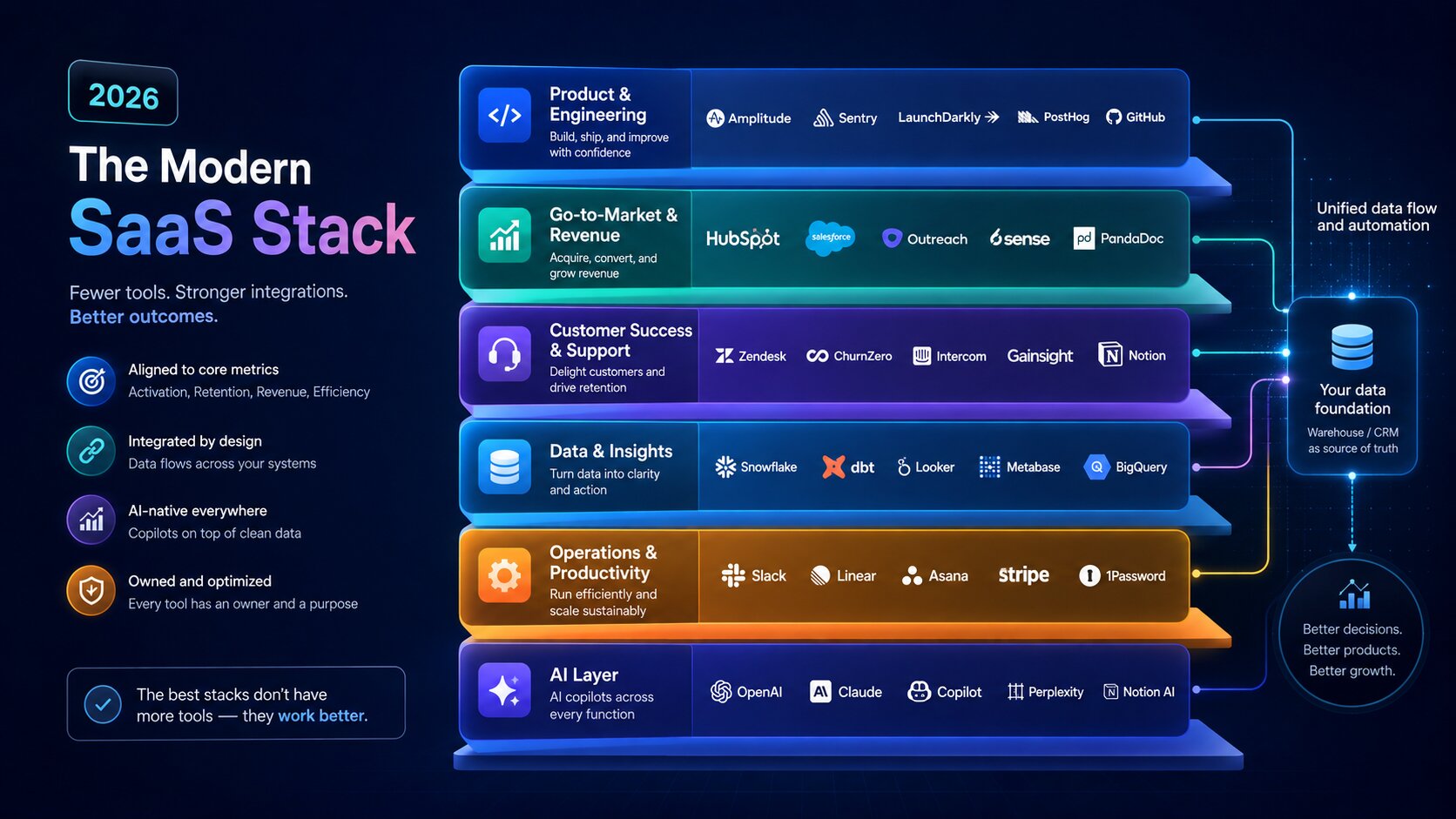
We’ll walk through six layers:
-
Product & engineering
-
Go-to-market & revenue
-
Customer success & support
-
Data & insights
-
Operations & internal productivity
-
AI layer
For each, you’ll get why it matters, how to choose, strong options in 2026, and when to upgrade.
Product & Engineering
Why it matters
This layer tells you what users do, what breaks, and how safely you can ship changes. It’s the backbone of product-led growth: if you can’t see activation and retention clearly, every roadmap debate is guesswork.
Core components
-
Product analytics
-
Error monitoring
-
Feature flags / experimentation
-
Customer feedback loops
Product analytics
What it does: Tracks events and behaviors in your product so you can measure activation, engagement, and retention, and tie them to revenue.
Key selection criteria
-
Event-based tracking with solid funnels and cohort analysis
-
Support for account-level views (B2B)
-
Good governance: tracking plans, permissions, and taxonomy
-
Integrations to warehouse and CRM
Strong options (2026)
-
Amplitude – default for growth-stage and enterprise SaaS that want deep behavioral analytics, cohorts, and experimentation in one place.
-
Mixpanel – fast, intuitive reporting for product teams; great for startups and mid-market that don’t have a full-time data team yet.
-
PostHog – open-source, engineer-friendly, bundling analytics, session replay, feature flags, and experiments.
When to graduate
-
From basic dashboards (e.g., Google Analytics) to Mixpanel or PostHog once you’re beyond simple page views and need event-level funnel and retention reporting.
-
From Mixpanel/PostHog to Amplitude when multiple teams rely on analytics and you need stronger governance, experimentation, and a unified behavioral data foundation.
Error monitoring
What it does: Captures exceptions and performance problems before customers flood support.
Common picks in 2026: Sentry, Datadog, and Rollbar, all of which integrate directly with modern stacks and alerting tools; selection should focus on language support, performance instrumentation, and how easily engineers can triage issues.
When to graduate:
-
Start with Sentry for most web/mobile apps.
-
Layer in Datadog when you have complex microservices and need infrastructure + application monitoring in one place.
Feature flags & experimentation
What it does: Decouples deployment from release, enables gradual rollouts, kills broken features instantly, and powers A/B tests.
Strong options
-
LaunchDarkly – enterprise standard with advanced targeting, governance, and compliance.
-
Flagsmith – open-source, balanced feature management; great value for startups and scale-ups.
-
GrowthBook – open-source experimentation-first platform with strong A/B testing plus flags.
Selection criteria
-
Governance (approvals, audit trails)
-
Targeting sophistication (segments, attributes, percentage rollouts)
-
Pricing model (MAU vs requests vs seats)
-
Self-host vs SaaS options (for compliance)
When to graduate
-
Start with Flagsmith or GrowthBook when you just need flags and light experimentation.
-
Move to LaunchDarkly once multiple teams depend on flags, you need strict governance, or compliance requirements justify the higher cost.
Customer feedback loops
Integrate in-app surveys and guides via tools like Pendo or PostHog surveys to close the loop between product changes and user sentiment; prioritize products that push data back into analytics and CRM rather than living in a silo.
Go-to-Market & Revenue
This layer houses your understanding of prospects, customers, deals, and revenue. If this stack is messy, forecasting and pipeline reviews quickly devolve into opinion battles.
Core components
-
CRM
-
Sales engagement
-
Marketing automation / lifecycle
-
Billing & subscriptions
-
Revenue intelligence
CRM
What it does: Central customer record, pipeline tracking, and revenue reporting. In practice, it’s also a political battleground — choose based on motion and maturity, not brand.
Strong options
Selection criteria
-
Motion: inbound-heavy, outbound-heavy, product-led, or mixed
-
Need for marketing automation and CMS (HubSpot wins here)
-
Custom object and workflow complexity (Salesforce)
-
Implementation and admin burden (Pipedrive is lighter, Salesforce heavier)
When to graduate
-
Start with Pipedrive or HubSpot Starter for founder-led sales and small teams.
-
Move to HubSpot Pro/Enterprise when marketing and sales need deep automation and closed-loop attribution.b2b-saas-tool-hub.
-
Graduate to Salesforce when you have complex hierarchies, territories, or multi-BU structures that outgrow mid-market tools.
Sales engagement
What it does: Orchestrates multi-channel sequences (email, phone, LinkedIn, SMS), logging touches and optimizing outbound efficiency.
Strong options
-
Apollo.io – best value for <100 reps, combining data (275M+ contacts) with sequencing and dialer.
-
Salesloft – strong for mid-market teams focused on coaching and deal intelligence.
-
Outreach – deepest enterprise platform for complex sequences and revenue intelligence.
Selection criteria
-
Team size and budget (Apollo is dramatically cheaper, Outreach/Salesloft assume higher spend)
-
Need for built-in data vs separate data provider
-
Importance of conversation intelligence vs pure sequence power
When to graduate
-
Start with Apollo if you’re early-stage or bootstrapped — data + sequences in one tool at startup-friendly pricing.
-
Layer in Salesloft or Outreach once you have 50+ reps, a formal SDR motion, and RevOps capacity; at that size, governance and manager visibility matter more than bundled data.
Marketing automation / lifecycle
For product-led and inbound-heavy motions, you’ll want automated journeys across email, in-app, and ads. HubSpot, Customer.io, and Braze are common choices; pick based on channel mix, data model, and integration depth with your product and CRM.b2b-saas-tool-hub.
Billing & subscriptions
What it does: Handles payments, subscription lifecycle, proration, dunning, invoicing, and increasingly global tax compliance.
Strong options
-
Stripe Billing – developer-first subscription layer on top of Stripe payments; supports complex usage-based and hybrid pricing models.
-
Paddle – Merchant of Record (MoR) that becomes the legal seller, handling VAT/GST/sales tax and chargebacks in 180+ countries.
-
Chargebee – subscription billing and revenue ops layer on top of gateways like Stripe, with advanced dunning, revenue recognition, and multi-gateway support.
Selection criteria
-
International reach and tax exposure (Paddle shines when compliance is scary)
-
Complexity of pricing and invoicing (Chargebee for multi-tier, multi-gateway scenarios)
-
Engineering capacity for custom billing flows (Stripe is most flexible, but you own more responsibility)
When to graduate
-
Start with Stripe Billing for simple domestic or light international subscription models.
-
Consider Paddle when you’re selling globally and want to offload tax and compliance; the higher fee often pays for itself in reduced overhead.
-
Introduce Chargebee around $50k–$100k MRR when finance starts asking questions Stripe’s dashboard can’t answer (revenue recognition, complex dunning, multi-gateway routing).
Revenue intelligence
What it does: Sits across CRM, engagement, and calls to explain why deals win/lose and to improve forecasting accuracy.
Strong options
-
Clari – enterprise-standard pipeline visualization and forecasting; good fit once deal flow and forecasts become board-level concerns.
-
Gong – conversation intelligence plus “Revenue OS” capabilities trained on billions of sales interactions.
When to graduate
-
Start with basic CRM reports and simple pipeline hygiene.
-
Layer Gong when coaching and call analysis are clear bottlenecks.
-
Move to Clari or similar once forecasting misses become painful and you have enough data volume to justify a dedicated platform.
Customer Success & Support
This layer keeps customers alive and growing. For SaaS, the difference between okay and great here is often the difference between flat NRR and >120% NRR.
Core components
-
Support platform (help desk)
-
Customer success / health tools
-
Knowledge base / documentation
Support platform
Strong options
-
Intercom (Fin / Intercom 2) – AI-first, conversation-driven support with in-app messaging and Fin AI agent resolving a large chunk of queries.
-
Zendesk – enterprise ticketing with omnichannel routing, structured workflows, and deep integrations.
-
Help Scout – shared inbox, simple UX, best for small teams that want human-centered email support with minimal admin overhead.
-
Freshdesk – aggressive free tier and strong value for cost-conscious SMBs.
Selection criteria
-
Volume and complexity of support (ticket-heavy vs conversational in-app)
-
AI posture (Intercom Fin, Zendesk AI, Help Scout / Freshdesk AI add-ons)
-
Need for omnichannel vs primarily email/in-app
When to graduate
-
Start with Help Scout or Freshdesk if you’re under 10 agents and mostly email-based.
-
Move to Intercom when you’re product-led, rely heavily on in-app chat, and want AI to proactively deflect tickets.
-
Shift to Zendesk when volume, channels, and SLA complexity outgrow lighter tools and you need enterprise-grade workflows.
Customer success / health
Tools like Gainsight, Catalyst, and Vitally track account health, usage signals, and renewal risk; they matter once you have a dedicated CS function managing scaled portfolios instead of ad-hoc account management. Selection should focus on integrations with product analytics, CRM, and billing, plus how easily CSMs can build health scores tied to meaningful behaviors.
Knowledge base
Notion, Confluence, GitBook, or your help desk’s native KB can all work — what matters is:
-
Clear ownership and review cadence
-
Discoverability (search that works)
-
Tight integration with support and product (linking articles to features and tickets)
Data & Insights
If you’re serious about growth, you need a clean way to turn product, GTM, and finance data into shared truths and decisions.
Core components
-
Data warehouse
-
Transformation layer
-
BI / dashboards
-
Reverse ETL (when ready)
-
Metrics / semantic layer
Modern data stack (2026)
A typical stack for $5M–$50M ARR SaaS:
-
Warehouse: BigQuery or Snowflake
-
Transformation: dbt
-
BI: Metabase or Looker / Tableau
-
Reverse ETL: Hightouch or Census (later)
-
Metrics layer: dbt semantic layer, Cube, or MetricFlow
Selection criteria
-
Cloud alignment (on GCP → BigQuery; on AWS → Snowflake or Redshift)
-
Data team maturity (Metabase is a great default when you’re just getting serious about analytics)
-
Volume and concurrency (Snowflake for heavy enterprise workloads; BigQuery for simpler consumption-based pricing)
When to graduate
-
Start with a warehouse (BigQuery or Snowflake) and a simple BI tool (Metabase) when you hit ~$2M–$5M ARR and the number of “what’s the real number?” arguments becomes painful.
-
Add dbt when you need tested, reusable models for core metrics.
-
Only introduce reverse ETL (Hightouch, Census) when you can name at least three specific operational use cases — for example, pushing product usage segments into Salesforce, HubSpot, or Intercom for targeted outreach.
-
Consider a metrics layer when multiple BI tools and teams need a single definition of things like MAU or NRR.
Operations & Internal Productivity
This layer keeps your team aligned and executing: docs, tasks, workflows, basic finance/HR.
Core components
-
Internal docs / wiki
-
Project management / issue tracking
-
No-code automation
-
Finance / HR basics
Internal docs / wiki
Strong options
-
Notion – all-in-one workspace for docs, projects, and wiki, with Notion AI and flexible database views.
-
Confluence – natural counterpart to Jira in Atlassian-heavy environments.
Choose based on whether you want docs + light PM (Notion) or a more traditional wiki tied tightly to Jira (Confluence).
Project management / issue tracking
Strong options
-
Linear – dev reference for 5–500 engineer teams; fast, keyboard-first.
-
Jira – enterprise default for large software teams with strict governance.
-
Asana / Monday.com / ClickUp – general work management for marketing, ops, and cross-functional projects.
Selection criteria
-
Team type (engineering vs general operations)
-
Need for strict governance vs speed
-
Desire for all-in-one (ClickUp, Monday) vs “do one thing well” (Linear, Asana)
When to graduate
-
Start with Linear or ClickUp for small SaaS teams that need speed and breadth without huge admin overhead.
-
Move to Jira when you cross ~50–100 engineers or compliance mandates standard tooling.
-
Layer Asana or Monday.com as you formalize cross-functional planning and portfolio management
No-code automation
What it does: Wires tools together, automates repetitive work, and accelerates ops without waiting on engineering.
Strong options
-
Zapier – easiest starting point with 6,000+ integrations; great for simple 2–3 step workflows.
-
Make – more powerful visual builder for complex multi-step, branching logic; best overall for serious automation without code.
-
n8n – open-source, self-hosted option for teams that want full data control and massive volume at low cost.
When to graduate
-
Start with Zapier if you’re new to automation and need simple syncs between mainstream tools.
-
Move to Make when Zapier’s pricing or logic limits start biting — for example, complex multi-step workflows and heavy data transformations.
-
Consider n8n when you have technical capacity, care deeply about data sovereignty, or your workflow volume makes per-task pricing prohibitively expensive.
Finance / HR basics
Tools like QuickBooks, Xero, Rippling, and Gusto cover accounting, payroll, and HR. For most SaaS companies at $1–10M ARR, the main requirement is that these systems integrate with your billing and bank feeds; deep HRIS complexity can wait until headcount and compliance demands it.
AI Layer (2026 Reality)
By 2026, almost every serious SaaS tool ships an AI copilot or agent: Intercom’s Fin in support, Salesforce and HubSpot’s revenue intelligence, Linear AI for tickets, Make’s AI scenario builder, Zapier’s AI workflow builder, and n8n’s flexible AI node integrations.
Where AI sits across the stack
-
Support: AI chatbots and agents deflect common queries and summarize conversations (Intercom Fin, Zendesk AI, Help Scout/Freshdesk AI).
-
Sales: AI-assisted sequences, coaching, and deal insights (Salesloft, Outreach, Gong, Clari).
-
Product: AI-generated tickets and requirement drafts, plus AI-led analytics exploration (Linear AI, Atlassian Intelligence, modern BI tools).
-
Ops: AI builders that translate natural language into workflows (Zapier AI, Make AI, n8n via OpenAI-compatible APIs).
Avoid fragmentation
You don’t want five disconnected AI agents all guessing off partial data. Prioritize:
-
Tools where AI is built on top of your actual product, CRM, and warehouse data
-
Clear use cases (e.g., “Fin answers common support questions from our KB and product data”)
-
Governance over prompts, data access, and quality guard
Treat AI features as multipliers on existing systems, not replacements. If your underlying data is messy, AI will confidently hallucinate on top of it.
Sample Stacks by Stage
Early Growth ($1–5M ARR): Lean, Founder-Friendly Stack
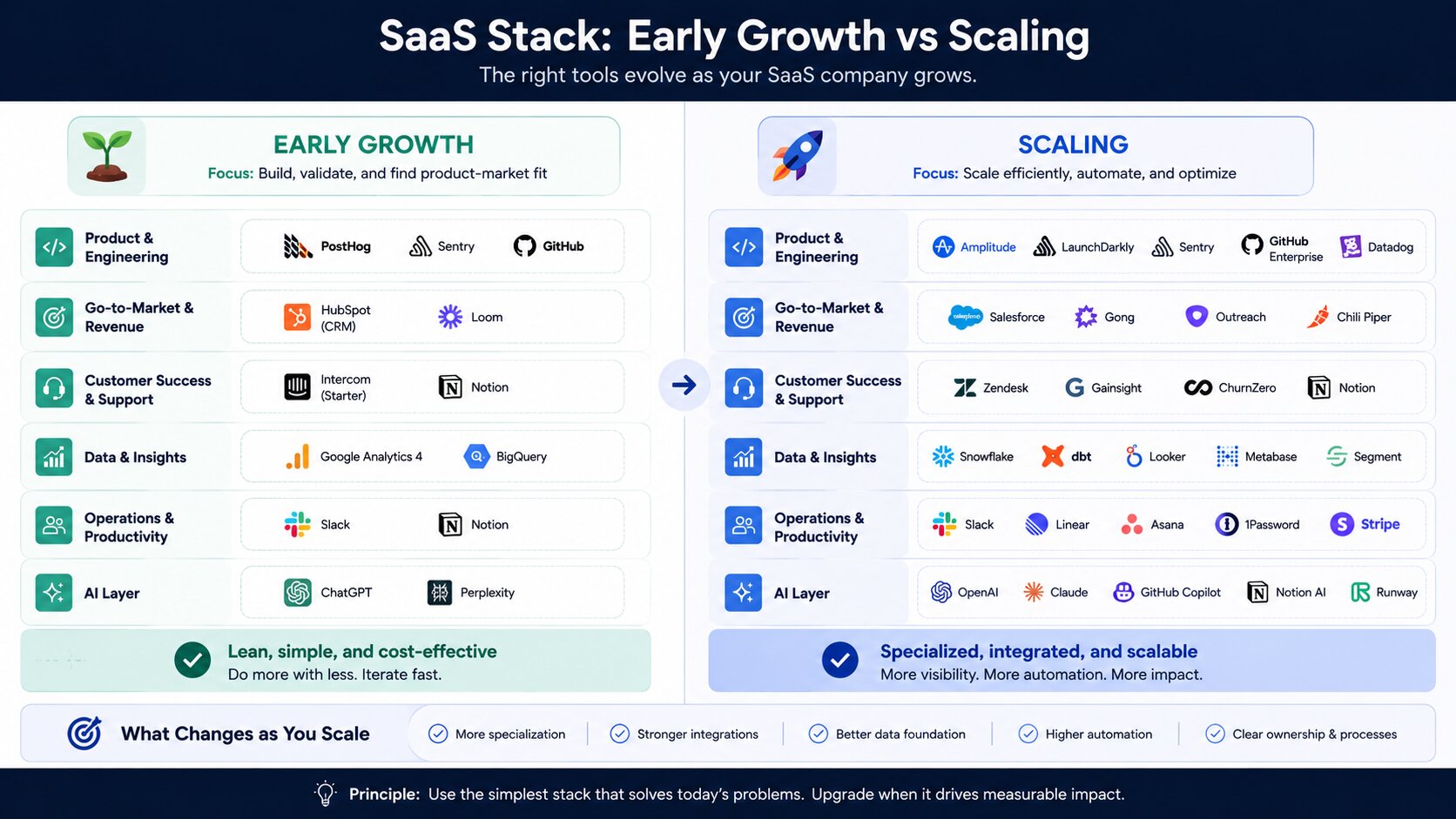
The goal here is to see what users do, run a sane funnel, and avoid over-investing in heavy enterprise tools.
Typical lean stack
-
Product & engineering: PostHog (analytics + replay + flags), Sentry
-
GTM: Pipedrive or HubSpot Starter, Apollo for outbound, Stripe Billing
-
Support: Help Scout or Freshdesk, Notion or GitBook for docs
-
Data: BigQuery Lite or just product analytics + CRM reporting
-
Ops: Notion for docs, Linear or ClickUp for PM, Zapier for basic automation
At this stage, resist the urge to buy Clari, Gainsight, or full-blown data stacks. You need clarity on activation and basic pipeline hygiene more than sophisticated AI insights.b2b-saas-tool-hub.
Scaling ($5–15M+ ARR): Specialized Tools & Stronger Data Infrastructure
Once you’re here, the problem shifts: more people, more data, more complexity.
Typical scaling stack
-
Product & engineering: Amplitude or Mixpanel, LaunchDarkly or GrowthBook, Sentry/Data
-
GTM: HubSpot Pro/Enterprise or Salesforce, Apollo/Outreach/Salesloft, Stripe + Chargebee or Paddle, Gong or Clari for revenue intelligence
-
Support: Intercom + Fin or Zendesk, dedicated CS platform (Gainsight/Catalyst/Vitally), Notion/Confluence for KB
-
Data: BigQuery or Snowflake, dbt, Metabase or Looker, reverse ETL (Hightouch/Census) for sales/marketing sync
-
Ops: Notion/Confluence, Linear/Jira, Make for complex automations, Rippling/Gusto + accounting suite
Common Upgrade Triggers
-
Activation or retention debates rely on anecdotes → upgrade product analytics.
-
Sales complaining CRM is “wrong” or “slow” → revisit CRM choice and admin resourcing.
-
Support backlog and inconsistent responses → move from inbox-only tools to full help desk + AI agent.
-
BI dashboards differ from finance numbers → formalize warehouse + dbt + a metrics layer.
Integration & Governance Best Practices
Preventing Tool Sprawl
-
Owner per tool: Every system has a clear business owner, not just IT.
-
Entry checklist: No new tool without defined use case, KPIs, and rollout plan.
-
Exit criteria: If a tool isn’t referenced in core rituals (weekly product review, pipeline review, CS standup) for a quarter, it’s a candidate for removal.
Data Ownership & Sources of Truth
-
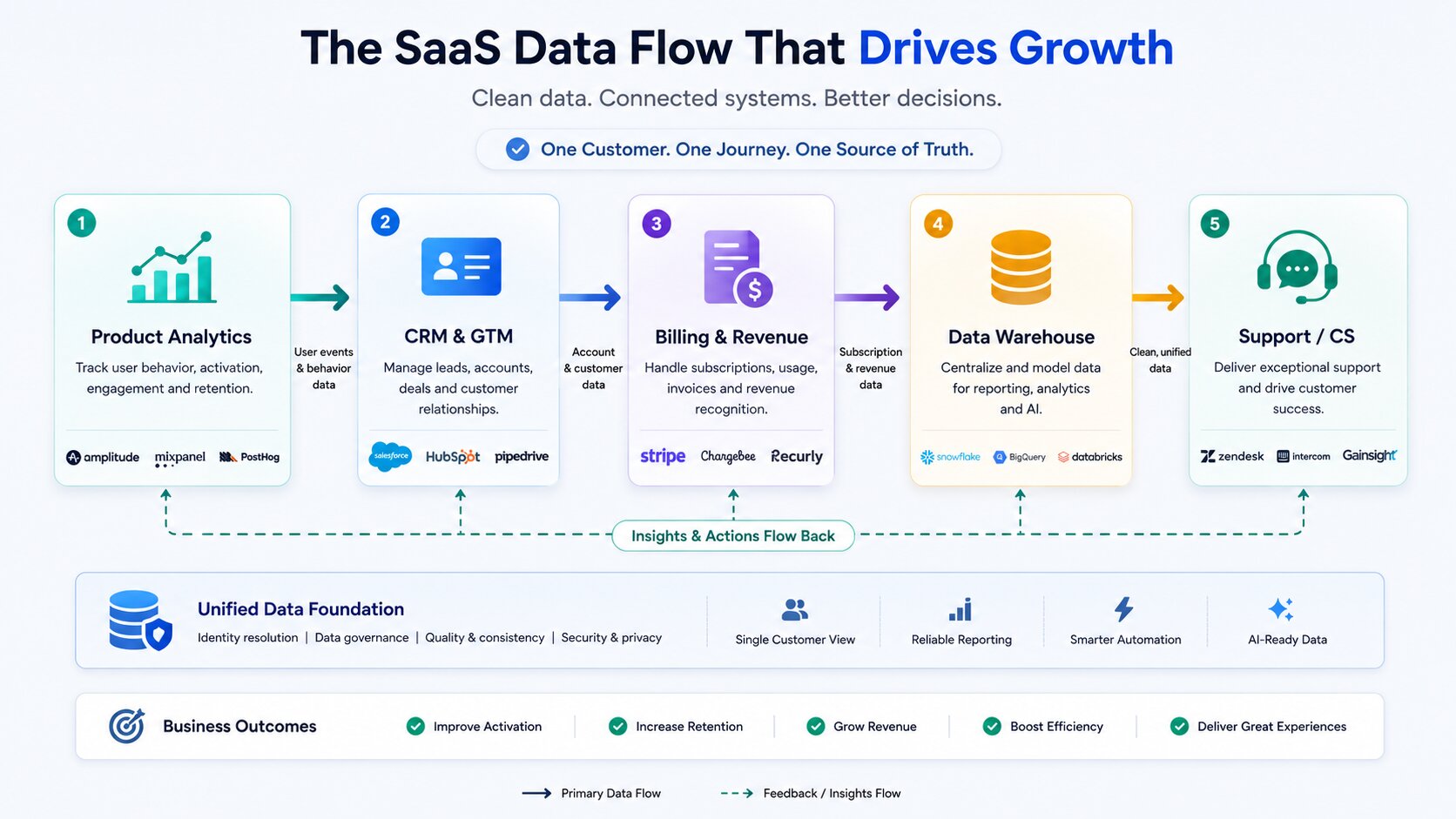
Make the warehouse the analytical source of truth and the CRM the operational source for GTM.b2b-saas-tool-hub.
-
Define what lives where:
-
Product behavior → warehouse + product analytics
-
Deals and accounts → CRM
-
Subscriptions and invoices → billing + warehouse
-
-
Use reverse ETL to push warehouse truths back into CRM/support only when teams have clear, recurring actions they’ll take based on that data.
Security, Access Control, and Cost Management
-
Centralize identity via SSO; enforce role-based access in core tools.
-
Review license assignments quarterly; unused seats are an easy win.
-
Watch AI and usage-based add-ons carefully (AI resolutions, operations, tasks) — they often sit outside headline list prices.
Simple Stack Audit Process
Twice a year:
-
Export your SaaS spend and list of tools.
-
For each tool: owner, core use case, last time referenced in a recurring meeting, integration points.
-
Mark tools as:
-
Core (directly tied to key metrics),
-
Supporting (nice-to-have with clear usage),
-
Redundant / underused.
-
-
Consolidate or remove redundant tools; downgrade underused ones to free/cheaper tiers.
What to Avoid in 2026
-
Over-buying enterprise tools too early.
Salesforce, Zendesk Suite, LaunchDarkly, Clari, and advanced BI stacks are fantastic when complexity demands them — but painful shelfware when you’re still under 20–30 employees. -
Multiple overlapping AI tools.
Running separate AI support bots, sales agents, and ops copilots with no shared data plane creates more confusion than value. Favor AI features inside your existing systems or platforms designed to sit across motions. -
Tools with weak APIs or poor adoption.
In a world of automation and AI, tools that don’t integrate cleanly or sit outside your team’s workflows are costly distractions. -
Ignoring total cost of ownership.
Look beyond list prices:-
Implementation and admin FTEs
-
Required add-ons (data subscriptions, AI, phone, extra modules)
-
Opportunity cost of time spent wrestling with tools rather than using them.
-
Wrap Up
A great stack multiplies your team’s output; a bloated one multiplies friction. The companies that win in 2026 aren’t those with the biggest SaaS catalog — they’re the ones with a tight set of tools that teams actually use, anchored around clear metrics, strong integration into a warehouse and CRM, and AI applied where it truly reduces toil.
Start with the essential layers: product analytics, CRM and billing, support, a modest data stack, and a small number of well-chosen productivity and automation tools. Upgrade only when you outgrow a system in practice, not because a competitor uses a fancier logo. Treat your stack as a living system: audit it, prune it, and keep it aligned to how your company actually sells, delivers, and learns.
FAQs
What’s the minimum viable SaaS stack for a company at $2M ARR?
You can run a very capable company at $2M ARR with:
-
Product: PostHog or Mixpanel + Sentry
-
GTM: Pipedrive or HubSpot Starter, Apollo for outbound, Stripe Billing
-
Support: Help Scout or Freshdesk, Notion for docs
-
Ops: Notion, Linear/ClickUp, Zapier for basic automation
You don’t need Clari, Gainsight, or a full modern data stack yet — you need clarity on activation and a clean pipeline more than advanced AI.
Which tools should I prioritize if I can only add 3–4 this year?
Focus on tools that most directly move activation and revenue:
-
Product analytics (Amplitude, Mixpanel, or PostHog) – to understand activation and retention.
-
CRM upgrade if your current system is holding back GTM (HubSpot or Salesforce depending on motion).
-
Support platform with AI (Intercom or Zendesk + AI) – to reduce response times and improve CX.
-
Basic warehouse + BI (BigQuery + Metabase) – once reporting is a recurring pain point.
Pick based on current bottleneck: if your funnel is unclear, start with analytics; if revenue ops is chaos, start with CRM; if support is drowning, start with help desk.b2b-saas-tool-hub.
Is it better to buy an all-in-one platform or best-of-breed tools in 2026?
All-in-one tools (ClickUp, Monday.com, HubSpot) win when:
-
You’re small-to-mid-sized,
-
You value lower admin overhead,
-
You’re okay with depth trade-offs in exchange for simplicity.
Best-of-breed wins when:
-
You have dedicated owners for each function,
-
Complexity and scale demand specialized features (Salesforce + Clari, LaunchDarkly, Amplitude, Intercom, BigQuery).
In practice, most teams run hybrids: a core “platform” (HubSpot or Salesforce + warehouse) plus best-of-breed where it matters most (analytics, feature flags, support).b2b-saas-tool-hub.
How do I know when I’ve outgrown a tool like HubSpot or Notion?
You’ve outgrown a tool when:
-
Teams are building side systems to work around it (spreadsheets, shadow apps).
-
You’re regularly blocked by missing capabilities (e.g., complex territories in HubSpot, advanced permission schemes in Notion).
-
Admin time is exploding compared to value (custom hacks every week).
For HubSpot, the jump to Salesforce often comes when sales org complexity (territories, many BUs, multi-level forecasting) outweighs the benefits of all-in-one simplicity. For Notion, you add Jira/Linear or other specialized PM tools once ticketing and governance needs exceed docs + light tasks.
What’s the biggest stack mistake growing SaaS companies still make?
The biggest mistake is buying enterprise tools to “look grown up” before the organization is ready: Salesforce with no admin, Zendesk Suite for a 5-person team, LaunchDarkly when flags could be handled by lighter tools, full reverse ETL with no active use cases.
The second biggest: layering tools without a clear owner or core ritual where their data is reviewed weekly. Tools that don’t show up in standups, reviews, or decision meetings become expensive noise.
How important are native AI features versus using separate AI agents?
Native AI features (Fin inside Intercom, AI inside Jira/Linear, AI workflow builders in Make/Zapier) are typically more valuable early because:
-
They sit on top of the tool’s full context and data,
-
They’re easier to adopt (no extra system),
-
They’re aligned with existing workflows.
Separate AI agents can make sense later when you have a strong data foundation in the warehouse and need cross-tool orchestration, but without good data they mostly automate confusion.
Should finance and HR tools be part of the core SaaS stack conversation?
Yes — at least to the extent that they:
-
Integrate with billing and revenue reporting,
-
Affect compliance and payroll reliability,
-
Influence your ability to understand unit economics.
At early stages, simple accounting (QuickBooks/Xero), payroll (Rippling/Gusto), and billing (Stripe/Paddle/Chargebee) are enough; the key is ensuring data connects to your warehouse and revenue reporting. As you grow, finance tools become core contributors to your single source of truth for revenue and costs.
How often should we audit and clean up our tool stack?
A light audit every 6 months and a deeper one annually is a good baseline.
Tie audits to natural planning cycles:
-
Pre-annual budgeting: deeper cost, usage, and redundancy review.
-
Mid-year: focused on adoption and AI/usage-based overruns.
The goal isn’t just cutting spend; it’s tightening integrations and usage around the few tools that matter most.
What integrations are non-negotiable between product, CRM, and billing?
At minimum:
-
Product analytics → CRM (to tie behavior to deals and accounts).
-
Billing → CRM (ARR, MRR, plan, renewal dates, status).
-
Billing → warehouse (for revenue analytics and cohort analysis).
-
Warehouse → GTM tools (via reverse ETL) once you have clear operational use cases.
Without these links, you end up with sales, product, and finance each living in their own reality.
How do I control SaaS spend without slowing the team down?
-
Centralize procurement and mandate owner + KPI for any new tool.
-
Prefer consolidating onto existing vendors where possible (e.g., using HubSpot for sequences before adding another SEP, or Make instead of dozens of small specialized automations).
-
Watch usage-based add-ons and AI pricing closely; they’re where quiet overages hide.
-
Frame cuts around impact: keep anything clearly tied to activation, retention, revenue, or clear efficiency gains; remove or downgrade tools that don’t show up in core rituals.
If you design the stack around a few strong platforms and a clear data backbone, you can give teams leverage without drowning in overlapping SaaS.