If you still key in data from invoices, claims, contracts, KYC forms, or medical records, you already feel the pain: volumes keep growing, formats keep changing, and simple rules or templates break every few weeks. In 2026, organizations that move to AI‑powered Intelligent Document Processing (IDP) are cutting document processing costs by about 60–80% and shrinking turnaround times by 70–90% compared with manual work or basic OCR plus RPA alone. Many mature invoice automation programs now report straight‑through processing (STP) rates in the 75–90% range, where documents flow from inbox to ERP with no human touch.
The problem is simple: most of your documents are semi‑structured or unstructured. An invoice template changes. A claims pack has 20 pages. A KYC file bundles IDs, proof of address, and company papers. A medical record mixes typed notes, checkboxes, and handwriting. Rule‑based RPA is great once clean data is already in a system, but it breaks down when it has to “understand” messy, real‑world documents. OCR on its own only sees characters on a page; it has no idea which “1234.50” is the invoice total or which date is the due date.
That is why IDP emerged. It started as a smarter layer on top of OCR and evolved into a full stack that combines computer vision, machine learning, natural language processing, and more recently generative AI to read, understand, and act on documents. In 2026, this stack is getting a major upgrade: agentic AI that uses document data to make decisions, multimodal models that handle text, images, tables, and even charts together, and deep, native integration into RPA and workflow platforms. You are no longer just “digitizing documents”; you are building autonomous document agents that classify, extract, validate, decide, and trigger end‑to‑end processes.
In this guide, you will get three things you can use right away:
-
A practical explanation of IDP in 2026 and how it differs from OCR and classic RPA.
-
A head‑to‑head view of leading tools, with accuracy ranges, strengths, and where each one fits best.
-
A step‑by‑step implementation framework, real‑world benchmarks, and a decision checklist so you can choose the right stack for your own documents.
The article draws on recent analyst reports, vendor benchmarks, and case studies across finance, insurance, healthcare, and banking, including invoice automation, claims processing, KYC onboarding, and patient intake. You will see what accuracy and ROI you can realistically expect if you implement IDP with RPA and AI in 2026—and what traps to avoid so your project does not stall after a small pilot.
At a high level, you can think of three layers of automation for documents:
-
OCR: Reads pixels and turns them into text, often with 85–95% character‑level accuracy on clean printed documents, but much lower on noisy scans or handwriting.
-
RPA document automation: Uses rules and screen bots to move data between systems, but expects that fields already sit in fixed positions or clean tables.
-
IDP: Adds intelligence on top of OCR and RPA so the system can classify documents, extract key fields in context, validate them, and learn over time from corrections.
Modern IDP platforms in 2026 usually include these core components:
-
Computer Vision + OCR
They enhance raw OCR with image cleanup (deskew, denoise), layout detection, table and checkbox recognition, and support for multi‑language, multi‑page documents. -
Machine Learning / Deep Learning
Models learn patterns from thousands of real invoices, claims, and contracts, and generalize to new layouts without manual templates; state‑of‑the‑art systems routinely achieve 95–99% field‑level accuracy on well‑structured documents. -
Natural Language Processing (NLP)
NLP understands context: which text is the vendor name, which paragraph in a contract defines liability, or whether a claim note hints at potential fraud. -
Generative AI for exceptions and enrichment
GenAI is now used to classify unseen documents with natural‑language prompts, fill in missing values from context, summarize long claims files, and propose answers for edge cases instead of just failing. -
Human‑in‑the‑loop validation
Instead of routing every document to a person, IDP surfaces only low‑confidence fields or complex edge cases for review, cutting manual review effort by about 70% in many rollouts.
If you sketch the 2026 IDP stack, it looks like layers: capture and OCR at the bottom, AI models (vision, ML, NLP, GenAI) in the middle, a human‑in‑the‑loop and governance layer around it, and RPA/workflow tools on top to run full business processes. When this stack is tuned well, your bots no longer just “type faster”; they actually understand documents enough to make safe decisions.
Top IDP Tools & Platforms Comparison 2026
You have many IDP platforms to pick from. To keep things practical, let’s focus on a set you are most likely to consider in 2026:
-
UiPath Document Understanding + AI Center
-
Automation Anywhere Document Automation / IQ Bot
-
Microsoft Power Automate AI Builder + Azure Document Intelligence
-
ABBYY FlexiCapture / ABBYY Vantage
-
Hyperscience Hypercell
-
Rossum
-
Docsumo
-
Nanonets
Analyst reports and vendor claims differ, but a few patterns stand out:
-
ABBYY and Hyperscience are consistently highlighted as leaders on extraction accuracy, especially for complex and long‑form documents.
-
UiPath, Automation Anywhere, and Microsoft win when you want tight integration with their existing RPA or Power Platform stacks and a single vendor for workflow plus IDP.
-
Rossum, Docsumo, and Nanonets often lead on ease of setup, API‑first usage, and high accuracy out of the box for invoices and financial documents.
Comparison
Below is a simplified view based on public statements, case studies, and independent comparisons; treat these as realistic ranges, not vendor‑approved guarantees.
2026 Real‑World Accuracy Benchmarks
You will often see vendors claim “95–99% accuracy.” That can be true on clean invoices, but real‑world accuracy and straight‑through processing depend heavily on document type, quality, and how you design your workflow.
Based on recent benchmarks, case studies, and surveys:
-
Invoices (structured / semi‑structured):
-
OCR + rules alone: roughly 70–85% field‑level accuracy, with a large share of invoices needing manual corrections.
-
IDP with ML + human‑in‑the‑loop: often 93–99% field‑level accuracy and 70–90% STP on mature implementations.
-
-
Contracts & agreements:
-
Traditional text search: struggles to reliably pull clauses and key fields, especially in long documents.
-
Document AI / IDP: long‑document benchmarks still show only about 66–69% performance on complex tables and long documents for general vision‑language models, but specialized IDP platforms deliver much higher business‑level accuracy by combining AI with rules and human review.
-
-
Medical claims / patient records:
-
IDP in healthcare is used to automate claim forms, remittance advice, and intake records, cutting manual work and errors; providers report big gains in speed and accuracy but usually keep humans in the loop for clinical or billing risk.
-
-
KYC / identity documents:
-
AI‑powered IDP can bring KYC extraction accuracy over 90–95%, reduce manual errors from double digits to under 1%, and cut turnaround time by more than 60%.
-
-
Handwritten forms:
-
Benchmarks for handwriting still show that even leading models reach around 75% character‑level accuracy on difficult handwritten sets; business‑level STP on handwriting usually stays below fully printed docs and often needs more human checks.
-
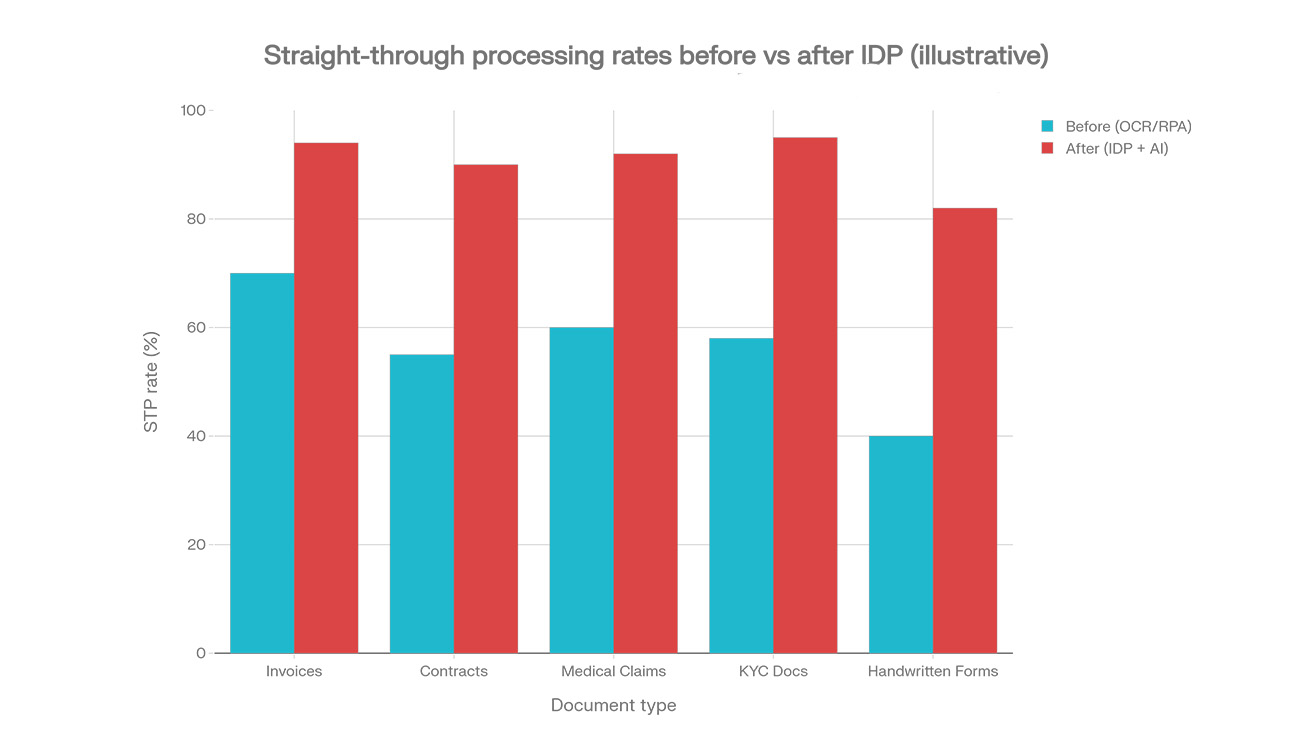
The grouped bar chart I shared shows a realistic pattern: STP rates moving from around 40–70% with basic OCR/RPA to roughly 82–96% with well‑implemented IDP across invoices, contracts, medical claims, KYC, and handwritten forms. That lines up with case studies where invoice and claims STP end up in the 75–90% zone after tuning, not on day one.
Key factors that drive your actual accuracy:
-
Document quality: skew, blur, low resolution, stamps, handwriting, and noisy scans can cut accuracy sharply.
-
Training data: how many labeled examples per document type you provide, and how varied they are.
-
Model choice and fine‑tuning: generic OCR vs vertical IDP models vs vendor‑tuned models for invoices, ID documents, or health forms.
-
Workflow design: using confidence scores, business rules, and validation checks to catch low‑confidence fields and route them to humans.
Proven 8‑Step IDP Implementation Framework
This is the part you will actually execute. You can treat this as your blueprint for any IDP project in 2026.
Step 1: Document discovery & classification
Goal: Know exactly what you process today, and bucket it into logical document types.
How to do it:
-
Export samples from email inboxes, shared drives, DMS, and line‑of‑business systems. Aim for a few hundred examples per key type (e.g., invoices, claims, KYC packets).
-
Tag by high‑level type (invoice, claim, contract), sub‑type (country, line of business), and quality (scan vs digital, handwritten vs printed).
-
Count volumes per type per month and peak periods; this drives your ROI and tool choice.
Tools and techniques: simple scripts, DMS reports, or lightweight classification models from IDP vendors to auto‑cluster documents.
Common mistakes:
-
Under‑sampling long tail documents (e.g., one‑off contracts) that later cause errors.
-
Ignoring handwriting: you discover too late that 20% of your forms are handwritten and much harder to automate.
Checklist: you should have a spreadsheet listing each document type, monthly volume, regions, languages, percent handwritten, and example files linked.
Step 2: Data extraction requirements & taxonomy design
Goal: Decide what you actually need to extract and how it will be named and stored.
How to do it:
-
For each document type, list required fields (e.g., for invoices: vendor name, invoice number, date, currency, net amount, tax amount, line items).
-
Agree on field names, formats, and validation rules with downstream system owners (ERP, claims, core banking, EMR, CRM).
-
Tag fields by criticality: “must have” for touchless processing vs “nice to have” for analytics.
Tools and techniques: data dictionaries in Excel, system configuration exports (e.g., ERP field lists), and workshops with business SMEs.
Common mistakes:
-
Trying to extract too many fields on day one and making models harder to train.
-
Using inconsistent field names across systems, which breaks downstream mapping.
Checklist: a signed‑off taxonomy per document type including field names, formats (string, date, decimal), and basic business rules.
Step 3: Tool selection & pilot planning
Goal: Pick a platform that matches your documents, tech stack, and budget—and prove value fast.
How to do it:
-
Short‑list 3–5 tools based on:
-
Your existing RPA or workflow stack (UiPath, Power Automate, AA, etc.).
-
Document mix: volume and complexity (high‑volume invoices vs unstructured contracts vs medical forms).
-
Regulatory demands (GDPR, HIPAA, SOC 2, FedRAMP, data residency).
-
-
Ask vendors to run a “bake‑off” on your own sample documents, measuring field‑level accuracy, STP, and time to configure.
-
Design a 8–12 week pilot with clear success metrics: target accuracy, STP, and payback period.
Tools and techniques: Everest PEAK Matrix reports, independent accuracy comparisons, vendor PoCs.
Common mistakes:
-
Choosing purely on license price instead of total cost of ownership (training, tuning, and operations).
-
Running demos only on vendor‑supplied “clean” samples instead of your ugly scans.
Checklist: a one‑page scorecard per vendor and a signed pilot scope that defines documents, metrics, and timelines.
Step 4: Model training & fine‑tuning
Goal: Teach your chosen IDP to understand your documents well enough for production.
How to do it:
-
Label a representative set of documents per type, focusing on the fields you defined in Step 2.
-
Use active learning or vendor tooling that tells you which samples to label next to get the most accuracy gain.
-
Track accuracy and confidence scores per field, and tighten or relax thresholds based on business risk.
Tools and techniques:
-
UiPath Document Understanding’s active learning and Helix extractors.
-
Automation Anywhere’s Document Automation with generative extraction and confidence‑based validation.
-
ABBYY skills and Vantage models plus marketplace templates.
Common mistakes:
-
Training only on one region or one vendor and then being surprised when a new format tanks accuracy.
-
Ignoring low‑frequency but high‑risk fields (e.g., tax IDs, bank account numbers).
Checklist: model evaluation reports per document type, with precision/recall per key field and a plan to close any gaps.
Step 5: Integration with RPA workflows
Goal: Turn extracted data into end‑to‑end automation, not just a prettier OCR.
How to do it:
-
Wire IDP into your RPA or workflow engine so documents trigger end‑to‑end flows: read → validate → enrich → post to systems → notify users.
-
Use confidence scores and business rules in your bots to decide when to auto‑post vs send for human review.
-
Log every decision and data change for audit and compliance.
Tools and techniques:
-
UiPath Orchestrator / Studio workflows consuming Document Understanding outputs.
-
Power Automate flows calling AI Builder and Azure Document Intelligence.
-
Automation Anywhere bots using Document Automation and GenAI agents.
Common mistakes:
-
Pushing low‑confidence data straight into core systems, then having to clean up downstream.
-
Forgetting retries, resilience, and idempotency when IDP or downstream APIs are slow.
Checklist: a process diagram for each flow, including entry points, bot tasks, human review steps, and error handling.
Step 6: Human‑in‑the‑loop & exception handling design
Goal: Let humans focus only on what the models are not sure about.
How to do it:
-
Define confidence thresholds per field and per document type; for example, 95%+ for invoice totals, lower for non‑critical fields.
-
Build simple validation UIs where reviewers see the original document, extracted fields, and low‑confidence highlights.
-
Capture corrections back into the training loop so the model improves over time.
Tools and techniques: vendor validation stations (UiPath Action Center, ABBYY verification UI, Hyperscience review views, Rossum’s validation inbox, etc.).
Common mistakes:
-
Dumping all exceptions to a small team without prioritization, leading to queues and burned‑out staff.
-
Not routing specific exception types to the right SMEs (e.g., tax rules vs basic typos).
Checklist: documented thresholds, queue SLAs, and a simple SOP for reviewers per document type.
Step 7: Governance, validation & compliance setup
Goal: Make sure your IDP behaves, stays compliant, and can pass audits.
How to do it:
-
Define who owns models, training data, and approvals for changes.
-
Log key events: model versions, training datasets, field‑level changes, and who approved overrides.
-
Map your flows to GDPR, HIPAA, SOC 2, or industry‑specific rules where you process personal or sensitive data.
Tools and techniques: IDP audit logs, RPA logs, SIEM integration, and model governance features from enterprise platforms.
Common mistakes:
-
Retraining models on production data without sign‑off or rollback plans.
-
Storing document images and extracted PII in uncontrolled locations (e.g., random shared drives).
Checklist: a governance charter, RACI, and a control matrix that maps IDP to your compliance framework.
Step 8: Monitoring, continuous improvement & scaling
Goal: Treat IDP as a living system that improves with your business, not a one‑off project.
How to do it:
-
Track KPIs: STP rate, field‑level accuracy, manual review rate, turnaround time, and cost per document.
-
Watch for drift: new layouts, regulatory changes, seasonal volume spikes, and model performance drops.
-
Scale from a single process (e.g., invoices) to neighboring use cases (e.g., statements, orders, contracts) using reusable components.
Tools and techniques: monitoring dashboards from vendors, custom BI, and agentic AI features that self‑adjust workflows within set bounds.
Common mistakes:
-
Declaring success after the first pilot and not funding ongoing operations and tuning.
-
Expanding to too many document types at once without a clear backlog and ROI view.
Checklist: a quarterly review cadence, budget for maintenance, and a roadmap of new document types to onboard.
Real‑World ROI Case Studies
Here are four patterns you can refer to when you build your own business case.
Finance: Invoice processing (around 70% cost reduction)
-
Independent studies and case studies show invoice automation cutting costs from roughly 12–30 units of currency per invoice to around 2–4, a 70–80% reduction, and shrinking processing from days to same‑day or near real‑time.
-
One invoice case reported 93% faster processing, 99%+ accuracy, and 75% STP with modern IDP, delivering 5–10× ROI in the first year.
Insurance: Claims automation (85% faster processing)
-
In property and casualty insurance, IDP helps some carriers reach 100% straight‑through processing on a subset of “touchless” claims, usually simple ones.
-
Broader claims programs using RPA + IDP report around 40–76% reductions in turnaround time and substantial manual effort savings, especially when combined with straight‑through processing for low‑risk events.
Healthcare: Patient intake and records
-
Healthcare providers use IDP to digitize patient records, automate intake forms, and accelerate insurance claims, leading to faster access to records, fewer admin errors, and lower backlogs.
-
Case studies report significant reductions in manual intake effort and improved revenue cycle times when claims are fed by accurate, structured data from IDP.
Banking: KYC onboarding
-
Banks deploying IDP for KYC document checks report over 60% reductions in KYC cycle time and extraction accuracy in the 90–95% range, along with a 4× drop in cost per case in some implementations.
-
AI‑powered IDP for KYC has been shown to cut manual error rates from around 10% to under 1% in at least one large‑bank example.
Across these examples, a 4–9 month payback window is common once you process tens or hundreds of thousands of documents per year.
Challenges, Risks & Best Practices
Even with strong tools, IDP projects can fail if you ignore a few hard truths.
Common failure points:
-
Poor input quality: low‑res scans, photos with glare, handwritten scribbles, and missing pages kill accuracy; no tool can fully “fix” that for free.
-
Over‑reliance on AI: pushing low‑confidence predictions straight to core systems without governance leads to bad payments, compliance issues, and mistrust.
-
Change resistance: workers may fear automation or not trust AI outputs; if you do not involve them, they will route everything back to manual anyway.
Security and compliance considerations:
-
You must handle personal and health data under GDPR, HIPAA, and sector rules; that means choosing vendors with proper certifications (SOC 2, FedRAMP, etc.) and clear data residency options.
-
Log extraction decisions and maintain traceable audit trails, especially for KYC and regulated industries.
Hybrid human + AI workflow design:
-
Use confidence‑based routing: high‑confidence cases go straight through; medium‑confidence go to human review; low‑confidence may be rejected or escalated.
-
Let humans correct the system inside a proper UI so their feedback retrains models and steadily reduces exceptions rather than just patching symptoms.
Best practices:
-
Start with one or two document types with clear ROI (usually invoices, claims, or KYC), prove value, then expand.
-
Keep your project scope small but your architecture future‑proof, so you can plug in more document types, GenAI models, and agents later.
Decision Framework: Which IDP Tool Should You Choose?
Use these questions as a simple checklist or to design a flowchart for your article or slides.
-
What is your dominant document type and volume?
-
Mostly invoices / AP with 50k+ docs per year → look at ABBYY, Rossum, UiPath, Docsumo, Nanonets.
-
Heavy contracts / long unstructured docs → consider Hyperscience and platforms strong in unstructured data.
-
KYC and onboarding → focus on tools with strong ID / KYC models and compliance posture (ABBYY, Hyperscience, banking‑focused IDP vendors).
-
-
What RPA / workflow stack do you already have?
-
UiPath shop → UiPath Document Understanding is usually the fastest path.
-
Power Platform / Dynamics 365 → AI Builder + Azure Document Intelligence integrate cleanly.
-
Automation Anywhere → Document Automation / IQ Bot plus GenAI Process Models.
-
-
What is your budget and team skill level?
-
Limited budget, developer‑heavy team → API‑first SaaS like Nanonets or Docsumo may be attractive.
-
Larger budgets, strong compliance needs → enterprise platforms like ABBYY or Hyperscience.
-
-
How strict are your industry regulations?
-
Healthcare and banking often need HIPAA, SOC 2, FedRAMP, and careful data residency; make sure each vendor meets these before you go deep.
-
-
Organization size and maturity:
-
Mid‑market: start with the platform aligned to your stack (UiPath, Power Automate, AA) and a small number of document types.
-
Large enterprise: run a structured RFP, request hands‑on pilots, and benchmark multiple vendors on your real documents.
-
You can turn these questions into a simple flowchart in your article: follow arrows based on stack (UiPath vs Power Automate vs AA), main document family, and volume, then shortlist 2–3 tools to test.
Future of IDP (2027–2028 Outlook)
Looking a bit ahead, three trends matter for you if you plan for the next two years:
-
Multimodal AI becomes standard
Benchmarks like the IDP Leaderboard are already comparing models across OCR, key information extraction, table extraction, visual QA, and long documents in a single suite. By 2027, you should expect most serious IDP platforms to use multimodal backbones that see text, layout, images, and even charts together. -
Autonomous document agents
Agentic AI trends show that workflows are shifting from static flows to multi‑agent systems that pursue goals, fix issues, and optimize themselves over time. In practice, this means agents that:-
Decide which model to use for each document.
-
Cross‑check extracted data with external sources.
-
Re‑route workflows when errors or bottlenecks appear.
-
-
Convergence with hyperautomation platforms
IDP is becoming one building block inside broader automation stacks that combine RPA, process mining, task mining, agents, and GenAI chat interfaces. For you, that means less time wiring tools together and more time designing how work should flow across teams, bots, and agents.
Conclusion
If you want to move from manual processing or brittle templates to real straight‑through document automation in 2026, IDP with RPA and AI is now proven, not hype. Organizations rolling out modern IDP are cutting document processing costs by 60–80%, shrinking turnaround times by 70–90%, and pushing STP rates into the 75–90% range on mature use cases like invoices, claims, and KYC.
Your next moves can be simple and concrete:
-
Run a two‑week discovery: inventory your main document types, volumes, and pain points.
-
Define the 10–20 fields that really matter per document type and build a clean taxonomy.
-
Shortlist 2–3 IDP platforms that fit your stack and regulations, and insist on pilots using your ugliest real documents.
-
Use the 8‑step framework in this guide to structure your implementation—from training and human‑in‑the‑loop design to governance and continuous improvement.
