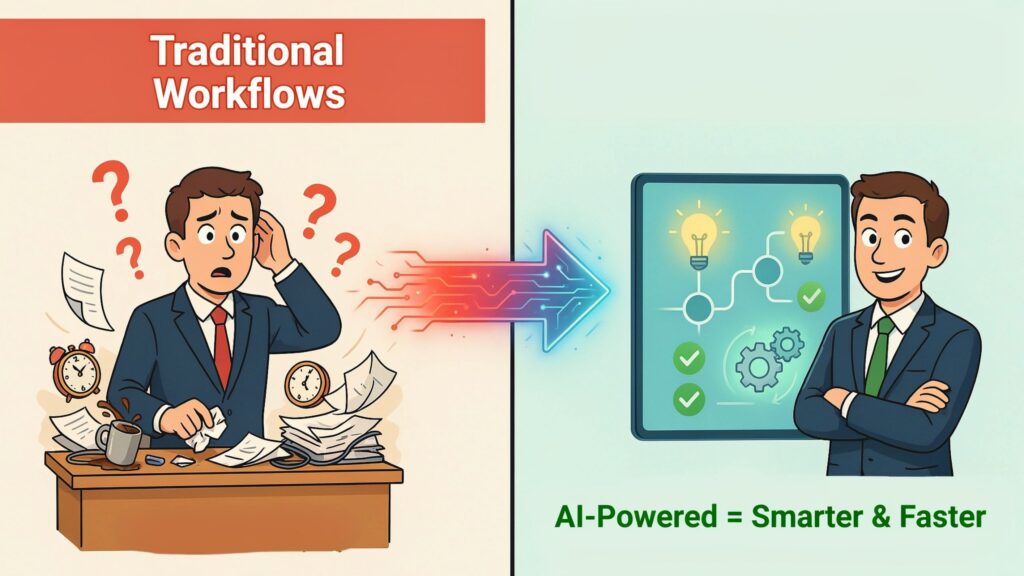
Imagine you’re a manager waiting on a critical report before approving a major project. The numbers sit in three different spreadsheets, two inboxes, and one outdated system that only your IT team can access. By the time everything is collected, checked, and shared, the opportunity window has already shrunk—or closed. You’re making a big decision with incomplete, delayed information, and you feel it.
Now picture a different setup. Your AI-powered workflow pulls live data from finance, operations, and sales, checks for anomalies, highlights risks, and presents you a clear recommendation in minutes, not days. Instead of chasing updates, you see a simple dashboard: “Approve,” “Hold,” or “Adjust,” with the reasoning laid out in plain language. You still decide—but this time, you’re not guessing in the dark.
Traditional workflows were built for a slower world, where manual checks, email threads, and spreadsheet trackers were “good enough.” In 2026, they’re too slow, too fragile, and too expensive. AI-powered workflows are changing how decisions are made and how work actually moves, by turning scattered data into live, usable insight and replacing manual steps with smart, connected automation.
In this guide, you’ll see how these workflows work under the hood, how they improve decision-making, what kind of efficiency gains you can realistically expect, the best tools in 2026, and a step‑by‑step path you can follow to implement them in your own team.
The evolution from traditional to AI-powered workflows
For most companies, workflows started as purely manual chains: someone fills a form, someone else checks it, another person approves, and then someone finally takes action. Everything depends on people remembering the next step and pushing the process forward.
The first big shift was rule-based automation—basic “if this, then that” flows in tools and scripts. These helped move data between systems, send alerts, and cut out some repetitive tasks, but they were rigid. If anything changed or broke, humans had to step in and fix or redesign the flow.
AI-powered workflows add a new layer: systems that don’t just follow rules, but learn from data, spot patterns, handle exceptions, and improve over time. AI-enhanced automation now processes tasks around three times faster than traditional rule-based flows and cuts error rates dramatically in document-heavy processes.
2026 is a tipping point because adoption has moved from “experiments” to “everyday infrastructure.” About 60% of companies have implemented workflow automation in at least one process, and AI automation delivers a median first-year ROI of 200–400%, with payback often within a few months. At the same time, around 89% of organizations have adopted or are investigating AI workflow automation, and 92% plan to increase their investments, which means your competitors are almost certainly moving in this direction.
In short, workflows have evolved from manual to rule-based to intelligent. If you’re still stuck in the first two stages, you’re playing a slower game than the teams that have already moved to AI-powered operations.
How AI-powered workflows work
At a simple level, an AI-powered workflow is a sequence of steps where data flows through different systems, and AI components help interpret that data, make suggestions, or take actions without needing a human at every stage. Let’s break down the key building blocks in plain language.
Machine learning and predictive analytics
Machine learning models look at past data and learn patterns—what usually happens before a deal closes, which invoices tend to be late, which tickets become escalations. Once trained, they can predict likely outcomes for new cases.
For you, that means your workflow can do things like flag a high-risk order before it turns into a refund nightmare, forecast demand more accurately, or score leads based on real behavior, not just guesswork. Predictive analytics turns “looking back” into “looking ahead,” and gives you early warnings instead of post‑mortems.
Natural language processing (NLP)
NLP is the part of AI that understands and generates human language. In workflows, it reads emails, chat messages, notes, and documents to extract key details.
For example, an AI agent can scan incoming customer emails, detect intent (“billing problem,” “upgrade request,” “cancellation risk”), and route them to the right workflow automatically. It can summarize long documents for you, draft replies based on policy, or turn unstructured text into structured data you can use in dashboards.
Intelligent document processing (IDP)
Intelligent document processing focuses on files—PDF invoices, contracts, forms, reports. Instead of someone manually retyping values into systems, IDP uses AI to recognize fields, extract data, classify documents, and even validate entries.
In document-heavy workflows like invoice processing or compliance reporting, AI can reduce errors by around 70% and significantly cut cycle times, because it takes over the repetitive, error-prone steps of reading and typing.
Generative AI for recommendations
Generative AI is what you see in tools like ChatGPT, but inside workflows it does more than chat. It can generate draft emails, risk summaries, scenario explanations, and recommended actions based on the data available.
You might see it in a workflow that suggests how to respond to a customer escalation, outlines three options for restructuring a contract, or explains why a certain approval should be fast-tracked or delayed, all in clear language you can review and adjust.
Real-time decision engines
Traditional workflows often wait for batch updates or overnight runs. AI-powered workflows use real-time decision engines that evaluate rules, predictions, and policies as data changes.
That means approvals, risk flags, alerts, and routing decisions happen instantly when new information arrives, not days later. Companies using AI workflow automation report around 40% average reduction in process cycle times compared with manual or slow rule-based flows.
Visual diagram: how it fits together
Imagine a simple diagram with five layers:
-
Input layer – boxes for “Systems” (ERP, CRM, HR tools), “Documents” (contracts, invoices), and “Messages” (email, chat).
-
Data layer – a central hub labeled “Data integration” where all inputs are standardized and cleaned.
-
AI layer – smaller boxes around the hub: “ML predictions,” “NLP understanding,” “IDP extraction,” and “Generative recommendations.”
-
Decision layer – a “Decision engine” box with arrows to “Approve,” “Escalate,” “Hold,” or “Route.”
-
Action layer – boxes for actual actions: “Update system,” “Notify team,” “Trigger payment,” “Create task.”
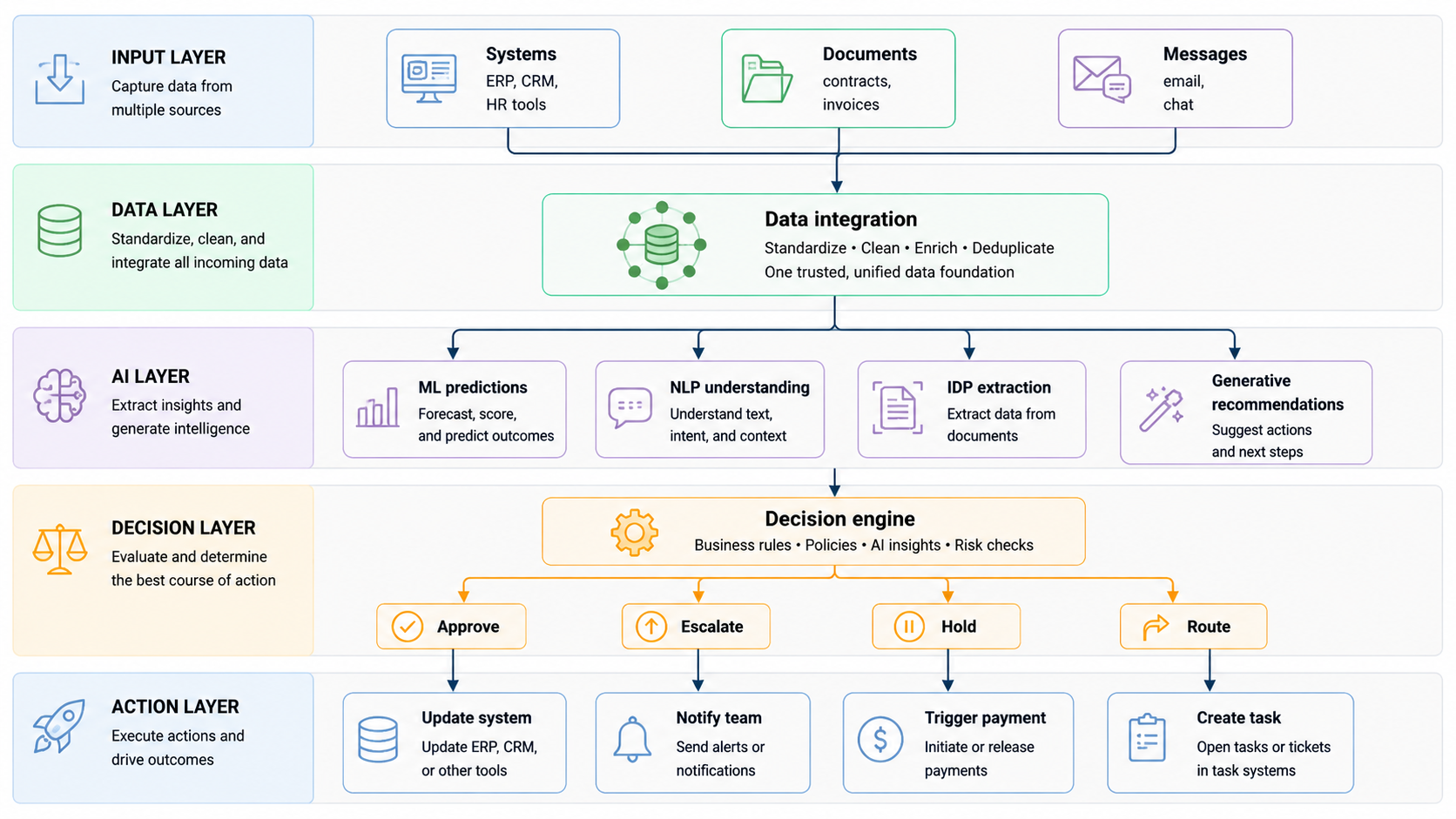
Your data enters from the left, AI modules interpret and enrich it in the middle, the decision engine applies rules plus AI signals, and then concrete actions happen on the right—without you needing to push every button yourself.
7 powerful ways AI workflows improve decision-making
Here are seven clear, practical ways AI-powered workflows improve decision-making, with examples you can relate to.
1. Faster access to actionable insights
In many teams, decision-quality suffers not because people are incapable, but because data arrives late or in messy form. AI workflows connect systems, clean data, and surface the most important points so you don’t waste time hunting for information.
For example, instead of ten spreadsheet exports from different tools, an AI workflow can pull live numbers into one view, highlight outliers, and summarize trends in plain language. Companies using AI automation see 37% faster task completion and about 25% faster decision-making because the right information is available at the right moment.
2. Reduced human bias in decisions
Every manager brings personal bias to decisions, even with the best intentions. AI decision support systems can help by enforcing consistent criteria and making patterns visible that you might miss.aisel.
Studies show that, when used carefully, AI advice can improve bias control by making both the system’s biases and the human’s own biases more obvious, especially when people are taught how to interpret AI recommendations critically. In practice, that can mean fairer promotion decisions, more consistent loan approvals, or hiring processes that rely on structured data instead of gut feelings.aisel.
3. Predictive decision support
AI doesn’t just tell you what happened—it can show you what is likely to happen next. Predictive models inside workflows can estimate churn risk, fraud probability, demand patterns, or the chance a project will run over budget.
You might see a dashboard that says, “This customer has a high likelihood of cancelling in the next 30 days,” or “This batch of transactions shows an elevated fraud risk,” with recommended actions. That shifts your decisions from reactive (“what went wrong?”) to proactive (“how do we prevent this?”).
4. Automated routine decisions
Many decisions in your day are not strategic—they’re routine, rule-based, and boring. AI workflows can take over those decisions safely, as long as the rules and data are clear.
Examples include auto-approving low-risk expenses under a certain amount, routing tickets based on topic and urgency, or triggering standard follow-up actions after specific events. Gartner expects that around 15% of routine work decisions will be made autonomously by AI systems by 2028, which frees human managers to focus on the complex, nuanced cases.
5. Better risk assessment and mitigation
Risk is often buried in details: an unusual pattern in a report, a small clause in a contract, a subtle shift in a KPI. AI workflows can scan large volumes of data, flag anomalies, and connect signals that humans might not see in time.
In finance, AI quality-control layers have already lifted the accuracy of generative AI outputs from around 67% to over 90% by validating answers against reliable data and flagging low-confidence results for human review. In your world, that could mean fewer compliance breaches, fewer expensive mistakes, and more early escape routes before a problem explodes.
6. Personalized recommendations
AI workflows can tailor decisions and actions to specific customers, employees, or scenarios instead of treating everyone the same.
Think about customer service: an AI workflow can look at a customer’s history, current issue, and sentiment signals, then suggest the best response path—self-service, fast-track human support, or proactive goodwill gesture. In HR, workflows can recommend personalized learning paths or benefits options based on role, performance, and preferences. Personalized decisions tend to improve satisfaction and retention because people feel seen, not processed.
7. Continuous learning and improvement
Traditional workflows are static; once built, they stay the same unless someone manually updates them. AI-powered workflows can learn from outcomes over time—what worked, what didn’t—and adjust thresholds, recommendations, or routing logic.
For example, if your approval workflow learns that certain risk signals rarely result in problems, it can relax rules to speed decisions. If it finds that specific combinations of signals often lead to escalations, it can tighten controls. This “learning loop” means decision quality improves the more you use the system, instead of degrading as complexity grows.
Major gains in process efficiency
AI-powered workflows don’t just improve decisions; they also change the speed and cost of the processes around those decisions. The most visible gains show up in time, cost, errors, scale, and employee productivity.
Time savings are significant. AI-powered automation has been shown to reduce process cycle times by around 40%, and employees often save 3–6 hours per week on tasks that could be automated. When you multiply this across a 20‑person team, you’re reclaiming dozens of hours every week that can go into higher‑value work.
Cost reduction follows naturally: companies save about 20–30% on operational costs with AI workflows, and labor cost cuts for automated processes can reach about 40%, especially when repetitive data entry and manual approvals are replaced.
Error reduction is another major benefit. Document-heavy workflows (like invoice processing and contract review) see around 70% fewer errors, while overall process errors can drop in the 40–75% range when manual steps are replaced with well‑designed automation.
Finally, scalability improves. With AI workflows, handling ten times more volume doesn’t mean ten times more staff. You can process more requests, documents, or tickets with the same—or even smaller—teams, which is critical if you’re trying to grow without exploding your costs.
Before vs after: sample metrics
Here’s a simple “before vs after” view that reflects typical changes reported across multiple studies in 2024–2026:
Your exact numbers will differ, but the pattern is consistent: less time, fewer mistakes, lower cost, and more capacity with the same team.
Real-world results and case studies
To make this concrete, here are four short case-style scenarios based on patterns reported across finance, HR, operations, and customer service in recent research.
Finance: invoice processing and approvals
A mid-sized finance team processing thousands of invoices per month moved from email and spreadsheets to an AI workflow that reads invoices, matches them to purchase orders, flags discrepancies, and routes approvals automatically.
Results typically include around 40–70% fewer errors in invoice data, about 44% faster invoice processing, and a clear drop in late-payment penalties and vendor disputes. Managers now focus on exceptions and negotiations instead of chasing paperwork.
HR: recruiting and onboarding
An HR department dealing with high hiring volume adopted AI workflows to screen resumes, extract key skills, and route candidates to the right recruiters, while automated onboarding flows handled documents, accounts, and training assignments.
Studies show HR automation can cut cost-per-hire by about 30% and make onboarding up to three times faster, which means new hires are productive sooner and recruiters spend less time on repetitive admin.
Operations: order and supply chain workflows
In operations, AI-powered workflows integrate order systems, inventory, and logistics. They predict demand, suggest optimal stock levels, and trigger replenishment or routing decisions automatically.
Companies using such workflows report about 22% lower supply chain costs and billions in projected savings from AI-driven optimization over the coming years. Operational managers move from firefighting stock-outs to managing exceptions and strategic improvements.
Customer service: ticket routing and resolution
A customer service team replaced manual ticket triage with an AI workflow that uses NLP to understand the issue, urgency, and sentiment, then routes tickets to the right queue and suggests response templates.
Research shows automation in support can cut average handle time by about 21–30% and improve resolution speed, while maintaining or improving satisfaction because customers reach someone who can actually help, faster.
Step-by-step guide: Implementing AI-powered workflows
Here’s the most important part of this article: a practical, six-step path you can follow to bring AI workflows into your team without getting overwhelmed.
Step 1: Identify high-impact processes for AI enhancement
Don’t start with “AI everywhere.” Start with one or two workflows where:
-
Volume is high.
-
Errors are painful.
-
Delays hurt business outcomes.
Common candidates: invoice approvals, expense claims, onboarding, customer ticket routing, order processing, and recurring reporting. Map the current process: steps, handoffs, tools, and pain points. This gives you a clear picture of where AI and automation can help.
Success metric idea: pick 3–5 metrics such as cycle time, error rate, and hours spent per week, and record your baseline.
Step 2: Assess data readiness and quality
AI workflows are only as good as the data they touch. Check:
-
Where your data lives (systems, spreadsheets, docs).
-
How clean and consistent it is.
-
Who owns each data source.
Research shows that many automation failures trace back to poor data and integration with old systems. Fix basic issues: duplicate records, missing fields, inconsistent formats. You don’t need perfection, but you do need reliable core data.
Common pitfall: skipping data work and blaming the AI tool when outputs are inconsistent.
Step 3: Choose the right AI workflow platform
Your choice depends on complexity, budget, and technical comfort.
-
If you want simplicity and have non-technical users, Zapier is strong for basic “when X happens, do Y” flows, with 7,000+ integrations and friendly interfaces.
-
If you need visual control over complex, branching workflows at high volume and want good cost-per-execution, Make (formerly Integromat) is a top pick.
-
If you have developers and want self-hosted, highly customizable flows—especially for AI agents—n8n is a powerful option.
-
If you’re deep in the Microsoft ecosystem and want native integration plus strong ROI benchmarks, Power Automate is a natural choice.
We’ll compare them in a table in the next section, but at this step, shortlist 2–3 tools and test their free tiers with a very small workflow.
Success metric idea: time to build first workflow, ease of use for your team, and whether core apps are supported out of the box.
Step 4: Design intelligent workflows
Once you pick a platform, design your first AI-powered workflow. Keep it small and well-defined. For example:
-
Read incoming invoices from email or a folder.
-
Use IDP to extract key fields.
-
Validate against your ERP or finance system.
-
Apply rules and ML predictions to score risk.
-
Route to automatic approval or human review.
Use AI components where they make clear sense: IDP for documents, NLP for text, ML for risk scoring, generative AI for summaries or explanations. Keep humans in control of final decisions at the start, even if the system could automate more.
Pitfall to avoid: trying to automate every edge case in version 1. Start with a narrow scope where the rules are clear.
Step 5: Pilot with a human-in-the-loop approach
Run your first workflow as a pilot for 4–8 weeks. During this period:
-
Let AI make suggestions, but keep humans responsible for key decisions.
-
Track errors, cycle time, user satisfaction, and any unexpected issues.
-
Collect feedback from everyone touching the workflow.
Research on AI decision-making shows that human oversight alone does not automatically prevent bias or bad outcomes—you need clear rules on when to override AI and how to log decisions. In your pilot, define:papers.
-
When humans must review AI outputs.
-
How disagreements are resolved.
-
How you record final decisions for audit and learning.
Success metric idea: compare pilot numbers (time, errors, costs) to your baseline, and decide whether improvements justify scaling.
Step 6: Scale, monitor, and optimize
If your pilot works, don’t just “turn it on and forget it.” Scale carefully:
-
Extend to similar processes or departments.
-
Standardize workflow templates and naming.
-
Set up dashboards to monitor performance.
Use continuous learning: adjust thresholds and rules based on outcomes, add better models as they become available, and refine AI components. Studies show that scaling is where most organizations struggle—about 88% use AI in at least one function, but only 33% scale it successfully.
Common pitfalls at this stage:
-
Growing too fast without governance.
-
Ignoring data privacy and compliance.
-
Underestimating change management and training.
Success metric idea: track a small set of metrics across all scaled workflows (cycle time, error rate, ROI, satisfaction) and review them regularly.
Best AI workflow tools and platforms in 2026
Here’s a comparison table of leading platforms in 2026, based on independent tool reviews and pricing studies.
You don’t need “the best” platform in an absolute sense. You need the platform that fits your stack, your team’s skills, and your workload.
Challenges, risks, and ethical considerations
AI-powered workflows are powerful, but they also come with real risks you must take seriously.
Data privacy is a core issue. When multiple systems are connected and documents are being read by AI, you must ensure sensitive data is protected, access is controlled, and regulations like GDPR or HIPAA are respected.
Bias is another concern. Studies show that AI systems can reduce some forms of bias when designed well, but they can also encode and amplify existing biases if training data and oversight are weak. You need clear policies on fairness, transparency, and escalation when decisions affect people’s lives or livelihoods.aisel.
Over-reliance on AI is risky too. If your team starts blindly following AI recommendations, especially in high-stakes decisions, you can end up with systematic errors that no one questions until it’s too late. Human judgment, AI literacy, and clear override rules remain crucial.papers.
Implementation costs and failure rates matter. Analysts expect more than 40% of agentic AI projects to be cancelled by 2027 due to cost overruns and unclear value. The antidote is simple but hard: focused pilots, clear success metrics, strong governance, and honest post‑mortems.
The future of AI-driven business operations
Looking beyond 2026, several trends stand out.
First, AI agents will move from “add-on features” to standard parts of enterprise apps. Gartner expects about 40% of enterprise applications to include task-specific AI agents by the end of 2026, and many more as we move toward 2028. Workflows will feel less like static flows and more like living systems where agents coordinate tasks.
Second, multimodal and zero-touch workflows will grow. AI systems that can handle text, images, audio, and structured data together will take over more complex processes, while “zero-touch” workflows run with minimal human involvement once guardrails are defined.
Third, governance and ethics will become non-negotiable. Forecasts suggest that AI ethics regulations and governance tooling will cover a large share of workflows in the coming years, forcing organizations to document decisions, log AI involvement, and prove fairness and compliance.
Finally, your competitive edge will increasingly depend on how well you combine human judgment with AI-powered workflows. The tech will be widely available; the real difference will be how wisely you use it.
Conclusion and action plan
If you’re still running critical decisions on email threads and spreadsheets, you’re carrying hidden risk and leaving real money on the table. AI-powered workflows can give you faster, clearer insight, cut errors, save time, and free your team to focus on the work that truly needs human judgment.
You don’t need to transform everything at once. Pick one high-impact process—maybe invoice approvals, onboarding, or ticket routing—map it, clean the data, choose a platform that fits your team, and run a human-in-the-loop pilot with clear success metrics. Once you see the difference, scaling becomes a practical next step rather than a vague ambition.
If you start now, you won’t just “add AI” to your workflows. You’ll build a decision engine that supports your growth instead of slowing it down—and that might be one of the most important moves you make between now and the next wave of AI in 2027 and beyond.
