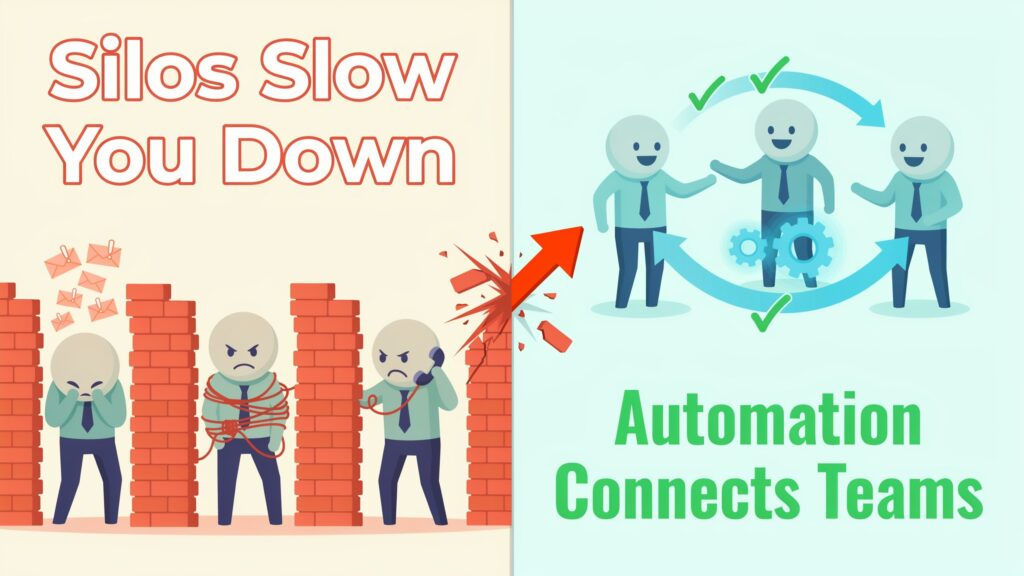
In many companies, work slows down not because people are lazy, but because teams are stuck waiting on each other. Marketing cannot launch a campaign until Finance approves the budget. Sales closes deals but then waits days for Legal to review contracts. Operations needs headcount, yet HR is still processing old requests. Emails pile up, messages get lost, and deadlines quietly slip. The result is frustration, blame, and a constant feeling that everything is harder than it should be.
At the heart of this problem are silos — teams working in their own systems, with their own rules, and very little shared visibility. These silos are one of the biggest barriers to productivity in modern organizations. Studies show that companies lose 20–30 percent of annual revenue due to inefficiencies from poor cross‑functional communication and data silos. Teams also waste more than 20 hours per month per person on rework, status chasing, and misaligned collaboration.
Workflow automation offers a way out. By turning messy, manual handoffs into clear, automated workflows, organizations can break down silos, create real‑time visibility, and help departments collaborate smoothly. Done well, automation does not replace people — it removes friction so people can finally work together on the right things at the right time.
Why Silos Form and Persist in Organizations
Silos rarely appear overnight. They grow slowly as each department picks its own tools, builds its own processes, and focuses on its own targets. Marketing might live in a campaign tool and a social scheduler while Sales lives in a CRM and Finance lives in spreadsheets and an ERP system. When tools do not talk to each other, people end up copying data manually or asking for updates over email and chat, which immediately introduces delays and errors.
Misaligned goals deepen the divide. Sales teams may be rewarded for closing as many deals as possible, while Finance is measured on risk control and cost management, and Legal is focused on compliance. Without a shared view of priorities and a shared workflow, each team optimizes for its own success, even if that slows down the end‑to‑end customer journey. Communication gaps then turn into habits: people default to “our way of working,” and collaboration becomes the exception instead of the norm.
The business impact is serious. Research shows that poor cross‑functional communication and data silos can cost organizations 20–30 percent of their revenue each year through delays, rework, and bad decisions. Teams waste over 20 hours per month due to poor collaboration and siloed tools — the equivalent of about six workweeks per year of lost productivity. Poor communication alone has been estimated to cost large corporations more than 62 million per year in inefficiencies. On top of that, employees in siloed environments report significantly lower job satisfaction and higher error rates, which further hurts performance and customer experience.
The Collaboration Bottlenecks Created by Manual Processes
When processes run on emails, chats, and spreadsheets, collaboration becomes fragile. Every handoff between departments depends on a person remembering to send a file, update a sheet, or forward a message. If they are sick, busy, or confused, the work simply stalls.
One of the biggest pain points is slow handoffs. In a typical procurement and finance process, an employee fills out a purchase request in a form or spreadsheet and emails it to their manager. The manager forwards it to Finance. Finance might send it to Legal for contract review, then back to the requester for corrections. Each step depends on someone checking their inbox and acting, which can stretch what should be a two‑day process into weeks. Government and enterprise case studies show that manual procurement and approval workflows often take 50–60 days and are filled with incomplete submissions and rework.
Another bottleneck is lack of real‑time visibility. Because information is scattered across email threads, messaging apps, and disconnected tools, nobody has a live view of where work stands. Teams send “Just checking in” messages, create side spreadsheets to track tasks, and hold extra meetings just to sync status. Studies show teams waste more than 20 hours per month due to poor collaboration and communication, much of it spent hunting for information that should have been visible to everyone from the start.
Miscommunication and version conflicts are also common. Marketing and Sales often work from different versions of pricing sheets or campaign plans stored in different tools. HR and IT might maintain separate onboarding checklists; one uses a document, the other a ticketing tool, so steps are missed or duplicated. When data lives in silos, employees spend hours recreating information that already exists or fixing errors caused by inconsistent versions.
Approval delays create further friction. Legal reviews, budget approvals, compliance checks, and change requests often follow informal, manual paths. A contract might sit in one manager’s inbox for days with no reminder. A finance approver might be away, and nobody knows to reroute the request. Research on automated approvals shows that manual approval processes are a major bottleneck, whereas automation can reduce approval cycle times by 40–65 percent or more, mainly by eliminating “dead time” between steps.
Finally, manual processes make accountability hard to track. When work is passed around through emails or ad‑hoc chat messages, it is unclear who owns the next step or how long it has been pending. This leads to blame, finger‑pointing, and defensive behavior. Instead of looking at a shared system to see the status, people argue about who “dropped the ball.” Over time, this erodes trust between departments and makes collaboration even harder.
How Workflow Automation Transforms Cross‑Department Collaboration
Workflow automation replaces fragile, manual processes with structured, digital workflows that connect tools, teams, and data. Instead of relying on memory and inboxes, tasks move automatically from one person or system to the next, with clear rules, notifications, and tracking.
A core capability is automated task routing and notifications. In an automated procurement workflow, for example, a purchase request submitted through an online form can automatically route to the right manager based on amount, cost center, or region. Once approved, it can flow straight to Finance and, if needed, to Legal, with automatic reminders when deadlines are missed. Nobody has to forward emails or remember who to involve; the workflow handles that logic.
Conditional workflows and branching logic allow processes to adapt without chaos. If a request is below a certain threshold, it might only need manager approval; above that threshold, it might also require Finance and Legal. In HR and IT onboarding, new employee workflows can branch based on role or location — for example, triggering extra access requests for engineers or different equipment for remote workers. Tools like Make and Power Automate specialize in complex branching, approvals, and data transformations so workflows can match real‑world complexity instead of forcing “one‑size‑fits‑all” processes.
Real‑time dashboards and shared visibility give everyone a single source of truth. Modern automation platforms provide dashboards where stakeholders can see how many requests are pending, where they are stuck, and how long each step is taking. This shared visibility means fewer status emails and fewer alignment meetings, because people can simply check the dashboard. It also allows leaders to spot bottlenecks early and fix them.
Seamless integrations between tools are another major advantage. Automation platforms such as Zapier, Make, and Power Automate connect popular tools like Slack, Microsoft 365, Google Workspace, CRMs, and ERPs, so data can move across systems without manual entry. For example, when Sales marks a deal as “Closed Won” in the CRM, an automation can create a project in Asana or ClickUp, notify Operations in Slack, and generate tasks for Finance and Legal — all without anyone copying and pasting information.
Centralized audit trails make collaboration safer and more compliant. Every action in an automated workflow — who approved, when they did it, what changed — is logged. This is especially important for Finance, Legal, and regulated industries, which need clear records for audits and reporting. Instead of digging through emails, teams can export a complete history from the workflow system.
These capabilities translate into clear benefits. Organizations that automate high‑friction workflows report 30–60 percent reductions in cycle times, 30–65 percent fewer errors in financial processes, and significant cost savings. Case studies show that approval times can be cut by 50–70 percent, while rework and manual data entry drop sharply. Teams not only deliver projects faster, but also spend more time on strategic work instead of low‑value admin tasks.
Automation also improves transparency and trust. When everyone can see the same workflow and status, there is less guessing and less blame. Shared dashboards and clear ownership make it easier to align goals and collaborate on improvements. Employees report higher satisfaction when repetitive tasks are automated and expectations around handoffs are clear. As the company grows, these automated workflows scale with it, supporting more volume and more complex collaboration without needing to add the same amount of headcount.
Manual vs Automated Collaboration
Real‑World Success Stories
Across industries and company sizes, workflow automation has shown clear gains in speed, quality, and collaboration.
A mid‑sized hotel chain used automation to connect sales, front desk, and revenue management data flows. Previously, these teams spent a lot of time reconciling spreadsheets, chasing updates, and manually adjusting rates. After implementing cross‑functional workflows, the company reduced data reconciliation time by 40 percent and cut manual tasks by 30–50 percent, allowing staff to focus on analysis and strategic pricing instead of data cleanup.
Government agencies have seen similar results by automating procurement and approval workflows. Instead of long email chains and paper forms, agencies introduced digital intake forms, automated routing, and structured approval paths before data reached the ERP system. This redesign led to 30–60 percent reductions in procurement cycle times, fewer incomplete submissions, and significantly fewer status‑check emails. With better audit trails and consistent processes, collaboration between purchasing, finance, and compliance teams improved as everyone worked from the same system.
At the enterprise level, automation has delivered strong return on investment. One productivity suite case study reported a 75 percent improvement in team efficiency after implementing AI‑powered task prioritization and automated workflow management. Administrative overhead dropped by 60 percent as routine tasks were automated, and enterprise clients saw an average 300 percent ROI thanks to reduced project timelines, improved cross‑team collaboration, and better use of talent. Other studies show that organizations adopting intelligent workflow automation can reduce operational expenses by 30–50 percent while increasing productivity across teams.
Step‑by‑Step Guide: Implementing Workflow Automation for Better Collaboration
Step 1: Identify high‑friction cross‑department processes
Start by listing processes where work crosses departments and regularly gets stuck. Common examples include procurement and vendor onboarding (Procurement + Finance + Legal), employee onboarding (HR + IT + Finance), marketing campaign launches (Marketing + Sales + Legal), and customer issue escalation (Support + Product + Engineering). Look for long email threads, frequent “Just checking in” messages, repeated data entry, and missed deadlines — these are signs of high friction.
A simple way to prioritize is to rate each process on three dimensions: impact (how important the outcome is), pain (how frustrating or slow it feels today), and volume (how often it runs). Give each process a score from 1 to 5 on each dimension, then add them up. The processes with the highest total score should be your top automation candidates.
Step 2: Map current workflows and pain points
Before you automate anything, map how the process works today. Note who starts it, what information they provide, who approves, what tools are used, and where data gets stored. Pay attention to handoffs — those moments when work leaves one person or team and moves to another. That is where delays and miscommunication usually happen.
Capture specific pain points: missing information at intake, unclear approvers, duplicate data entry, lost emails, and lack of visibility. Wherever possible, quantify the pain. For example, Finance might estimate that manual invoice processing is taking twice as long as it should, or Legal might note that contract approvals often stretch 30–40 days. These numbers will help you make the case for automation and later measure success.
Step 3: Select the right automation platform
Your choice of platform should match your tech stack, complexity, and governance needs. For simple, app‑to‑app automations across a wide range of SaaS tools, Zapier is often the easiest starting point, especially for non‑technical users. It offers thousands of integrations and a clean, trigger‑and‑action model that is ideal for quick departmental wins.
If your organization is heavily invested in Microsoft 365, Power Automate is a strong choice, with deep integration into Teams, SharePoint, Outlook, and the Power Platform, plus strong governance and security features. For more complex workflows with multiple branches, conditions, and heavy data manipulation, Make provides a visual, flow‑chart style interface and advanced logic controls. Larger enterprises with complex IT service, HR, or compliance processes often use platforms like ServiceNow for large‑scale, governed workflow automation across many departments.
Step 4: Design collaborative workflows
When designing automated workflows, start from the user experience. Ask what information each department needs to do its part correctly the first time. Design intake forms that capture complete data up front, with validation and conditional fields so people cannot submit half‑empty requests. Define clear rules for routing and approval based on thresholds, roles, or regions.
Make workflows transparent by including notifications and status updates that go to all relevant stakeholders, not just the person who triggered the process. Where possible, surface status in tools people already use daily, like Slack or Microsoft Teams, through message notifications and adaptive cards. Also, build in exception paths: what should happen if an approver is out of office, or if a request is urgent?
Step 5: Roll out with training and change management
Automation is not only a technical project; it is a change in how people work together. Involve representatives from all affected departments early, show them prototypes, and gather feedback. Start with a pilot group, refine the workflow based on real use, and then expand.
Provide simple training materials and cheat sheets, focusing on how the new workflow makes each person’s work easier: fewer status emails, less data entry, and clearer expectations. Highlight wins quickly — for example, share metrics showing how approval times dropped or how many hours were saved in the first month. This helps build momentum and reduces resistance.
Step 6: Measure success with key metrics
From the start, define how you will measure success. Common metrics include:
-
Cycle time: How long the process takes from start to finish.
-
Number of handoffs and approvals per process.
-
Error rate or rework rate (for example, how many requests are sent back for missing information).
-
Time spent on manual tasks like data entry and status updates.
-
Employee satisfaction with the process.
Studies show that organizations that automate manual workflows often see 50–77 percent reductions in workflow cycle times, 30–65 percent fewer errors, and significant cost savings. Track your own before‑and‑after numbers to prove value and to spot new improvement opportunities.
Ready‑to‑use prioritization checklist
For each cross‑department process, ask:
-
Does this process involve 2 or more departments?
-
Do people complain about delays, confusion, or rework?
-
Is there repeated data entry into multiple tools?
-
Is the process critical for revenue, compliance, or customer experience?
-
Does leadership care about improving this area in the next 12 months?
If you answer “yes” to at least three of these questions, the process is a strong candidate for workflow automation.
Best Tools and Platforms for Cross‑Department Automation
There is no single “best” automation tool for every organization; the right choice depends on your size, tech stack, and complexity.
Zapier is ideal for small teams and startups that want quick, no‑code integrations between cloud apps, especially for simple, linear automations. Make suits small to mid‑sized businesses and agencies that need more advanced branching, data manipulation, and visual logic for complex workflows. Power Automate works best for organizations that run primarily on Microsoft 365 and need deep integrations with Teams, SharePoint, Outlook, and the wider Power Platform, plus strong governance controls.
For work management and collaboration, platforms like Asana, Monday.com, and ClickUp combine task management with built‑in automations, templates, and cross‑team visibility. Larger enterprises often adopt ServiceNow to automate IT service management and other enterprise workflows at scale, with strong compliance, security, and integration features. Many organizations end up using a mix: a central enterprise platform for core processes and lighter tools like Zapier or Make for departmental experiments and quick wins.
Overcoming Challenges and Common Pitfalls
Implementing workflow automation can face obstacles. Some employees fear that automation will replace their jobs, while others worry about losing control over their work. Clear communication is essential: automation should be framed as a way to remove repetitive tasks so people can focus on higher‑value work, not as a way to cut headcount. Involve teams in designing workflows so they feel ownership rather than disruption.
Data security and integration issues are another concern. Organizations must ensure that automation tools meet their compliance requirements and that data moves safely between systems. Choosing platforms with strong governance, role‑based access, and audit logging helps. A further pitfall is over‑automation — trying to automate every edge case and building workflows that are too complex to maintain. Best practice is to start small, automate the 80 percent of the process that is standard, and handle exceptions through simpler paths or human review.
Finally, some teams attempt to “set and forget” automation. In reality, workflows need maintenance as business rules, tools, and structures change. Assign owners to key workflows, review performance metrics regularly, and adjust rules based on feedback and results. This keeps automation aligned with real‑world collaboration rather than becoming a rigid, outdated system.
The Future of Collaborative Work
The next wave of workflow automation is being shaped by artificial intelligence and hyper‑automation. AI‑powered tools can already analyze process data to suggest which steps to automate, predict bottlenecks, and even generate workflows automatically. In some industries, AI‑enabled workflows have reduced regulatory and approval timelines by 50–65 percent by automating document drafting, metadata tagging, and compliance checks.
Looking ahead, more collaboration will happen inside intelligent workflows rather than in separate tools. Systems will anticipate who needs to be involved, pre‑fill information from past work, and surface insights at the right moment. Instead of reacting to problems after they appear, teams will get predictive alerts — for example, when a cross‑department project is likely to miss a deadline. Organizations that invest early in workflow automation and data‑driven collaboration will be far better positioned to benefit from this future.
Conclusion
Departmental silos and manual processes quietly drain productivity, increase errors, and frustrate teams. Research shows they can cost organizations a large share of their revenue and thousands of hours in wasted time every year. Workflow automation offers a practical way to break down these barriers by connecting tools, structuring handoffs, and giving everyone shared visibility into how work moves across the company.
By starting with high‑friction, cross‑department processes, mapping the current state, choosing the right tools, and rolling out with clear communication and metrics, organizations can cut cycle times dramatically, reduce errors, and unlock better collaboration between teams. The most important step is to begin. Pick one cross‑department process this week, audit how it works today, and identify where automation could remove friction. True collaboration is not about more meetings — it is about smarter systems that let people focus on the work only they can do.
