You’re juggling leads from multiple sources. Your team is scattered across different locations. Clients expect instant responses on WhatsApp. Your agents are spending more time entering data into your CRM than actually closing deals. Meanwhile, you’re paying thousands every month for a platform that doesn’t quite fit how you actually work.
This is the reality for most real estate businesses using generic CRM systems in 2026.
The real estate industry has fundamentally changed. Your leads don’t just come from your website anymore—they pour in from Google ads, Facebook, Instagram, property portals, WhatsApp inquiries, and direct referrals. Your sales process isn’t linear either. A buyer might visit a property twice, go silent for three months, then suddenly reappear ready to negotiate. Your CRM needs to handle all of this complexity while your team remains mobile, managing site visits across multiple properties in a single day.
Generic CRMs like Salesforce, HubSpot, and Zoho were designed for SaaS companies and general sales teams. Real estate is different. It’s emotional, high-ticket, geographically fragmented, and full of unique stages that off-the-shelf platforms simply don’t understand. When you try to force your workflows into a generic CRM, you’re essentially asking your team to work around the technology instead of having the technology work for your business.
This guide exists to help you make the right decision for your business in 2026. Whether you’re a solo agent managing hundreds of leads, a brokerage with multiple teams, a real estate developer tracking inventory across projects, or a property management company handling tenant lifecycles, you need clarity on what custom CRM development can do for you, how much it costs, how long it takes, and whether the return on investment justifies the effort.
By the end of this guide, you’ll understand exactly when a custom CRM makes sense (and when it doesn’t), what features matter most, how much you’ll actually spend, and how to avoid the mistakes that cause 30-70% of CRM implementations to fail.
Let’s start with why generic solutions keep falling short.
Why Off-the-Shelf CRMs Don’t Work Well for Real Estate
Your Salesforce implementation looks good on paper. You’ve got contact management, a sales pipeline, and email integration. Your team has been trained. But six months in, everyone’s still using Excel spreadsheets and WhatsApp groups because the CRM doesn’t match how real estate actually works.
This isn’t a failure on your part. It’s a design problem.
Lead Leakage and Poor Follow-Up Tracking
Real estate leads are fragile. A buyer sees a property online, visits once, then disappears. Three months later, they’re ready. But if your CRM doesn’t automatically flag this lead, send a reminder to your agent, or trigger a personalized follow-up sequence, that deal is gone. Generic CRMs don’t understand that real estate follow-ups require different timing, different messaging, and different persistence than enterprise software sales.
When off-the-shelf systems fail to capture leads from multiple sources (property portals, WhatsApp, social ads), manual data entry becomes the bottleneck. Your agents spend 30 minutes a day just logging leads instead of working them. Within weeks, lead leakage becomes inevitable.
Inflexible Pipelines for Property Buying Cycles
A typical real estate transaction isn’t just “Lead → Deal → Closed.” Your actual process looks more like: Website Inquiry → Initial Contact → Site Visit → Follow-Up → Negotiation → Offer → Legal & Documentation → Closing. Sometimes buyers revisit properties. Sometimes they go cold, then warm up again. Sometimes a single buyer becomes interested in multiple properties simultaneously.
Generic CRMs come with predefined pipeline stages that don’t reflect this complexity. When you try to customize them, you either end up with clunky workarounds or a bloated system with too many fields that nobody uses.
Limited MLS, Portal, and WhatsApp Integrations
Real estate has specific tools: MLS (Multiple Listing Services), property portals, video tours, mortgage calculators, and increasingly, WhatsApp for client communication. Off-the-shelf CRMs don’t integrate seamlessly with these tools out of the box. Each integration requires an expensive third-party add-on or custom code. Meanwhile, your competitors using custom CRMs have automatic property updates, instant WhatsApp lead capture, and seamless portal connections built into their system.
Poor Mobile Experience for On-Field Agents
Your agents aren’t sitting at desks. They’re at open houses, site visits, neighborhood walkthroughs. A CRM designed for office workers is a nightmare on mobile. Generic platforms often force you to choose: get a simplified, feature-limited mobile app or use the full system only from a desktop. Real estate agents need full access to client history, property details, contracts, and follow-up tools—all from their phone, with offline capability, and automatic syncing when they reconnect.
Data Overload Without Real Insights
Off-the-shelf CRMs excel at generating reports. But they generate reports on things that don’t matter to your business. You need to know: Which lead sources actually convert? What’s the average time from inquiry to closing? Which agent has the highest commission per deal? Which neighborhoods are your buyers most interested in? Generic dashboards show activity metrics, not the business insights that drive decisions.
The painful truth: 30-70% of CRM implementations fail not because the software is broken, but because businesses try to use generic tools designed for other industries. You’re not alone in struggling with Salesforce for real estate. In Indian real estate specifically, Salesforce adoption rates sit below 10%, with most teams reverting to WhatsApp and Excel.
What Is Custom CRM Development for Real Estate?
Custom CRM development for real estate means building a system specifically designed around how real estate businesses operate, scaled to your team size, and integrated with the tools you actually use.
Instead of forcing your workflows into a generic platform, custom development builds a platform around your workflows.
How Custom CRM Differs from Off-the-Shelf Solutions
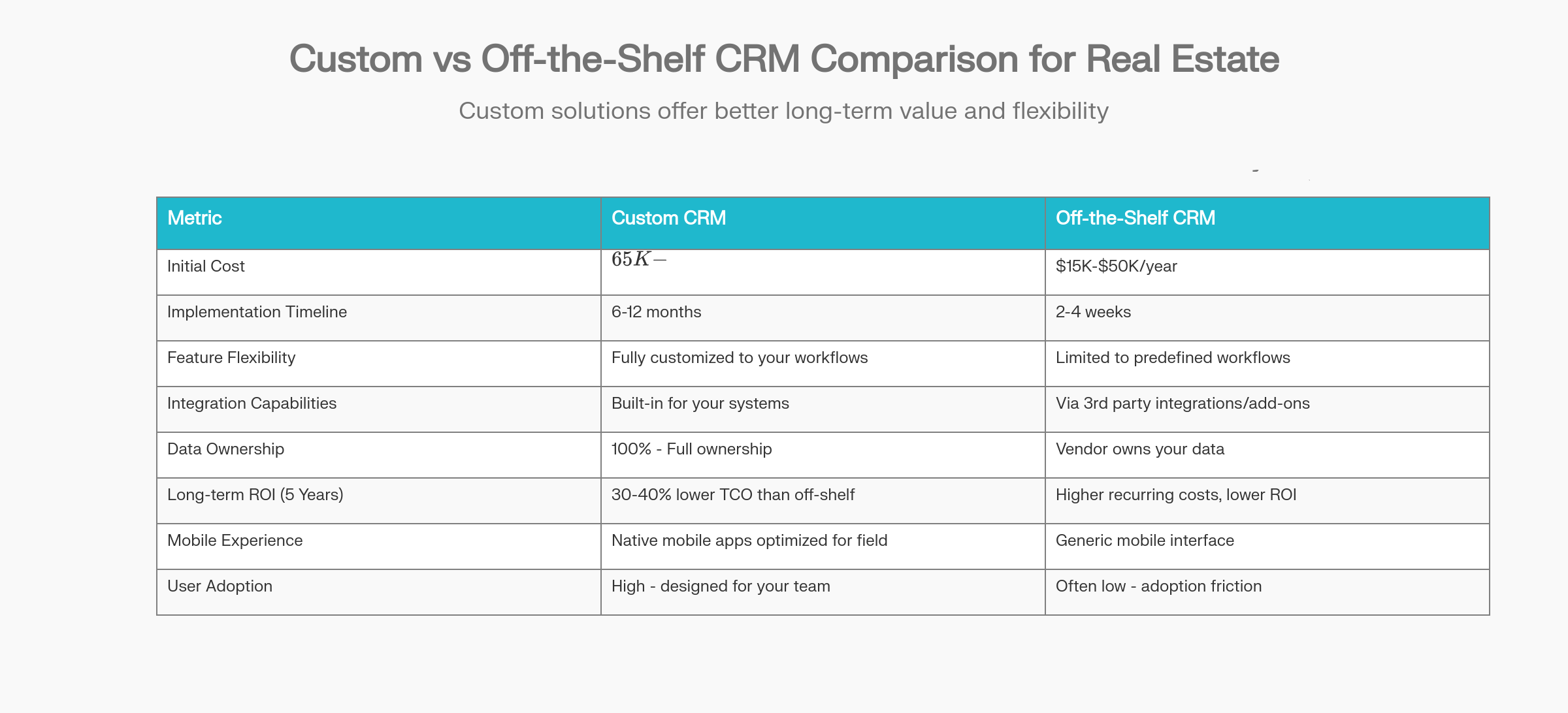
Off-the-shelf CRMs (Salesforce, HubSpot, Zoho): Standardized features, predefined workflows, quick deployment (2-4 weeks), lower upfront cost ($15K-$50K annually), limited customization without developer help, generic dashboards, vendor owns your data infrastructure, higher long-term costs due to recurring subscriptions and add-ons.
Industry-specific CRMs (specialized real estate platforms like BoldTrail, Follow Up Boss): Better than generic, but still designed for general real estate use cases. You’re paying for features you might not need, and you still can’t fully customize to your exact workflow.
Custom CRM built for your business: Every feature built for your specific process, integrations connected to your exact tools, workflows that match how your team actually works, data fully owned by you, scalable architecture that grows with your business, dashboards showing exactly what matters to your decisions, mobile-first design for your specific use cases.
Real Estate–Specific Challenges Custom CRM Solves
-
Multi-source lead capture: Leads arrive from websites, ads, WhatsApp, portals, and referrals. A custom CRM captures from all channels, automatically deduplicates, and assigns intelligently based on agent capacity or specialization.
-
Property complexity: You’re not just managing contacts—you’re managing properties, inventory, pricing history, availability changes, and buyer-property matches. Custom systems handle this seamlessly.
-
Channel partner management: Brokers, reference partners, and co-agents complicate workflows. A custom CRM can track commissions, lead ownership, and split-deals automatically.
-
Site visit logistics: Your agents need to schedule visits, get directions, see past visit notes, and mark properties as shown—all from mobile while on-site.
-
Regulatory compliance: Different states and countries have different real estate regulations. Your CRM needs to enforce them without breaking workflow.
-
Team coordination: Sales, marketing, operations, finance—they all need different views of the same data. A custom CRM can provide role-based access without exposing unnecessary complexity.
When Custom CRM Makes Sense (and When It Doesn’t)
Build a custom CRM if:
-
You’re a medium to large organization (20+ users) with specific workflows that off-the-shelf platforms can’t handle
-
Your business model involves complex integrations (MLS, multiple portals, payment processors, compliance systems)
-
You need to maintain competitive advantage through proprietary workflows or data insights
-
You plan to scale significantly over the next 3-5 years
-
You’ve tried off-the-shelf platforms and spent more time customizing than using them
-
Your team is distributed and needs mobile-first functionality
-
You need AI-driven features like predictive lead scoring or automated buyer-property matching
Skip custom CRM and use off-the-shelf if:
-
You’re a solo agent or very small team with basic needs (contact management + basic pipeline)
-
Your workflows match the platform (unlikely in real estate, but possible)
-
You need the system deployed in weeks, not months
-
You don’t have budget for ongoing maintenance and upgrades
-
You’re in early-stage experimentation and not ready to commit to a long-term tool
Key Features of a Custom Real Estate CRM (Must-Have in 2026)
When you’re planning a custom CRM, you need to know which features actually drive revenue and which are nice-to-have distractions. Here’s what separates a good real estate CRM from a great one.
Lead & Client Management
Your custom CRM captures leads from every touchpoint your business uses: website forms, Facebook ads, Google Local Services, property portal inquiries, WhatsApp messages, email referrals, and open house sign-in sheets. When a lead arrives, the system automatically deduplicates (prevents the same person from appearing twice if they’ve inquired multiple times), tags them based on property interest and behavior, and assigns them to an available agent.
The system separates buyer journeys from seller journeys because they’re fundamentally different. A buyer is hunting for properties. A seller is evaluating market value. Your follow-up strategy, messaging, and timeline are completely different for each. Smart lead tagging lets your team segment by budget range, property type preference, timeline (urgent vs. someday), and financial readiness (pre-approved vs. exploring).
Lead scoring in 2026 goes beyond basic engagement metrics. AI-driven scoring analyzes property view frequency, email engagement velocity, mortgage calculator usage, financial readiness signals, and market research patterns to predict which leads are most likely to close. Your best agents get the warmest leads. Your newer agents get solid mid-tier leads. Nobody wastes time on cold prospects that the system has identified as low-conversion.
Property & Listing Management
A centralized property database becomes your single source of truth. Every property in your inventory shows: exact location and description, current pricing and pricing history, availability status (available, under-offer, sold), all associated documents and images, tenant details (if rented), renovation history, and performance metrics (days on market, showings, offers received).
When you integrate with MLS and property portals, this data updates automatically. When a listing is sold on MLS, your CRM marks it as closed. When a competitor lists a nearby property, you see it. This eliminates manual updates and keeps your team working with current information.
The system can automatically match buyers with listing based on their stated preferences, budget, location preferences, and browsing history. If a buyer saved properties between 2-3 BHK in a certain neighborhood, and a new listing matching that profile appears, the CRM can notify that buyer (and the agent handling them) instantly.
Sales Pipeline & Deal Tracking
Custom pipelines reflect your actual deal stages: Lead Inquiry → Initial Contact → Site Visit 1 → Site Visit 2 → Negotiation → Offer Made → Offer Accepted → Legal & Documentation → Payment Processing → Handover. At each stage, specific tasks auto-trigger: reminders to follow up if no movement after 3 days, document requests if stuck in legal, payment confirmations before handover.
Deal timelines matter enormously in real estate. Your CRM tracks how long each lead spends in each stage, flags deals that are stalling, and predicts likely closure dates based on historical data. Your management team gets a real-time pipeline dashboard: X deals in negotiation, Y awaiting legal clearance, Z ready to close this month.
Site visit scheduling integrates with your team’s calendars, prevents double-bookings, and sends automatic reminders to both agent and buyer 24 hours and 1 hour before the visit. After the visit, the agent logs feedback: property condition, buyer interest level (hot/warm/cold), next steps. The CRM updates the deal stage automatically.
Automation & Communication
When a lead arrives via WhatsApp, the CRM captures their contact details, sends an automatic welcome message, and logs the conversation. When an agent wants to send bulk messages to 50 buyers with updated listings, the CRM lets them send personalized WhatsApp messages instantly—not generic blasts, but messages that reference each buyer’s stated preferences.
Email, SMS, and WhatsApp drip campaigns run on autopilot. New buyer enters the system → Day 1: Welcome email with your top 3 listings → Day 3: SMS with mortgage calculator link → Day 7: WhatsApp with neighborhood market report → Day 14: Phone call from agent if no engagement.
Task automation handles repetitive work: data entry, appointment scheduling, document filing, reminder notifications. Agents spend time on what only humans can do—building relationships and closing deals—not on administrative overhead.
Reporting & Analytics
Your custom dashboard shows agent-specific metrics: deals closed this month, average commission per deal, conversion rate (inquiries to showings), closing rate (showings to contracts), average days-to-close. Brokers see team performance: which agents close fastest, which generate highest commissions, where new agents need coaching.
Lead source ROI is critical. Your CRM tracks: leads from Google ads convert at 8% vs. portal leads at 12% vs. referrals at 35%. Marketing budget should flow to your highest-ROI sources. Dashboards surface this automatically, so your marketing team stops wasting money on underperforming channels.
Sales cycle analysis shows how long it typically takes from inquiry to close, where deals stall, and which segments (luxury properties, first-time buyers, investor properties) have different timelines. This data informs better forecasting and resource allocation.
AI & Smart Features (2026-Ready)
By 2026, AI is table stakes, not luxury. Smart systems use historical data to predict which leads will close (deal closure probability), recommend next-best actions for agents, automatically suggest properties to buyers based on browsing patterns, and detect when a cold lead is suddenly warming up.
Chatbots handle 24/7 property inquiries: “What’s the price?” “Show me 2-BHK units.” “How do I schedule a visit?” The bot answers instantly, captures contact info, and routes qualified leads to agents. This runs while your team sleeps. International buyers asking questions at midnight get immediate answers.
Predictive analytics identify which properties are likely to sell fastest, which neighborhoods are heating up, and which buyer segments are entering the market. Agents get intelligence, not just data.
Security & Compliance
Your CRM stores sensitive data: buyer financial information, legal documents, contracts under negotiation. Role-based access control ensures agents only see their own deals, management sees portfolio-level data, and finance only accesses payment information.
Data encryption (at rest and in transit), automated backups, audit trails of who accessed what data and when—these aren’t optional. Your system needs to be GDPR-ready and compliant with Indian real estate regulations, depending on where you operate.
Benefits of Custom CRM Development for Real Estate Businesses
The investment in custom CRM development pays dividends across your entire operation.
Higher Lead Conversion Rates: Professional CRM systems improve lead conversion by an average of 47%. Your agents spend less time managing data, more time building relationships. Leads get faster response times (within 5 minutes versus 12+ hours), automatic follow-ups keep prospects engaged, and personalized communication based on data shows buyers you understand their needs. Industry average conversion sits at 2-4%, but CRM-powered teams regularly hit 10-15%.
Faster Deal Closures: Every stage of your deal process becomes faster when unnecessary friction disappears. Site visit scheduling shifts from 5 email exchanges to one click. Document collection that used to take days happens in hours. Agents access all information they need instantly instead of searching across multiple tools. Case studies show transaction processing times drop by 52% with custom CRM automation.
Better Agent Productivity: Your agents aren’t data entry clerks—they’re salespeople. When CRM automation handles the administrative work, agents recover 1-3 hours daily that they previously spent on manual tasks. Multiply that across a team of 10 agents, and you’ve gained the equivalent of 2-3 full-time employees without hiring.
Improved Customer Experience: Buyers remember interactions where the agent clearly understands their needs and preferences. When your agent immediately recalls “You were interested in properties with western exposure near Metro stations,” it feels personal and professional. Customized property recommendations feel relevant, not generic. This personal touch increases buyer satisfaction and referral rates.
Full Ownership of Data: Your customer database is your greatest asset. When you use off-the-shelf CRMs, your data lives on the vendor’s servers. If they shut down, raise prices, or change policies, you’re affected. A custom CRM means your data is 100% under your control, stored where you choose, structured for your business, accessible on your terms.
Scalable System as Your Business Grows: Off-the-shelf CRMs scale by tier: $50/user/month at the starter tier, $100 at the pro tier, $150 at enterprise. As you grow from 10 to 50 to 100 agents, your per-user licensing costs compound. Custom CRM scales without added per-user costs. Your architecture supports growth without fundamental changes. You’re not forced to switch to a new platform when you hit 50 users.
Real-World Use Cases of Custom CRM in Real Estate
Custom CRM isn’t one-size-fits-all. Different roles in real estate need different tools. Here’s how custom CRM adapts to each.
For Real Estate Agents
You’re managing hundreds of leads simultaneously. Cold leads from 8 months ago that are suddenly warming up. Buyers comparing your listings with competitors across three portals. Site visits scheduled back-to-back across different neighborhoods. Follow-ups needed but your spreadsheet lost track of who you promised to call today.
A custom CRM built for agents gives you: Mobile app that syncs in real-time. Property details, buyer preferences, and past interaction history all available offline, so you can show listings even without cell coverage. Voice-to-text note-taking while touring properties (hands-free, eyes-on-buyer). One-tap site visit scheduling that sends automatic reminders to buyers. Follow-up task lists that surface exactly what needs to happen today, sorted by priority and conversion probability.
When an agent logs a site visit, the CRM auto-generates a follow-up message: “Thank you for visiting [Property Name] today. Let me know if you’d like to discuss next steps.” Task automation reminds the agent to follow up the next day, then 3 days later, then a week later if there’s no response. Nothing falls through the cracks.
For Brokers & Agencies
You’re managing 20 agents, each with their own pipeline, their own leads, and their own performance metrics. You need visibility: which agents are closing deals fastest, which are struggling, who needs support. Commission calculation is complex—some deals are solo-agent closes, others involve split commissions, referral fees, or referral partner cuts.
A custom agency CRM gives you: Master dashboard showing each agent’s deals, conversion rates, commission earned this month, and trend over time. Lead assignment rules that automatically route new leads to agents based on capacity, specialization, or performance. Commission calculation engine that automatically calculates splits, referral fees, and payouts. Team collaboration tools so when an agent takes a sick day, another agent can access all their leads and follow up seamlessly.
You can run reports: which neighborhoods are our agents strongest in, which time of year produces the most closings, which marketing channels deliver the best leads. This intelligence guides budget allocation, agent training, and marketing strategy.
For Real Estate Developers
You’re launching a 200-unit residential project. You’ve got multiple phases, different unit types (studio, 1-BHK, 2-BHK, 3-BHK, penthouses), changing prices as the project progresses, and multiple sales channels (direct sales, channel partners, brokers).
A custom CRM for developers handles: Inventory tracking across all units and phases in real-time. When a unit is sold or booked, inventory updates instantly so multiple teams don’t double-sell. Price management across phases and unit types. When Phase 1 sells out, prices for Phase 2 automatically adjust. Channel partner and broker management: track which partner brought which leads, calculate referral commissions automatically, maintain partner relationships through portal access to leads they’ve generated.
Lead capture across channels feeds into one system. Whether a buyer called your sales office, submitted a lead through your website, or was referred by a broker, they appear once, with their full history. Your sales team knows if a buyer is serious about one unit or considering multiple options.
For Property Management Companies
You’re managing 500 rental properties across the city. Each property has tenants, lease agreements, maintenance issues, rent collection schedules, and tenant communication needs.
A custom CRM for property management tracks: Tenant lifecycle from move-in to move-out, lease renewal dates, rent payment history, maintenance requests and resolution, property inspection schedules, and vendor management (plumbers, electricians, etc.). When a tenant submits a maintenance request, it auto-creates a task, alerts the appropriate vendor, and sends automatic updates to the tenant.
Rent collection becomes automated: automatic reminders sent to tenants before due date, automatic payment processing when possible, escalation to management if payment is late. You have visibility into which properties are cash-flow positive, which have persistent payment issues, and where maintenance costs are climbing.
For Commercial Real Estate Firms
Commercial deals have longer sales cycles (6-18 months), involve investor relationships, lease agreements, space configurations, and multi-stakeholder negotiations. Your workflow isn’t buyer-seller; it’s investor-lender-tenant-landlord.
A custom commercial CRM handles: Long sales cycle tracking with detailed deal stages unique to commercial. Multiple decision-makers and stakeholders per deal, with visibility into each person’s role and engagement. Lease management with auto-renewal alerts, escalation schedules, and renegotiation tracking. Investor relationship management and performance reporting. Document management organized by deal, with version control and signature tracking.
You need analytics showing: average deal length in your market segment, which decision-makers typically move deals forward faster, which lease terms are most profitable, and which investor relationships generate highest returns.
Custom CRM vs Real Estate CRM Software: A Comparison
Let’s be clear: not every business needs custom development. Sometimes a specialized real estate CRM platform serves you better. Here’s how to think about the decision.
Detailed Comparison Across Key Dimensions
Feature Flexibility: Off-the-shelf real estate CRMs (BoldTrail, Follow Up Boss, Contactually) come with real estate-specific features built-in—MLS integration, property matching, site visit tracking. That’s great for standard workflows. But if your process is even slightly different (you manage investor portfolios, you specialize in commercial properties, you operate in a region with specific regulations), you’ll find yourself fighting the platform’s assumptions.
Custom CRM bends to your process, not the other way around.
Cost Over 3–5 Years: Initial cost tells a misleading story. Yes, custom costs more upfront ($65K-$120K for real estate-specific). But over 5 years, the total cost of ownership for custom is 30-40% lower than off-the-shelf. Why? Off-the-shelf platforms charge per-user licensing fees ($30-$100/user/month). If you grow from 10 to 30 agents, your annual costs jump from $36K to $108K. With custom CRM, you’ve already paid for the system; scaling to 30 users costs nearly nothing extra.
Scalability: Off-the-shelf scales vertically: you upgrade to the “Enterprise” tier, which costs more but supports more users and features. Custom CRM scales horizontally: add more users, more properties, more data with minimal additional cost or complexity. Over 5-10 years, custom scales more economically.
Integration Limitations: Off-the-shelf real estate CRMs integrate with popular tools via marketplace integrations. But if your business uses a custom accounting system, a proprietary lead source, or a regional MLS system, integration might not exist. Custom CRM integrates with literally any system—your exact tech stack, no compromises.
Data Ownership: This matters more than most realize. Off-the-shelf platforms own your data architecture. If they’re acquired, shut down, or change their data policy, you’re vulnerable. Custom CRM means your data is yours, on your servers (or servers you control), structured for your business.
Long-term ROI: CRM ROI comes from productivity gains (fewer hours on admin), conversion improvement (faster response, better follow-ups, smarter targeting), and data insights (knowing what actually works). Both can deliver ROI, but custom CRM compounds benefits over time as you refine the system to your exact business model.
Right Time to Choose Each:
-
Choose off-the-shelf real estate CRM if you’re a team of 5-15 people with fairly standard workflows, you need deployment in weeks (not months), and you’re comfortable paying per-user licensing fees forever.
-
Choose custom CRM if you’re scaling rapidly, your workflows are complex or unique, you need deep integrations with your existing systems, or you’ve outgrown an off-the-shelf platform.
Cost of Custom CRM Development for Real Estate (2026 Pricing)
Let’s get specific about money. The single biggest question every real estate business asks is: “How much will this actually cost?”
The answer is: it depends. But we can give you framework to estimate your specific situation.
Cost Breakdown by Project Phase
Discovery & Planning ($2,000–$5,000, 3–5 weeks): In this phase, your development team sits with your business leaders to understand how you actually work. They document your sales process, technical requirements, integrations you need, and success metrics. This phase is critical—rushing it causes problems later.
UI/UX Design ($10,000–$50,000, 4–6 weeks): Your CRM will only be used if it’s intuitive and fast. This phase creates wireframes, interactive prototypes, and visual design. A well-designed interface increases adoption by 20-30% versus poorly designed systems.
Development (Frontend + Backend) ($30,000–$100,000+, 4–12 months): This is the longest and most expensive phase. Frontend developers build the user interface using React or Vue.js. Backend developers build the logic, databases, and APIs using Node.js, Django, or other frameworks. Integrations with external systems (MLS, payment processors, WhatsApp) happen here.
Integrations ($5,000–$80,000): Simple email integrations might cost $5K. Complex MLS data sync or real-time portal updates might cost $20-40K. If you need integrations with 5+ external systems, budget accordingly.
Testing & Deployment ($8,000–$15,000, 2–3 weeks): Before going live, your system must be tested for bugs, performance, security, and data accuracy. This includes user acceptance testing (your team actually using the system before it goes live), production deployment, and live monitoring for the first week.
Maintenance & Upgrades ($500-$2,000/month ongoing): After launch, your CRM needs continuous care. Bug fixes, updates to handle new MLS formats or regulatory changes, performance optimization, security patches. Budget roughly 15-20% of development cost annually for maintenance.
Estimated Cost Ranges by CRM Complexity
Basic CRM ($15,000–$40,000):
-
Core features only: contact management, basic sales pipeline (5-7 stages), simple lead capture from 2-3 sources, email integration, basic reporting.
-
Timeline: 2–4 months
-
Best for: Solo agents, very small teams, or proof-of-concept before larger investment
-
Not included: MLS integration, AI features, mobile app, WhatsApp automation
Mid-Level CRM ($40,000–$80,000):
-
Advanced lead management (multi-source capture, auto-deduplication, lead scoring), property management, customized pipeline stages (10-15), WhatsApp/SMS automation, mobile app, MLS integration, team collaboration tools, custom dashboards
-
Timeline: 4–8 months
-
Best for: Brokerages with 10-30 agents, developers with multiple projects, property management with 100+ units
-
This is the “sweet spot” for most businesses—includes everything you truly need without excess complexity
Enterprise-Grade CRM ($80,000–$200,000+):
-
Everything in mid-level PLUS: Advanced AI features (predictive lead scoring, deal closure probability, behavioral recommendation), multiple user role types (agent, manager, finance, compliance), advanced security and audit logs, voice integration, virtual tour integration, blockchain-based document verification, multi-region/multi-language support, custom marketplace integrations, API for third-party developers, dedicated account management
-
Timeline: 8–18 months
-
Best for: Large developers (1000+ units), national brokerages (100+ agents), complex commercial operations
-
Ongoing cost: $2,000-$5,000/month for maintenance, enhancements, and dedicated support
Factors That Affect Cost
Number of Users: 5 agents vs. 50 agents affects system architecture, database design, performance requirements, and testing scope. Scaling from small to large adds cost.
Integrations (MLS, Portals, Payment Gateways): Each integration requires custom development time. Simple API integrations ($2-5K each). Complex, bidirectional syncs with legacy systems ($10-20K each). If you need 5 integrations, that’s $25-50K just for integrations.
AI Features: Basic lead scoring add $10-15K. Predictive deal closure probability adds another $10-15K. Advanced behavioral AI and recommendation engines add $20-30K. Machine learning models that improve over time add complexity and cost.
Mobile App vs Web Only: Web-only CRM costs $40-70K. Adding iOS and Android native apps adds $30-50K due to development complexity, testing across devices, and maintenance.
Custom Workflows & Automation: Every unique workflow you need costs time. If you need specific approval processes, commission calculation logic, or compliance checks, that’s custom development time.
Timeline: How Long Does It Take to Build a Custom Real Estate CRM?
Development timeline matters because your business needs results, and you’re investing money while the system is being built.
Realistic Timelines by Project Scope
MVP (Minimum Viable Product): 3–6 months
-
This is your core system: contact management, basic pipeline, lead capture from 1-2 sources, email/WhatsApp integration, mobile app
-
You launch with essential features only—no fancy AI, no complex integrations, but functional and profitable
-
You can start using it and improving it based on real feedback
Mid-Market CRM (Most Common): 6–9 months
-
Full feature set: advanced lead management, property management, multiple integrations (MLS, portals, payment), mobile app, automation, custom dashboards
-
This is what takes real time—the integrations, the testing, the refinements
Enterprise-Grade CRM: 9–15+ months
-
Complex workflows, multiple integrations (5+), AI features, voice agents, document management, compliance tooling
-
Add months if you need blockchain-based document verification or highly specialized features
Phase-by-Phase Breakdown
Phase 1: Discovery & Planning (4–8 weeks)
-
Your development partner meets with your team, understands your processes, defines requirements, selects technology stack
-
Critical: spending 4 weeks here (not rushing to 2 weeks) reduces delays later by 25%
Phase 2: Design & Prototyping (4–6 weeks)
-
UI/UX team creates wireframes, interactive prototypes, gets your approval
-
You see what the system will look like before a single line of code is written
-
Design changes now cost $1K; design changes after development costs $10K
Phase 3: Core Development (4–12 months, depending on scope)
-
Frontend and backend teams work in parallel using Agile methodology (2-week sprints)
-
You see working features every 2 weeks, not just after 6 months
-
Integrations are built and tested incrementally
Phase 4: Testing & QA (2–3 weeks)
-
Quality assurance team tests every feature, finds bugs, verifies integrations work
-
Your team does user acceptance testing—actually using the system, providing feedback
Phase 5: Deployment & Go-Live (1–2 weeks)
-
Final production setup, data migration from your old system (if applicable), user training, live support for the first week
Agile Development Approach
The best development teams use Agile methodology, delivering working features every 2 weeks instead of everything at the end. You see progress, give feedback, and the team adjusts. This reduces surprises and ensures the final system actually meets your needs.
When You Can Start Seeing ROI
Be realistic: you won’t see ROI immediately. There’s a ramp-up period where your team learns the system.
-
Month 1: Team is learning. Adoption is slow. Productivity might dip slightly while people adjust.
-
Month 2-3: Adoption picks up. Automation starts working. You see productivity gains (1-2 hours/agent/day saved).
-
Month 4-6: Full adoption. Lead response times drop from 4+ hours to minutes. Conversion rates tick up. Agents are faster at closing deals.
-
Month 12-18: ROI materializes. You’ve saved thousands in agent time, closed more deals, and optimized your marketing spend. Compare this to your $60-80K investment—payback period is typically 18-24 months, then pure margin after that.
Technology Stack Used for Custom Real Estate CRM Development
Your CRM runs on a foundation of technology choices. These choices affect performance, cost, scalability, and long-term maintainability.
Frontend Technologies (What Users See)
React (Most Common): Facebook-built framework. Component-based architecture makes it fast and efficient. Large talent pool means cheaper development. Real estate CRMs built on React scale easily from 5 users to 500.
Angular (Enterprise): Google’s framework. Powerful built-in features reduce development time on complex systems. Best for enterprise CRMs with 100+ users and complex workflows.
Vue.js (Rising): Lightweight and flexible. Good balance between React’s simplicity and Angular’s power. Used by CRMs targeting startups and mid-market businesses.
Mobile Frameworks: If you need iOS and Android apps, React Native (shared code between platforms, faster development) or native development (iOS with Swift, Android with Kotlin) for maximum performance.
Backend Frameworks (The Engine)
Node.js (Most Popular): JavaScript runtime. Fast, event-driven architecture perfect for real-time updates (lead assignments, WhatsApp message arrival). Used by most modern CRM platforms.
Django (Python): Batteries-included framework. Rapid development. Excellent for complex business logic (commission calculations, deal workflows). Strong community with real estate experience.
ASP.NET (Enterprise): Microsoft framework. Rock-solid performance. When you need absolute reliability and integration with Microsoft ecosystems (Office, Azure).
Database Options
PostgreSQL (Recommended): Open-source relational database. Powerful, reliable, handles complex queries. Best for real estate data with complex relationships (properties-buyers-agents-deals).
MongoDB (NoSQL): Flexible, document-based. When your data structure is less rigid or you need extreme scalability.
MySQL: Older but widely supported. Lower cost hosting. Fine for smaller CRMs.
Cloud Hosting
AWS (Market Leader): EC2 (compute), RDS (databases), S3 (storage), Lambda (serverless functions). Expensive but infinitely scalable.
Azure (Enterprise): Microsoft’s cloud. Integrates with Microsoft tools. Competitive pricing.
Google Cloud: Competitive pricing. Strong AI/ML tools for predictive features.
For real estate CRM, most choose AWS or Azure for reliability and support.
AI & Analytics Tools
TensorFlow & PyTorch: Machine learning frameworks for predictive lead scoring and deal closure probability.
Real-time Analytics: Looker, Tableau, or custom dashboards for insights.
Third-Party Integrations
MLS Integration: Direct API connection to your regional MLS system.
Twilio: SMS and WhatsApp messaging API.
Stripe/Razorpay: Payment processing for transaction bookings.
Zapier: Low-code integration with 1000+ tools if direct integrations don’t exist.
How to Choose the Right Custom CRM Development Company
Your development partner makes or breaks your project. You’re not just hiring developers; you’re hiring a team to become experts in your business within weeks.
Critical Factors
Real Estate Domain Experience: Have they built real estate CRMs before? Do they understand MLS integrations, site visit workflows, agent mobile needs? A development company with 5+ real estate projects in their portfolio knows your business. One without real estate experience will learn on your dime and budget.
Portfolio and Case Studies: Don’t just look at project count; look at outcomes. Did their CRM clients actually use the system (adoption rate)? Did they see conversion improvement? Did projects finish on time and budget? Request references and actually call them.
Customization Capabilities: Can they adjust their approach to your specific needs, or do they try to force you into their standard template? Real estate is complex. You need partners flexible enough to handle your unique requirements.
Post-Launch Support: Development doesn’t end at go-live. You’ll find bugs, need performance optimizations, want new features. Your partner should offer ongoing support (include this in your contract). Is there a 24/7 emergency number if your CRM goes down during prime selling hours?
Pricing Transparency: Demand fixed-price proposals with detailed breakdowns, not vague time-and-materials estimates. You should know: exactly what’s included in the $70K, what happens if scope changes, what support is included post-launch.
Red Flags to Avoid
❌ “We can build it in 2 months for $30K”: Unrealistically fast timelines and cheap costs lead to quality problems and missed features.
❌ No real estate experience: They’ll spend 2 months learning your industry on your budget.
❌ Vague scope definitions: “We’ll build a CRM” without detailed requirements is a recipe for disappointment.
❌ No project management methodology: If they don’t use Agile, sprints, or regular status meetings, you won’t see progress until the project is half over.
❌ Unclear post-launch support: What happens after go-live? Who fixes bugs? Who maintains the system? This must be crystal clear.
❌ Pressure to use their tech stack regardless of your needs: A good partner recommends the right technology for your project, not just their favorite.
❌ Low communication: If you have to chase them for status updates, find another partner.
Common Mistakes to Avoid When Building a Custom Real Estate CRM
Learning from others’ failures is cheaper than making your own.
Overbuilding Features
Mistake: You imagine all the features you might want someday (voice agents, AI chatbots, predictive pricing, blockchain verification) and want them all in the MVP.
Reality: This inflates cost and timeline by 50-100%. You end up with a system that’s 6 months late and $100K over budget. By then, the business has changed and half your requirements are obsolete.
Fix: Start with MVP (truly minimum viable product). Deploy that, let your team use it for 2-3 months, get real feedback, then add Phase 2 features based on actual needs versus imagined ones.
Ignoring Agent Usability
Mistake: You focus on management dashboards and reporting because “that’s what leadership cares about” but neglect the agent interface.
Reality: Agents spend 8 hours/day in the system. If their experience is clunky, they’ll resist adoption. You’ll have invested $70K and your team will still use WhatsApp and Excel.
Fix: Prioritize agent usability. Make their daily workflows frictionless. Management dashboards can be refined later. Agents are your primary user.
Poor Mobile Optimization
Mistake: You build a great desktop system, then add a “mobile version” at the end that’s a limited, slow version of the desktop.
Reality: Your agents are mobile. If the app is slow or missing key features, they won’t use it. You’ll hear “We can just do this on the desktop when we get back to the office.”
Fix: Develop mobile-first. Assume agents will do 80% of their work on mobile. Desktop is secondary.
Not Planning for Scale
Mistake: You build a system that works great with 10 agents but wasn’t architected to handle 50.
Reality: When you grow and the system becomes slow, you have to rebuild. That costs nearly as much as the original development.
Fix: When designing architecture, ask “How do we handle 5x more data and users?” Build for scale even if you’re not there yet. It costs 10% more upfront; saves 100% costs later.
Skipping User Training
Mistake: Your CRM launches Monday. Tuesday, agents are confused and nobody’s entering data.
Reality: Adoption rates plummet. The system sits unused. You’ve wasted $70K.
Fix: Before go-live, train your team. Create video tutorials. Assign a “CRM champion” who knows the system inside-out and is accessible to help. Provide ongoing support for the first 30 days.
Poor Data Migration
Mistake: You migrate old CRM data haphazardly—duplicate records, incomplete fields, messy notes.
Reality: Your beautiful new CRM is filled with garbage data. Reports are unreliable. People don’t trust the system.
Fix: Before migration, clean your data. Deduplicate records, standardize fields, remove incomplete entries. A clean data migration costs time but pays dividends.
Is Custom CRM Development Right for Your Real Estate Business?
By now, you’re probably wondering: Does this make sense for us?
Decision Checklist
You should build custom CRM if you answer YES to 4+ of these:
-
You’ve tried off-the-shelf platforms and felt they didn’t fit your processes
-
You manage 20+ agents/team members and need sophisticated reporting
-
Your business involves complex integrations (MLS, multiple portals, payment processors, accounting systems)
-
You project growth to 50+ agents within 3 years
-
Your team is distributed across multiple locations and needs excellent mobile functionality
-
You specialize in a niche real estate market (commercial, luxury, industrial) with unique workflows
-
You’ve calculated a 5-year TCO and it favors custom over licensing costs
-
You have recurring frustrations with existing CRM that manual workarounds no longer solve
-
You need proprietary workflows or data handling that competitors can’t easily replicate (competitive advantage)
-
You have budget for ongoing maintenance ($500-2,000/month post-launch)
You should stick with off-the-shelf if you answer YES to 3+ of these:
-
You’re a solo agent or small team (<10 people)
-
Your workflows are fairly standard (match what off-the-shelf platforms offer)
-
You need the system deployed within 4 weeks
-
You don’t have budget for custom development OR post-launch maintenance
-
You’re in evaluation mode and not ready to commit long-term
-
You want minimal IT complexity and just want a tool that works
Build vs Buy vs Hybrid Approach
Pure Custom Build: You own everything. Total control, full customization, high upfront cost, long timeline. Best if you’re committed to the tool for 5+ years and truly have unique needs.
Buy (Use Off-the-Shelf): Lower cost, faster deployment, limited customization. Best if your needs are standard and your team is small.
Hybrid Approach (Increasingly Popular): Use a specialized real estate CRM platform (BoldTrail, Contactually, Follow Up Boss) as your base + custom integrations and add-ons. You get 80% out-of-the-box functionality at 30% the cost of pure custom. Add custom integrations for your unique needs. Cost: $40-60K. Timeline: 4-6 months. Best if you want some customization without pure custom build complexity.
ROI Evaluation Framework
Calculate your 3-year payback:
-
Development cost: $70,000 (your estimated investment)
-
Annual maintenance: $10,000 (ongoing support, updates)
-
Annual licensing saved (if switching from off-the-shelf): $30,000 (10 agents × $3,000/year)
-
Productivity gains: 2 hours/agent/day × 10 agents × 250 working days = 5,000 hours saved annually. At $50/hour = $250,000 value
-
Conversion improvement: 1% improvement × 1,000 annual leads × $50,000 average deal = $500,000 incremental revenue
Total Year 1 benefit: $280,000 (conservative, not including revenue improvement)
Your payback: $70,000 ÷ $280,000 = 0.25 years (3 months)
Any calculation that shows payback within 18 months makes financial sense. If payback exceeds 3 years, you need to justify it on strategic grounds (competitive advantage, future scalability) not pure ROI.
Future Trends in Real Estate CRM (2026 & Beyond)
Your CRM investment today must be future-proof. Here’s what’s coming.
AI-First CRMs: By 2026, predictive AI isn’t a luxury feature—it’s expected. Lead scoring is automatic and constantly improving. Your CRM flags leads that are warming up before you notice. Deal closure probability predictions help you decide which deals to push and which to nurture differently. Machine learning continues to improve predictions as more deals close.
Voice Assistants for Agents: “Hey CRM, what’s my pipeline for today?” “Book a site visit for 2 PM.” “Send a follow-up message to all warm leads.” Voice commands become faster than typing for field agents. By 2026, expect voice interfaces as standard, not novelty.
Hyper-Personalized Buyer Journeys: Generic drip campaigns are dead. Each buyer gets a personalized journey based on their behavior. If they researched school districts, they get school information. If they viewed 3 properties in the same neighborhood, they get neighborhood insights. Personalization increases conversion rates by 20-30%.
Predictive Deal Analytics: Your CRM predicts not just lead-to-close, but deal value, likely negotiation tactics, required documentation timeline. Management sees risk indicators before problems emerge.
Integration with Virtual Property Tours: VR/AR property tours aren’t separate tools—they’re embedded in your CRM. Buyers explore properties in VR, their interaction data flows into the CRM, agents see exactly which property features most engaged each buyer.
Blockchain-Based Document Verification: By 2026, compliance documents, contracts, and ownership verification might use blockchain for immutable, instant verification. Your CRM integrates this seamlessly.
Final Thoughts: Should You Invest in Custom CRM Development?
Custom CRM development isn’t for everyone. But for the right business at the right time, it’s transformative.
If you’re a real estate company planning to scale from 10 to 50+ agents, if your team is drowning in WhatsApp conversations and Excel spreadsheets, if you’ve tried off-the-shelf platforms and felt constrained, if you’re losing deals because follow-ups are slow—a custom CRM is worth the investment.
The cost is real: $60-80K and 6-9 months of your team’s time. But the payback is faster than most realize, and the benefits compound for years.
Who benefits the most:
-
Growing brokerages (15-50 agents)
-
Real estate developers (100+ unit projects)
-
Property management companies (200+ units)
-
Commercial real estate firms with complex workflows
-
Any team where CRM is a competitive advantage, not just a tool
When it becomes a competitive advantage:
-
You integrate with systems your competitors don’t
-
Your agents close deals 20% faster
-
Your lead response time is 1/10th of competitors
-
Your team loves using the CRM instead of fighting it
-
Your margins improve from better lead source tracking and conversion optimization
How to start:
-
Document your exact workflows (don’t imagine, actually map how you work)
-
Identify 3-5 development partners with real estate experience
-
Get detailed proposals with fixed pricing and clear scope
-
Start with MVP—not everything you imagine, just what you actually need today
-
Commit to 6-9 months of development + 30 days of intensive support post-launch
Your CRM should feel like an extension of your business, not a tool you’re constantly fighting. When you find that fit—whether through custom development or the right off-the-shelf platform—your team’s productivity and your deal closures will thank you.
FAQs
How much does custom CRM development cost?
Real estate CRM typically costs $65,000–$120,000 for a mid-level system (4-8 months development). Basic systems: $15K-$40K. Enterprise systems: $80K-$200K+. Factor in $500-$2,000/month ongoing maintenance. Total 5-year cost is typically 30-40% lower than licensing off-the-shelf CRMs.
Is custom CRM better than Salesforce for real estate?
Salesforce is powerful but wasn’t designed for real estate. Generic features don’t match real estate workflows. MLS integration, property matching, site visit management require heavy customization. For real estate, a custom CRM or specialized real estate platform (BoldTrail, Contactually) usually outperforms customized Salesforce. However, if you already use Salesforce heavily for other operations (accounting, HR), customizing it for CRM might make sense.
Can a custom CRM integrate with property portals?
Yes. Custom CRMs integrate directly with MLS systems, property portals (Zillow, 99acres, MagicBricks), payment gateways, WhatsApp, SMS providers, email systems, and accounting software. Integration costs vary ($5-40K depending on complexity), but seamless data flow is possible.
How scalable is a custom real estate CRM?
Very scalable. Custom architecture can handle growth from 5 agents to 500 without fundamental changes. Off-the-shelf CRMs scale by paying more per user; custom scales by adding users with minimal additional cost. True scalability requires good architecture from day one—spend time on discovery and system design upfront.
Do small agencies need a custom CRM?
Probably not. Solo agents or teams under 10 people are better served by off-the-shelf platforms or even spreadsheets + WhatsApp. Custom development ROI requires scale. When you hit 15-20 agents and feel off-the-shelf constraints, that’s the right time to consider custom.
What’s included in post-launch support?
Good development partners include 30 days of intensive support after launch. After that, ongoing support contracts ($500-2,000/month) cover bug fixes, performance optimization, feature updates, and emergency support. Clarify exactly what’s included before signing the contract.
