Your factory is running right now. Somewhere on your plant floor, machines are running, workers are assembling products, and materials are moving. But here’s the question that keeps production managers up at night: Do you actually know what’s happening out there in real-time?
For most factories still relying on spreadsheets, paper logs, and disconnected systems, the answer is no. They find out about problems hours or days later—after the damage is done. A machine breaks down, but nobody notices for two hours. A batch has quality issues, but the operator doesn’t realize it until fifty units are already made. A shipment gets delayed because materials were never tracked. These aren’t rare situations. They’re everyday frustrations in manufacturing.
A Manufacturing Execution System (MES) is designed to fix exactly this problem. It’s the “missing link” that sits between your business planning systems (like ERP) and your actual production floor, giving you real-time visibility and control over everything happening in your factory. Think of it as the nervous system of your manufacturing operation—instantly connecting your brain (the planning side) to your body (the machines and workers).
A Simple Real-World Example: Before and After MES
Let’s walk through a real scenario. Imagine you run a small automotive parts factory making brake components.
Before MES (The Old Way):
-
A production manager prints out a schedule every morning
-
Workers log their progress on a clipboard at lunch and at the end of the shift
-
Someone in the office manually enters that data into an Excel spreadsheet
-
Quality issues are discovered when the parts are inspected—sometimes a day later
-
When something breaks, the manager finds out when someone walks over and tells them
-
You don’t know your actual profit on each order until accounting closes the books weeks later
Result: You’re constantly fighting fires. Problems pile up before anyone notices them.
With MES (The Smart Way):
-
Production schedules are automatically sent to the shop floor and displayed on screens
-
Machines report their status in real-time—how many parts made, how long it took, any defects
-
Operators scan barcodes as they move work between stations
-
If there’s a quality issue, you know about it instantly
-
The system predicts when a machine might fail based on performance trends
-
You have exact profitability data for each order by the end of the shift
Result: You’re proactive instead of reactive. Problems get caught before they cascade.
Why Spreadsheets and Manual Logs Fail at Scale
When you’re small, you can manage with paper and spreadsheets. Everyone sits in the same room. The manager can walk the floor and see what’s happening. But the moment you grow—more lines, more products, more workers, more locations—that system breaks down.
Here’s why:
The Data Lag Problem: Paper gets filled out, walked to the office, entered into a computer. By the time you see the data, it’s already hours old. Decisions based on yesterday’s information are usually wrong.
The Data Quality Problem: People make mistakes. An operator writes down 47 units when they made 74. A supervisor estimates downtime instead of measuring it. That bad data cascades through your decision-making. Your ERP thinks you’re profitable when you’re not. Your planner thinks materials are available when they’re not.
The Manual Labor Problem: Someone has to sit at a desk every day, typing in production numbers. That’s time they’re not spending on actual improvement. And at some point, you’ve got enough data that this job becomes genuinely impossible—nobody can manually track fifty machines and two hundred workers.
The Silos Problem: Your quality system has one number. Your accounting has another. Your production floor has yet another. Nobody knows which is right. When there’s a dispute about what actually happened, there’s no single source of truth.
This is the environment where most manufacturers live today. And it’s a problem that gets exponentially worse the bigger you grow.
How MES Became the Missing Link
For decades, manufacturing had two layers:
-
Enterprise layer: ERP systems that handled financials, planning, and orders
-
Control layer: SCADA systems and PLCs that directly controlled machines
But there was a gap in the middle. ERP says you need to make 500 units this week. PLCs control the machines. But nobody was coordinating between those two layers. Nobody was tracking the actual execution in real-time. Nobody was asking: “Are we on schedule? Is quality okay? When will we finish? Why is this taking longer than expected?”
MES fills that gap. It sits in the middle, translating business plans into shop floor instructions, collecting real-time data from machines and workers, and feeding that data back up to the business systems. It’s the bridge between what you plan to do and what’s actually happening.
This role became critical once manufacturing started dealing with more complexity—more SKUs, faster product changes, tighter quality requirements, and regulatory compliance demands. Suddenly, you needed to know exactly what happened on every single product, at every step, right now.
What You’ll Learn in This Article
By the end of this guide, you’ll understand:
-
What an MES actually is
-
How it fits alongside your ERP, SCADA, and other systems
-
What it does on a day-to-day basis (with real examples)
-
Whether your factory actually needs one
-
What implementation looks like, what it costs, and how long it takes
-
How to choose the right system for your business
-
What the real ROI looks like (realistic numbers)
This isn’t theoretical. This is practical knowledge to help you make a real business decision.
What Is a Manufacturing Execution System (MES)?
Let’s start with the simple definition first, then build from there.
Plain-English Definition
A Manufacturing Execution System (MES) is software that tracks and controls everything happening on your factory floor in real-time.
It knows which products are being made right now. It knows how many units each machine has made. It knows about every quality issue as it happens. It knows if a machine is down and why. It guides your workers on what to do next. And it creates a permanent record of everything that occurred.
More technically: MES connects your business planning systems (like ERP) with your actual production equipment (machines, robots, sensors). It sits in the middle, collecting data from the floor and using it to make better decisions about what happens next.
What MES Does in Real Time
Here are the actual things happening while MES is running:
Production Tracking: Your system knows that Line 3 is running Job #4829, making blue widget Part A, and has completed 847 units so far. It knows the target was 1,000 units and you’ll finish at 2:15 PM based on current speed.
Quality Monitoring: As each unit comes off the line, it’s either inspected (manually or automatically) and the result is recorded. A defect is flagged instantly. If this is the third defect in an hour, the system alerts the supervisor automatically.
Equipment Status: The system knows Machine 5 has been idle for 22 minutes. It automatically started its warm-up sequence 5 minutes ago so it’ll be ready when the next job begins.
Material Management: As parts move between workstations, workers scan barcodes or the system tracks them automatically. The system knows how much raw material you have left and alerts purchasing before you run out.
Labor Tracking: The system knows that Operator Jose is assigned to Station 4, has completed 5 jobs today, and is working efficiently. Tomorrow, based on experience, the system might assign him to a high-precision task he’s best at.
Performance Measurement: In real-time, the system calculates Overall Equipment Effectiveness (OEE)—a key metric that tells you the percentage of time your machines are working at full capacity without defects. If OEE drops suddenly, you see it immediately and investigate.
Compliance Records: Every event is recorded—who did what, when, the material used, the result, any deviation from the plan. This creates an “as-built” record that shows exactly what happened to every product.
All of this happens automatically or with minimal manual entry. The system doesn’t wait for your daily review. It’s happening right now.
MES vs. “Just Another Software Tool”
Here’s what makes MES different from generic factory software or basic monitoring tools:
It’s Real-Time, Not Delayed: A basic reporting tool might show you yesterday’s production. MES shows you this minute’s production.
It’s Actionable, Not Just Informative: MES doesn’t just tell you that OEE dropped. It can automatically recommend actions (increase speed on the next run, swap in a different material, pre-schedule maintenance). Many systems can even execute some of these actions automatically.
It’s Connected, Not Isolated: MES integrates with your ERP, your quality systems, your maintenance systems, and your equipment. Data flows seamlessly between them.
It’s Predictive, Not Just Reactive: Good MES systems, especially newer ones with AI built in, can predict problems before they happen. If a bearing is starting to wear out, the system detects the pattern and recommends maintenance before it fails.
It Creates a Digital Record: In regulated industries (pharma, food, medical devices), MES creates a permanent, tamper-proof record proving exactly what happened. This is legally required in many cases.
A basic data collection tool might log that your machine ran for 8 hours. MES will tell you the machine ran at 95% speed, achieved 98% quality, had 12 minutes of downtime (and exactly why), was operated by two different people (with data for each), and used 47.3 kilograms of Material A and 22.8 kilograms of Material B. Then it connects all that to the specific customer order, the unit cost, and the profit margin.
If you’re in a hurry: MES is real-time production management software that sits between your business planning system and your factory equipment. It tells you what’s happening on the shop floor right now—what’s being made, whether it’s being made right, whether it’s on schedule, and whether there are any problems. It automatically records every detail, helping you optimize production, maintain quality, and make faster decisions. Think of it as the digital nervous system of your factory.
Where MES Fits in the Manufacturing Tech Stack
Your factory probably has multiple software systems already. They’re like layers of an organization. Let’s talk about how MES fits into that structure and why it matters.
MES as the Bridge Between Shop Floor and Management
Imagine your manufacturing operation as a building with three levels:
Level 4 (Top) – The Planning Layer: This is your ERP (Enterprise Resource Planning) system. It handles financial planning, sales orders, inventory planning, supplier management, and long-term strategy. It says: “This month, we need to produce 10,000 units of Product X across all our factories.” But it’s not actually telling machines what to do. It’s too high-level.
Level 3 (Middle) – The Execution Layer: This is where MES lives. It takes that plan and translates it into actionable shop floor instructions. It says: “Okay, Line 2, you’re making 500 units of Product X on Tuesday, then 300 units of Product Y on Wednesday.” But it’s also constantly monitoring: “Wait, Line 2 only made 450 units. Why? Oh, there was a 15-minute setup delay. So now we’ll finish at 2:15 PM instead of 1:45 PM. And we need to adjust the schedule for the next product.” MES makes real-time adjustments and keeps everything synchronized.
Level 0-2 (Bottom) – The Control Layer: This is SCADA (Supervisory Control and Data Acquisition) and PLCs (Programmable Logic Controllers). These are directly controlling the machines. PLC says: “Motor, run at 1,500 RPM.” SCADA says: “Monitor the temperature sensor every second.” They’re the brains of individual machines.
MES is the nervous system connecting these levels. It translates between business language (we need 500 units) and machine language (run this program, move this material, check this quality). It’s also listening to both levels constantly, making sure the plan matches the reality.
How Information Flows Through a Factory
Let’s trace the flow of information through a real order:
-
A customer order comes in. The sales team enters it into the ERP. The order says: “1,000 units of Part B, needed by Friday.”
-
ERP creates a production plan. It looks at your capacity, your current load, your suppliers, your inventory. It decides: “We’ll manufacture this on Line 3, starting Tuesday at 6 AM. We’ll need Material X and Material Y.”
-
MES takes that plan and creates a schedule. It says: “Okay, here’s exactly when Line 3 will run this job. Here’s the equipment setup. Here’s what quality checks we need. Here’s what material will be consumed. Here’s who should be assigned to this line.” MES displays this on a screen at the line so everyone knows what’s happening.
-
Production runs. As the line runs, MES collects data. “Finished 147 units in the first hour. One defect was caught by the vision system. Machine speed averaged 94% of target. No downtime.” All real-time.
-
MES adjusts on the fly if needed. If the line is running slow, MES might alert the supervisor: “At this rate, you’ll finish at 4 PM Friday, not 2 PM. Should I move the next job to Line 4?” The supervisor makes a decision, and MES coordinates the adjustment.
-
MES feeds data back to ERP. By Thursday afternoon, ERP knows the order will be done Friday at 2 PM. It tells purchasing: “Your Material X will be needed in 2 days, not 3.” It tells quality: “This batch is ready for final inspection.” It tells finance: “This order cost us $4,742 to produce and we’re selling it for $6,200.”
-
The product ships. MES creates the final record: “Batch #5729 contained 1,000 units of Part B, made on Line 3, Tuesday-Friday, Quality Status: Pass, Actual Cost: $4,742.” This record stays forever.
This entire flow is what MES makes possible. Without it, you’d have manual phone calls, emails, spreadsheets, and guesswork at every step.
MES vs. ERP: Understanding the Key Differences
These two are often confused because they work together. But they’re very different systems with different purposes.
| Aspect | MES | ERP |
|---|---|---|
| Focus | Real-time execution of specific production jobs | Long-term planning and business management |
| Time Horizon | Seconds to minutes to hours (right now) | Days to months to years (future planning) |
| Primary Question | “What’s happening on the factory floor right now?” | “What should we make next month?” |
| Who Uses It | Operators, line supervisors, plant managers | Planners, finance teams, executives |
| Data Source | Machines, sensors, manual entry, scanners | Sales orders, financial transactions, inventory counts |
| Example Action | “Line 2, switch to Product B now. You have 30 minutes” | “We need to order 500 kg of Material X by Tuesday to avoid a shortage” |
Planning vs. Execution: Think of ERP as your military’s strategic command center deciding where to fight. MES is the field general executing the strategy and reporting back what’s actually happening.
Why ERP Alone Isn’t Enough: An ERP system can tell you that you need to make 1,000 units this week. But it can’t tell you in real-time whether you’re on track to actually make them. It doesn’t know if your machines are running well or poorly. It doesn’t know if there’s a quality issue. It doesn’t know if you’re going to finish on time. All of that requires MES.
Here’s a realistic scenario: Your ERP says you have 50 units of Material X in inventory. But the inventory is actually based on paperwork from two days ago. In reality, you only have 32 units (the discrepancy was a measurement error nobody caught). MES prevents this by tracking materials in real-time as they’re used, so inventory is always accurate.
The Integration: The best manufacturers integrate ERP and MES closely. ERP sends the production plan to MES. MES executes it and continuously reports back. When MES finishes a job, it automatically tells ERP so the system knows the materials were consumed and the product is ready to ship. The two systems work as a team.
MES vs. SCADA: Control vs. Coordination
SCADA and MES are another potentially confusing pair. But they have distinct roles.
| Aspect | SCADA | MES |
|---|---|---|
| Focus | Controlling individual machines and processes | Coordinating the entire production flow |
| Scope | Single equipment or single process | Multiple machines, multiple products, entire plant |
| Time Response | Sub-second (milliseconds) | Seconds to minutes |
| Primary Role | “Make this motor run at this speed” | “Make 500 units of Product A using this sequence of machines” |
| Example | Controls a conveyor belt speed; detects a sensor reading and adjusts a valve | Schedules which product runs on which machine next; tracks how many units were made; routes materials between stations |
Why MES Doesn’t Replace Machines: SCADA directly controls equipment. MES doesn’t. MES tells SCADA what to do, but SCADA is making the real-time decisions about equipment behavior.
Here’s an example: You have a packaging machine that fills bottles and seals them. SCADA controls the exact timing of the filling valve, the pressure, the sealing head temperature. It can respond to sensor data in milliseconds. But SCADA doesn’t know that this job is for Customer A, or that it needs to be done by 3 PM, or that there’s a quality issue 50 bottles in. That’s where MES comes in. MES tells SCADA: “Start this job. You’ll fill bottles with Product X. Use Recipe #47. When you’re done, send the data to the quality system.”
The Real Relationship: SCADA is like an individual worker who’s very good at their specific task but doesn’t know the bigger picture. MES is like a supervisor who knows the whole operation and coordinates all the workers. They need each other.
MES vs. MOM: How MES Fits Inside MOM
You might hear the term MOM (Manufacturing Operations Management). MOM is basically a newer, broader name for what used to be called MES. Think of it like this:
MES = Focused on real-time execution and monitoring of production
MOM = All of MES, plus quality management, maintenance management, and supply chain coordination
MOM is a broader ecosystem. MES is the core of MOM, but MOM includes other components too.
| Aspect | MES | MOM |
|---|---|---|
| Scope | Production execution and real-time monitoring | Production execution + Quality + Maintenance + Supply chain |
| Timeframe | Real-time (now) | Real-time and medium-term (now + next few days) |
| Planning | Short-term (what happens next) | Medium-term (what happens this week) |
| Typical User | Plant floor supervisors | Plant managers and operations directors |
Why MES Is Often the Core Layer: Most manufacturers start by implementing MES because that’s where the biggest immediate problems are and the quickest ROI happens. Once MES is working well, they expand to full MOM by adding more sophisticated quality management, predictive maintenance, and supply chain coordination.
Think of it as building a house. MES is the foundation and frame. MOM adds the electrical, plumbing, HVAC, and all the finishing touches.
Core Functions of an MES (What It Actually Does)
Now let’s walk through what MES actually does on a day-to-day basis. Each of these functions exists for a specific reason, and each one saves time and prevents problems.
Production Scheduling & Dispatching
What It Does:
Your factory has multiple production lines. You need to run 15 different jobs this week. Each job has different setup times, different quality requirements, different labor needs. You need to decide: Which job runs where? In what order? Starting when?
MES answers these questions automatically. It creates an optimized schedule based on:
-
Order priorities (which customers have urgent deadlines?)
-
Equipment availability (which machines are available and capable?)
-
Material availability (do you have the raw materials in stock?)
-
Operator skills (does your best operator have the complex jobs?)
-
Changeover time (it takes 2 hours to change Line 1 from Product A to Product B, so sequence matters)
-
Estimated run times (how long will this job take?)
Why It Matters:
Without MES, a scheduler sits at a desk and manually creates a schedule. They make pretty good guesses, but guesses are all they are. They might schedule a job on a machine that doesn’t actually have the right capability. They might not account for the fact that the operator who can run the complex job is on vacation. They might not realize that if they sequence jobs differently, they can eliminate a 2-hour changeover.
With MES, the system finds the genuinely optimal sequence. Over time, this alone can reduce your cycle time by 10-15%.
Real Example:
You have three jobs due Friday. The scheduler used to pick an order that seemed reasonable. But MES says: “If you run Job B, then Job C, then Job A, you save one 45-minute changeover because C and B use the same setup. That gets you done by 2 PM instead of 4 PM.” That’s one real changeover saved, plus the chain reaction benefit when the next jobs can start earlier.
Real-Time Production Monitoring
What It Does:
While production is actually running, MES watches everything. It knows:
-
How many units have been made (per hour, per shift, per day)
-
What the current production speed is (units per minute)
-
Whether you’re ahead of schedule or behind
-
Any machine downtime (and why it happened)
-
Any quality issues detected
-
Whether there are bottlenecks (one station is holding up the rest of the line)
All of this appears on a dashboard that supervisors can see. Some information updates every few seconds. If something goes wrong, alerts appear immediately.
Why It Matters:
Production problems are like icebergs—most of the damage happens below the surface before anyone notices. Without real-time monitoring, a supervisor might not realize a line went down at 10:30 AM until the daily report at 5 PM. By then, 6.5 hours have been wasted and the whole week’s schedule is affected.
With real-time monitoring, you know immediately. You can call a maintenance technician right away instead of discovering the problem the next day.
Real Example:
It’s 10:37 AM. MES detects that Line 3 has produced zero units in the last 5 minutes. It’s supposed to be running. An alert pops up on the supervisor’s screen: “Line 3 stopped. Last alert was a temperature sensor error.” The supervisor immediately checks the line (it’s a cooling system issue), calls maintenance, and they’re working on it by 10:45 AM instead of not finding out until 5 PM. That’s a huge difference in lost time.
Quality Management
What It Does:
MES can be connected to your quality systems—whether that’s automated inspection systems that check every part, or manual quality entries where an inspector logs defects. MES tracks:
-
Whether each unit passed or failed inspection
-
What the defect was (if it failed)
-
Whether a defect is part of a pattern
-
Whether quality is trending up or down
-
Whether a batch is good enough to ship
Why It Matters:
In older systems, quality issues are discovered downstream. You’ve already made 200 units before you find out unit #47 had a defect. That’s 153 wasted units plus remediation costs.
With real-time quality tracking, defects are caught early. Better yet, if MES detects a pattern of defects, it can alert the operator before any parts are even rejected: “Warning: Your last three units had small cracks. Adjust the pressure setting now.”
This reduces scrap, reduces rework, and reduces warranty claims.
Real Example:
You’re making precision metal parts. Your automated vision system checks every part. On Unit #178, the system detects a dimensional problem—0.2mm off spec. MES immediately alerts: “Unit 178 failed spec. This is the second unit in the last 10 with this specific error. Recommendation: Check tool wear.” The operator investigates, realizes the cutting tool is getting dull (something that happens gradually and isn’t visible to the eye), and changes the tool. That prevents Units 179-300 from also being defective. You just saved 121 scrap parts.
Performance & KPI Tracking (Overall Equipment Effectiveness)
What It Does:
MES continuously calculates a metric called Overall Equipment Effectiveness (OEE). This is the most important single number in manufacturing. It measures three things:
-
Availability: What percentage of time was the machine actually running (not broken, not waiting for material, not being set up)?
-
Performance: When the machine is running, is it running at full speed or slower than it should?
-
Quality: What percentage of units made were actually good (not scrap or rework)?
OEE = Availability × Performance × Quality
For example: If a machine runs 80% of the time (Availability), makes parts 75% as fast as it should (Performance), and 95% of parts are good (Quality), then OEE = 0.80 × 0.75 × 0.95 = 57%.
Why It Matters:
OEE is incredibly powerful because it forces you to be specific about problems. You can’t just say “the line is underperforming.” You have to say “availability dropped because of three downtime incidents, one lasting 47 minutes.” Then you fix the specific problem.
Manufacturing companies that focus on improving OEE typically see 20-30% overall equipment efficiency improvement within two years. That means the same machine, running the same number of hours, makes 20-30% more good parts.
Real Example:
Last month, your line averaged 72% OEE. This month, it’s 68%. That’s a problem. But MES tells you the breakdown: Availability dropped from 88% to 82% (more machine breaks), Performance stayed at 90%, Quality stayed at 95%. So your problem is reliability. You investigate the downtime incidents and discover that the hydraulic pump is failing more frequently. You replace it (or rebuild it) and OEE goes back to 72%. That’s a focused, evidence-based fix.
Inventory & Material Tracking
What It Does:
As materials are used in production, MES tracks them in real-time. When a job starts, it tracks what material is pulled from inventory. As the job runs, it tracks material consumption. The system knows:
-
How much raw material you have right now
-
How much material is in each work-in-progress (WIP) location
-
Whether you’ll run out of a material before the next order arrives
-
How much material was actually consumed vs. how much was planned (this helps catch waste)
Why It Matters:
Without real-time tracking, you have two bad choices:
-
Keep lots of extra inventory (ties up cash, takes up space, material might expire)
-
Keep minimal inventory and risk running out
With MES, you know exactly where you stand. You keep just enough. You can predict when you’ll need to order more based on actual consumption rates, not guesses.
This typically reduces inventory carrying costs by 15-25%.
Real Example:
You have three jobs this week, each using Material X. According to your standard (the recipe), each job should use 100 kg of Material X. So you plan for 300 kg total. But MES tracks actual consumption. Job 1 used 98 kg (efficient). Job 2 used 103 kg (slight waste). Job 3 is running now and has used 97 kg so far. MES tells you: “You’ll probably finish Job 3 using about 100 kg, total for the week: 298 kg. Your current inventory is 312 kg. You have 14 kg extra, which is good—your next material shipment arrives Friday.” Now you can decide: Should you run a small test batch to use that 14 kg? Or leave it as buffer? You have real information to make that decision.
Traceability & Genealogy
What It Does:
MES creates a permanent record of everything about each unit or batch. For example, if you’re making a pharmaceutical product, the record might include:
-
Batch #5392
-
Manufactured on Line 2, August 15-17
-
Used Material Lot A-001 (supplier: Company X, received August 12)
-
Operated by employees: Jose, Maria, Ahmed
-
Temperature readings every 15 minutes (all within spec)
-
Final quality inspection: Passed all tests
-
Final destination: Customer Y, shipped August 20
This record can be retrieved years later. If a customer ever says “I got a bad unit from Batch #5392,” you can pull up the exact record and say “Here’s everything that happened to that unit.”
Why It Matters:
In regulated industries (pharmaceutical, food, medical devices, aerospace), this record is legally required. The FDA, for example, requires “device history records” for medical devices. Food safety regulations require trace ability to the ingredient level.
But beyond compliance, this capability is valuable for troubleshooting. If you discover that units from Batch #5392 are failing in the field, you can trace back: “They all used Material from Lot A-001. Let me check if any other batches used that lot… Yes, Batch #5395 also used it. Those might fail too. Let’s proactively inspect them.”
Traceability helps you do recalls precisely (you recall only the affected products, not your whole product line).
Labor & Resource Management
What It Does:
MES tracks which workers are assigned to which tasks, how productive they are, and what skills they have. The system can:
-
Track the time each operator spent on each job (helping calculate labor costs per product)
-
Identify which operators are fastest or most accurate at specific tasks
-
Alert you when skill-based assignments could improve productivity
-
Calculate labor efficiency (units made per labor hour)
Why It Matters:
Labor is often your second-largest cost (after materials). Small improvements in labor efficiency add up. If you can assign your most accurate operator to high-precision work and your fastest operator to high-volume work, you improve both quality and speed.
Also, when you’re training a new operator, MES helps you track their progress. You can see when their productivity reaches 80% of an experienced operator’s rate, meaning they’re ready to work mostly independently.
Real Example:
You have five operators. Operator A is very fast but makes occasional mistakes. Operator B is slower but extremely accurate. Operator C is good at both. On a regular job, you’d probably put A and B on it. But MES suggests: “This job has tight quality requirements. Put Operator B and C on it.” On another job: “This job is high-volume and less critical. Put Operator A and the trainee on it.” These assignments, day after day, compound into significant productivity and quality improvements.
Key Benefits of Using an MES
Now that you know what MES does, let’s talk about the real benefits you’ll see.
Improved Productivity
The most direct benefit is that your people and equipment work more efficiently. With real-time visibility into what’s running and what’s not, you eliminate waiting time. With better scheduling, you reduce changeover time. With real-time alerts, you fix problems faster.
Studies show that manufacturers implementing MES typically see productivity improvements of 15-30% within the first year. Some of that comes from doing the same work faster. Some comes from making better use of capacity that was already there but hidden by inefficiencies.
Reduced Downtime
When equipment breaks down, every minute matters. The faster you know about it and respond, the less time is lost. MES gets you information quickly, and many MES systems can even predict problems before they happen.
Manufacturers report 30-50% reductions in unplanned downtime after implementing MES and predictive maintenance.
Higher Product Quality
You catch defects faster. You identify trends before they become big problems. Your operators work with real-time feedback, so they adjust processes continuously rather than waiting until the end of the day.
Quality defect rates typically drop 40-60% after MES implementation.
Better Compliance and Audits
In regulated industries, audits are expensive and time-consuming. You have to dig through records to prove what happened. MES creates the records automatically. When an audit happens, you just pull up the data. Your audit preparation time drops dramatically.
Faster Decision-Making
Managers used to make decisions based on yesterday’s data. Now they have this-minute data. That means decisions are based on current reality, not historical patterns that might have changed. Decisions are also more often right because you have better data.
Cost Savings (With Realistic Expectations)
Okay, let’s be honest about cost savings. Different manufacturers see different numbers depending on their starting point. But here’s what’s typical:
-
Labor savings: Reducing manual data entry and administrative work saves 10-15% of supervision/planning labor
-
Material waste: Better tracking and predictive alerts reduce scrap and rework by 15-25%
-
Inventory savings: Better material tracking reduces inventory carrying costs by 15-25%
-
Energy savings: Better equipment utilization reduces energy per unit by 5-10%
-
Equipment life: Predictive maintenance helps extend equipment life by 5-10%
Put together, a mid-sized manufacturer might see total cost reductions of 15-25% within 2-3 years.
But here’s the key: These savings happen over time. You don’t see them all on day one. And they depend on you actually using the system to make changes. If you implement MES but don’t act on the data it’s showing you, you don’t get the benefits. The system is a tool; you have to use it.
MES Use Cases by Industry
Different industries have different needs. Here’s how MES gets used in specific sectors.
Automotive Manufacturing
Automotive factories are high-volume, high-complexity, high-stakes operations. You might make a car with 3,000 parts. Every single part has to be exactly right. If there’s a quality issue, you might have a recall affecting thousands of cars.
MES in automotive tracks:
-
Every component as it moves through assembly
-
Quality checks at multiple stages
-
Traceability (which parts went into which vehicles)
-
Downtime tracking (because a line being down for even 5 minutes loses dozens of units)
The result: Manufacturing defects are caught early. Production schedule is maintained consistently. You can trace any vehicle back to its components, so recalls are precise.
Real impact: A major automotive supplier reduced their warranty costs by 23% after implementing MES focused on early quality detection.
Food & Beverage
Food manufacturing has unique challenges. You’re dealing with perishable materials. You have strict food safety regulations. You need to track ingredients through the manufacturing process (for food recalls, every ingredient batch needs to be traceable).
MES in food & beverage tracks:
-
Ingredient usage and batch traceability
-
Temperature and time throughout processing (critical for safety)
-
Equipment cleaning and sanitation (food-safe operations)
-
Packaging and labeling accuracy (ingredients, expiration dates)
The result: Food safety compliance is built in. If there’s a contamination issue anywhere, you can trace it to the ingredient lot and recall only that production batch, not your entire product line.
Real impact: A food company reduced their recall scope by 65% by implementing granular traceability. Instead of recalling 1 million units, they recalled 350,000 units, saving millions in costs.
Pharmaceuticals
Pharmaceutical manufacturing might be the most heavily regulated manufacturing. Every batch of medicine has to meet exact specifications. The FDA requires electronic batch records. You need to prove that every tablet was made correctly.
MES in pharma tracks:
-
Electronic batch records (replacing paper documentation)
-
In-process quality testing
-
Deviation tracking (if anything went slightly out of spec, it’s documented and the impact is assessed)
-
Data integrity and audit trails (proving that records haven’t been altered)
The result: Compliance is automatic, not a huge effort. Batches that meet spec can ship quickly. Batches with deviations are quickly assessed and either released with justification or rejected.
Real impact: A pharmaceutical company reduced their batch release time from 7-10 days to 2-3 days by implementing electronic batch records through MES. That’s huge—it means products get to patients faster.
Electronics & Semiconductor
Electronics manufacturing requires extreme precision. A semiconduct or chip might have 5 billion transistors. A single defect can make the entire chip worthless.
MES in electronics tracks:
-
Process parameters for each machine (temperature, pressure, timing, etc.)
-
Defect detection at multiple stages
-
Cleanroom conditions (for semiconductor manufacturing)
-
Traceability to the wafer level (not just the batch level)
The result: Manufacturing excellence is extremely high (yields of 85-95% in good facilities). Problems are identified within seconds, not days. You can trace any chip back to its wafer and the exact condition when it was manufactured.
Real impact: An electronics company improved their yield (percentage of good chips) from 89% to 94% through MES-driven process optimization. On a $1 billion production line, that’s tens of millions of dollars in value.
Heavy Machinery & Industrial Equipment
Making a crane, a turbine, or a large construction machine is a different kind of manufacturing. You’re not making thousands of units. You’re maybe making 10-50 units a year, each one custom or semi-custom.
MES in heavy machinery tracks:
-
Engineering-to-order customizations (tracking which configuration each unit has)
-
Long lead-time material procurement
-
Multi-week assembly processes
-
Quality at assembly milestones
The result: Complex, one-off products are manufactured consistently. You don’t lose track of where a particular crane is in its 8-week build process. You know exactly what customizations are in each unit.
Real impact: A machinery builder reduced their warranty issues by 30% by tracking every subassembly and ensuring that complex configurations were built correctly the first time.
MES Architecture Explained (Simple, Not Technical Overload)
If you’re evaluating an MES, you need to understand how it’s built and how it connects to your existing equipment. This doesn’t require getting into deep technical details, but the general structure matters.
High-Level System Components
An MES system has a few core pieces:
The Database: This is where all the data lives—all your production history, all your configurations, all your real-time data. Think of it like the memory of your system.
The Logic Engine: This is the “brain” that makes decisions. It looks at current conditions (What’s running now? What’s next? Do we have material? Are we on schedule?) and decides what to do next (keep going, switch to next job, alert the supervisor about a problem, etc.). Some of this logic is deterministic (if X happens, always do Y). Some uses artificial intelligence to make better predictions.
The Data Collection Layer: This is how the system gets information from the factory floor. It might be:
-
Sensors connected to machines (detecting temperature, pressure, vibration, output)
-
Automatic scanners (barcodes, RFID)
-
Connection to your equipment’s control systems (getting data directly from your CNC machine or PLC)
-
Manual entry (workers entering data through an app or a terminal)
The Display/Dashboard Layer: This is what people see. Production supervisors see production dashboards. Plant managers see executive summaries. Quality people see quality trends. Everyone sees something different based on their role.
The Integration Layer: This is how MES connects to your other systems—pulling data from ERP, sending commands to SCADA, pulling quality data from your quality management system, etc.
How MES Connects to Machines, Sensors, and People
The connection happens at multiple levels:
Direct Equipment Connection: Modern machines often have network connections (Ethernet). MES connects via standard protocols (usually OPC UA or MQTT) and pulls real-time data directly from the machine. This is the cleanest way—you get data from the source without any intermediate translation.
Sensor Integration: If you have IoT sensors on equipment (accelerometers on bearings, temperature sensors, vibration sensors), they typically send data to a gateway, which then sends it to MES. This is how you get predictive maintenance data.
PLC/SCADA Integration: Older equipment might only have connections through its PLC or SCADA system. MES communicates with the PLC/SCADA to get data and send instructions.
Manual Data Entry: Not everything is automated. Sometimes an operator manually enters data (the weight of material used, or a visual quality check, or completion of a job). Modern MES systems make this easy through mobile apps or simple terminal interfaces.
ERP Connection: MES regularly syncs with ERP. When ERP sends down a production plan, MES receives it. When MES completes a job, it sends completion data back to ERP.
On-Premise vs. Cloud-Based MES
You have two basic deployment options:
On-Premise MES:
-
You buy or license the software
-
You install it on servers in your facility
-
You’re responsible for maintenance, updates, backups, security
-
You control where your data is stored
-
Connectivity to your equipment happens on your network
Advantages: You have complete control. Your data never leaves your facility (important for some companies for security or confidentiality reasons).
Disadvantages: You have to manage IT infrastructure. Updates and maintenance are your responsibility. Scaling to multiple facilities is more complex.
Cloud-Based MES:
-
You access the software over the internet (like Gmail or Salesforce)
-
Your data is stored on the vendor’s secure servers
-
The vendor handles maintenance, updates, backups, security
-
You pay a subscription fee
Advantages: No IT infrastructure to manage. Easy updates (the vendor updates it, you automatically have the latest version). Easy to scale to multiple facilities. Generally faster to implement.
Disadvantages: Your data is not under your physical control (though good vendors have strong security and compliance). You’re dependent on internet connectivity (though local caching helps if the internet goes down).
The Trend: More and more manufacturers are moving to cloud-based MES. The technology has matured, security is good, and the operational simplicity is attractive. For a new implementation, cloud is often the better choice.
How MES Collects Data from the Shop Floor
Good MES implementation depends on good data. Let’s talk about how data flows from machines to the MES and why data quality matters so much.
Manual Data Entry vs. Automated Data Collection
The ideal is 100% automated data collection—the system knows everything without anyone having to enter anything. But reality is more complex.
Automated Collection:
The system connects to machines and sensors and pulls data directly. For example:
-
A CNC machine outputs how many parts it made in the last hour
-
A temperature sensor continuously reports the processing temperature
-
A scale automatically records how much material was used
-
A barcode scanner records when a part moved from one station to another
-
A camera system detects defects automatically
Advantages: No human error. Real-time data. No delays. No one forgets to enter data.
Disadvantages: Requires investment in sensors and connectivity. Requires technical expertise to set up properly.
Manual Collection:
Workers manually enter data. For example:
-
An operator at the end of the shift types in how many units were made
-
A quality inspector writes down defect information
-
A forklift driver scans a barcode when moving material
Advantages: Works with any equipment, even very old equipment. Low technical complexity.
Disadvantages: Subject to human error, delays, and occasionally, people just not entering the data if they’re busy.
The Practical Approach:
Most implementations use a hybrid. You automate what you reasonably can, but don’t create an expensive burden. For example:
-
CNC machines automatically report part counts (easy, machines have network connections)
-
Quality inspectors manually enter defect data (can’t be fully automated without expensive vision systems)
-
Material handlers scan barcodes to move WIP between stations (easy, everyone has smartphones now)
-
Equipment downtime is logged manually when it happens, but MES automatically tracks when it wasn’t producing (comparing actual output to planned output)
IoT Devices, PLCs, and Sensors
These are the three main sources of real-time production data:
IoT Devices (Internet of Things):
These are sensors that are connected to the internet (usually through WiFi or a local network). Examples:
-
A vibration sensor on a pump bearing
-
A temperature sensor in a furnace
-
A humidity sensor in a cleanroom
-
A camera on a conveyor line
IoT devices typically send data to a gateway or directly to the cloud. MES can then access that data. The advantage is that you can add IoT sensors to old equipment that was never designed for digital integration.
PLCs (Programmable Logic Controllers):
These are the “brains” of machines. A CNC machine has a PLC. An injection molding machine has a PLC. The PLC stores historical data about the machine’s operation (temperatures it ran at, pressures, cycles completed, errors that occurred). MES connects to the PLC and pulls this data.
The advantage of PLC integration is that you’re getting data from the source. The disadvantage is that PLCs from different manufacturers have different interfaces, so you might need multiple custom connections.
SCADA Systems (Supervisory Control and Data Acquisition):
SCADA is one level above PLCs. It can monitor multiple machines and provides a centralized view. If you already have SCADA, MES can integrate with it to pull data.
Why Data Accuracy Matters More Than Data Volume
This is important: More data isn’t better. Better data is better.
A company that collects 1,000 data points a second but they’re all wrong is worse off than a company collecting 10 data points a second that are all accurate.
Here’s why data accuracy is critical:
Bad data leads to bad decisions. If MES tells you that you have 500 units of Material X but you actually have 200, you’ll make the wrong decision about which jobs to schedule.
Bad data makes you distrust the system. If a supervisor checks what MES says and finds it’s wrong, they’ll stop trusting it and go back to manual checking. Then the system becomes worthless.
Bad data cascades. One bad data point feeds into your calculations, which feeds into your planning, which feeds into more bad decisions.
How to ensure data accuracy:
-
Validate at the source: When data first comes in (from a sensor, a manual entry, a machine report), check it for obvious errors. If a sensor reports “2,000 units per hour” but the machine’s maximum is 500 units per hour, that’s obviously wrong. Flag it.
-
Reconcile regularly: Maybe once a week or once a month, do a physical count or spot-check and compare to what MES says. If there’s a discrepancy, investigate.
-
Keep manual checks for critical data: For the most important data points (inventory of expensive materials, quality results), keep a manual verification step even if you’re mostly automated.
-
Train people on data entry: If workers are manually entering data, make sure they understand why accuracy matters.
-
Use redundancy: For very critical data, collect it two ways (a sensor and a manual count, for example) and flag if they disagree.
MES Implementation: What It Really Takes
Now we’re getting into the practical side. What does it actually take to implement an MES?
Typical Implementation Steps
Most MES implementations follow a similar path:
1. Assessment Phase (Weeks 1-4)
You and the vendor analyze your current situation:
-
How many production lines do you have?
-
What equipment is on those lines?
-
What data can you currently collect automatically, and what requires manual entry?
-
What are your current pain points?
-
What’s your current level of digitalization?
The vendor creates a proposal: “Here’s what’s possible, here’s the scope of work, here’s the timeline, here’s the cost.”
2. Integration Phase (Weeks 1-8, overlaps with planning)
Technically connecting MES to your equipment and systems:
-
Setting up connections to machines (networking, configuring data feeds)
-
Connecting to your ERP or other business systems
-
Setting up data flows so information moves smoothly between systems
This is where 40% of implementation problems occur, because every facility has unique equipment that requires custom integration work.
3. Configuration Phase (Weeks 4-12)
Setting up the MES to work the way your factory actually works:
-
Defining your production workflows (what sequence do jobs typically follow?)
-
Setting up quality parameters (what makes a unit acceptable or defective?)
-
Creating production schedules
-
Defining dashboards and reports
-
Setting up alerts and rules (if X happens, do Y)
This is typically the longest phase because you’re building the system for your specific operation.
4. Training Phase (Weeks 8-12)
Teaching your staff how to use the new system:
-
Supervisors learn the production dashboard
-
Operators learn to enter data
-
Managers learn to pull reports
-
Planners learn to work with MES schedules
Don’t underestimate this phase. Good training is the difference between success and a system that people avoid using.
5. Pilot and Go-Live Phase (Weeks 10-16)
Usually, you don’t just turn it on everywhere. You start with one production line or one shift:
-
The pilot line runs with MES while other lines continue as before
-
You catch problems and fix them while the impact is limited
-
Once the pilot is stable, you gradually bring other lines online
The go-live is when you fully cut over. All lines are using MES. The old manual system is no longer running in parallel.
Total typical timeline: 4-6 months for a mid-sized manufacturer with moderate complexity. 2-3 months for a smaller, simpler operation. 9-18 months for a large, complex operation with many systems to integrate.
Common Challenges (And How to Avoid Them)
Most MES implementations hit a few predictable obstacles. Here’s what they are and how to handle them:
Challenge 1: Resistance from Operators
Operators are skeptical. They’ve been doing this job well for years. Now you’re asking them to change. They worry that a computer system will make it harder, or that it will track them too closely.
How to avoid it:
-
Involve operators early in design, don’t surprise them with a system
-
Explain the “why” not just the “what”
-
Show them how it will make their job easier (fewer interruptions about “what should I do next?”)
-
Demonstrate that the system is tracking processes, not tracking performance to get them in trouble
-
Train thoroughly and then provide good support
Challenge 2: Poor Data Quality
The system goes live and immediately people notice that the data doesn’t match reality. Inventory is wrong. Downtime isn’t being recorded right. Quality flags don’t make sense.
How to avoid it:
-
Spend time in the assessment phase really understanding your current data and systems
-
Do a data cleanup before implementation (correct records, resolve discrepancies)
-
Start with manual data entry for complex things, automate later once you’ve got the process right
-
Have a data quality review in the first few weeks after go-live
Challenge 3: Over-Customization
The vendor says they can customize the system to exactly match your current process. Sounds great, but then it takes 9 months and costs twice what was budgeted, because every customization is expensive and makes future updates harder.
How to avoid it:
-
Distinguish between “must have” and “nice to have” requirements
-
Be willing to change some processes to fit the system (that’s actually a good thing; the system embodies manufacturing best practices)
-
Prioritize getting the core system working; add customizations later
-
Make customizations only for genuinely unique business needs, not for “the way we’ve always done it”
Challenge 4: Lack of Leadership Buy-In
The plant manager thinks this is mainly an IT project. They don’t actively support it. They don’t clear obstacles. When there’s a conflict between implementation activities and day-to-day production, production always wins.
How to avoid it:
-
Make sure the plant manager (or whoever owns production) is a champion for the project, not just a bystander
-
Communicate progress and benefits regularly to senior leadership
-
Ensure they understand that short-term disruption is necessary for long-term improvement
Challenge 5: Going Live Too Fast
You’re excited to go live. You rush through training. You try to activate too many features at once. Then problems cascade and overwhelm everyone.
How to avoid it:
-
Use a phased approach (start with one line, then expand)
-
Go live with core features first (production tracking), add advanced features (quality management, predictive maintenance) later
-
Have contingency plans: “If MES fails, here’s how we manually run production for a day”
How Long Does MES Implementation Take?
This varies significantly based on your complexity:
Small Factory (1-3 lines, simple equipment, no existing systems to integrate):
-
Timeline: 8-16 weeks
-
Key factors: You have less equipment to integrate, less complex workflows
Mid-Sized Manufacturer (5-15 lines, mix of equipment, maybe some existing systems):
-
Timeline: 16-26 weeks
-
Key factors: Multiple systems to integrate, more complex workflows, more training needed
Large Enterprise (20+ lines, multiple facilities, complex equipment, multiple existing systems):
-
Timeline: 6-18 months
-
Key factors: Significant integration work, lots of stakeholders, phased approach necessary
Why these numbers matter:
The cost per week is roughly the same whether you’re a small or large operation (assuming you’re implementing a similar MES). So timeline directly affects cost. A small operation might spend $80,000-120,000. A mid-sized operation might spend $150,000-400,000. A large operation might spend $500,000-2,000,000+.
MES Costs: What Should You Expect?
Okay, the practical question: How much does this actually cost?
Licensing Models
Subscription/SaaS Model (Most Common Now):
You pay a monthly or annual fee. Typical range: $2,000-10,000 per month depending on features and how many “seats” (users) you have.
Example: A mid-sized manufacturer with 30 users might pay $5,000-8,000 per month, or $60,000-96,000 per year.
Advantages:
-
Predictable costs
-
No upfront capital expense
-
Includes updates and basic support
-
Easy to expand (just add more licenses)
Disadvantages:
-
Over a 5-year period, total cost might be higher than perpetual licensing
-
You don’t “own” it; if you cancel, you lose it
Perpetual License Model (Less Common, More Traditional):
You buy the software permanently. You typically pay a big upfront cost ($100,000-500,000+ for enterprise systems) plus annual maintenance fees.
Advantages:
-
After you’ve paid for it, cost per year is lower (just maintenance)
-
You own the software
Disadvantages:
-
High upfront capital expenditure
-
Your responsibility for updates and support
-
Scaling is more complex
Hardware and Integration Costs
Beyond the software licensing, you’ll have other costs:
Equipment and Infrastructure:
-
Servers (if on-premise): $20,000-100,000
-
Network infrastructure (if needed): $10,000-50,000
-
Sensors and IoT devices (if you’re adding connectivity): $5,000-100,000+ depending on how many
-
PCs/tablets for shop floor displays: $5,000-30,000
Professional Services:
-
Implementation: $50,000-500,000+ depending on complexity
-
Training: $10,000-50,000
-
Custom development/integration: $20,000-200,000+
Hidden Costs People Don’t Talk About
Internal Staffing Time:
You need people from your team involved throughout the project:
-
Plant manager for leadership and decisions: maybe 5-10 hours per week
-
Supervisors for configuration and testing: maybe 10-20 hours per week
-
IT person for infrastructure and integrations: maybe 20-40 hours per week
This is real cost. You should value it. At typical manufacturing wages, this might add $50,000-150,000 to your project.
Disruption and Productivity Loss:
During go-live, production might be slower while people adjust. It might take 2-4 weeks to get back to full speed. You might lose 5-15% productivity during that time. On a $2 million annual production budget, that’s $100,000-300,000 in lost value.
Ongoing Support and Maintenance:
After go-live, you’ll need:
-
Vendor support (usually included in subscription): $1,000-5,000/month
-
Internal IT support (to maintain the system): maybe 0.5-1 FTE
-
Continuous improvement (regularly optimizing the system): maybe 1-5 hours per week
This is typically $50,000-150,000 per year.
ROI Timeline (Realistic Ranges)
Here’s what companies typically see:
Months 1-3 (Implementation, no benefits yet)
You’re spending money. You’re getting disruption. Productivity might even be slightly down. No ROI yet.
Months 4-6 (Early benefits)
You’re starting to see benefits. Better scheduling reduces changeover time. Real-time visibility catches problems faster. Maybe you’re seeing 5% improvement in productivity.
Months 7-12 (Significant benefits):
You’re past the learning curve. People are using the system effectively. You’re seeing 15-25% improvement in key metrics. The cost of the system is starting to be offset by benefits.
Year 2+:
You’re harvesting the full benefits. Benefits might be 20-30% improvements. You’re now running the old system and the new system in parallel mentally. You could have done it without MES, but with MES it’s better.
Total ROI Timeline:
-
Small, simple implementation: Payback in 12-18 months
-
Mid-sized implementation: Payback in 18-24 months
-
Large, complex implementation: Payback in 24-36 months
Real Example:
A mid-sized automotive parts supplier:
-
Spent $400,000 total (software, hardware, services, internal time)
-
Saw $80,000 in annual benefits (labor savings, less downtime, less waste)
-
Payback period: 5 years
Wait, that sounds bad. But then in years 6-10, they get $80,000/year in benefits with minimal additional cost. So total 10-year value: $800,000 in benefits vs. $400,000 in costs. 2x ROI.
Also, they experienced benefits beyond dollars: Better quality, less stress on the team, faster response to customer problems. That’s harder to quantify but real.
How to Choose the Right MES for Your Business
You’ve decided you want an MES. Now which one? This is an important decision because you’re probably going to live with it for 5-10 years.
Size of Operation
Your operation size constrains your choices:
Small Manufacturers (< 50 employees, 1-3 production lines):
You can’t afford a complex enterprise system. You need something that’s:
-
Easy to implement (4-8 weeks, not 6 months)
-
Affordable ($100-300/month range)
-
Not over-featured (you don’t need supply chain optimization if you only have 3 lines)
Look for vendors specifically targeting small manufacturers (many of the big vendors don’t pay attention to this segment).
Mid-Sized Manufacturers (50-500 employees, 5-20 production lines):
You need something more robust, but you still want reasonable implementation time and cost:
-
12-24 week implementation timeline
-
$5,000-15,000/month licensing
-
Good balance between features and simplicity
This is the sweet spot. Most vendors have offerings here.
Large Enterprises (500+ employees, 20+ lines, multiple facilities):
You need enterprise-grade:
-
Ability to manage multiple sites
-
Scalability and integration with large ERP systems
-
Advanced features (scheduling optimization, predictive maintenance, advanced analytics)
-
Implementation timeline: 6-18 months
-
Licensing: $20,000-50,000+/month
-
These systems are complex but powerful
Industry Requirements
Different industries have different needs:
Regulated Industries (Pharma, Food, Medical Devices):
Critical requirements:
-
Electronic batch records capability
-
Audit trail and data integrity features
-
Compliance reporting (FDA 21 CFR Part 11, EU GMP, etc.)
-
Validation documentation
Expect to pay more for these capabilities. These vendors have done the heavy lifting on regulatory compliance, so you don’t have to.
Automotive / Aerospace:
Critical requirements:
-
Traceability to the serial number level
-
Integration with quality management systems
-
Genealogy tracking (which parts went into which assemblies)
-
Supply chain integration
Food & Beverage:
Critical requirements:
-
Recipe and ingredient tracking
-
Temperature/time logging
-
Cleaning and sanitation records
-
Allergen tracking
Integration with ERP and Machines
This is probably the biggest practical factor. Your MES has to fit into your existing ecosystem:
ERP Integration:
-
If you’re on SAP, look for vendors who specialize in SAP integration (it’s complex)
-
If you’re on smaller ERPs (NetSuite, Acumatica, etc.), check that the vendor has experience with that ERP
-
Understand the data flows: Does the vendor extract from your ERP and push schedule? Do they push back completion data? How current is the data exchange?
Equipment Integration:
-
What equipment do you have? CNC machines? Injection molding? Assembly robots?
-
Does the vendor have experience integrating that equipment?
-
Do they connect via SCADA (if you have it) or directly to the equipment?
-
What’s the cost to add a new machine after implementation?
Scalability and Customization
Scalability:
Can you start small and grow?
-
Start with 2 production lines, later add 10 more
-
Start with basic production tracking, later add quality and maintenance modules
-
Start at one facility, later manage 3 facilities
Good vendors have modular designs so you can grow incrementally.
Customization:
Avoid over-customization (we talked about this earlier). But you might need some:
-
Custom dashboards for different roles
-
Integration with unique equipment
-
Unique business processes that are actually differentiating (not just “the way we’ve always done it”)
Evaluate vendors on whether they have:
-
Pre-built configurations for your industry
-
Ability to do light customization without heavy programming
-
A balance between flexibility and out-of-the-box functionality
Vendor Support and Roadmap
Support:
How does the vendor support you?
-
What does “included support” mean? 24/7? 9-5 business days?
-
How fast do they respond to issues?
-
Do they have resources in your region or time zone?
-
What’s the cost of support beyond the included level?
Roadmap:
Where is the vendor going?
-
Are they investing in AI and predictive analytics?
-
Are they moving to cloud-based models?
-
Are they staying focused on your industry or going more generic?
-
Will they still be around in 10 years?
Look at how long they’ve been in business, how stable the company is, what their growth trajectory is. An MES from a vendor that’s acquired or goes out of business is a problem.
Popular MES Software Providers (Overview Only)
Rather than hard-sell any particular vendor, here’s a neutral overview of the market:
Enterprise/Large-Scale Solutions
Siemens Opcenter:
-
Best for: Large manufacturers, complex requirements, integration with Siemens PLCs
-
Strengths: Deep integration with automation systems, strong in regulated industries (pharma, medical), scalable
-
Approach: Full MES + MOM capabilities, increasingly cloud-based
-
Cost range: Enterprise (typically $50,000+/year licensing, plus implementation)
Dassault Systèmes DELMIA Apriso:
-
Best for: Large manufacturers with PLM (Product Lifecycle Management) systems already in place
-
Strengths: Integration with 3DEXPERIENCE ecosystem, good for complex product variants
-
Approach: MES as part of broader manufacturing operations platform
-
Cost range: Enterprise
SAP MII/S/4HANA MES:
-
Best for: Companies already using SAP ERP and wanting tight integration
-
Strengths: Seamless data flow with SAP ERP, strong in discrete manufacturing
-
Approach: MES designed to work with SAP systems
-
Cost range: Enterprise (varies greatly based on implementation scope)
Rockwell Automation Plex:
-
Best for: Mid to large manufacturers wanting cloud-based MES+ERP integration
-
Strengths: Cloud-native design, good for automotive and discrete manufacturing, includes some ERP functions
-
Approach: SaaS-based, modern architecture
-
Cost range: Mid to enterprise level
Mid-Market Solutions
Parsable (formerly DataBox):
-
Best for: Manufacturers wanting simplified, mobile-first MES
-
Strengths: Easy to implement, mobile-friendly, good for discrete manufacturing and process industries
-
Approach: Cloud-based, rapid deployment model
-
Cost range: Mid-market, $10,000-30,000/year typically
Plex Systems:
-
Best for: Mid-sized manufacturers, especially automotive suppliers
-
Strengths: Cloud-based, industry-specific templates, good integration capabilities
-
Approach: Modular, add features as needed
-
Cost range: Mid-market
Smaller/Specialized Solutions
MES vendors focusing on specific industries:
-
Food & Beverage: Innova, Westaim
-
Pharma: Veeva MES, GE DigitalPharos
-
Discrete Manufacturing: Parsable, Wonderware (now AVEVA), Wonderware
There are dozens of smaller, specialized vendors. Some are very good in their niche.
When to Choose Each
Enterprise Systems: When you have complex requirements, regulatory needs, multiple facilities, or deep integration with other Tier-1 systems. You’re paying for capability and support. Implementation is longer.
Mid-Market Systems: When you want good functionality without the complexity and cost of enterprise. Implementation is faster. You get most of what you need without paying for capabilities you don’t use.
Specialized/Smaller Solutions: When you have specific industry needs and a smaller vendor has deep expertise there. Often faster implementation, lower cost, but potentially less breadth of functionality.
MES and Industry 4.0
You’ve probably heard the term “Industry 4.0” or “Smart Manufacturing.” What does that have to do with MES?
MES as the Foundation of Smart Manufacturing
Industry 4.0 is the idea that manufacturing is becoming more connected, more automated, and more data-driven. Factories of the future will be “smart” in the sense that machines talk to each other, learn from their own performance, and adapt to changes.
MES is foundational to this because it’s the orchestrator. It connects the business layer (ERP) to the operational layer (SCADA, robots, sensors) to the analytical layer (AI, big data, business intelligence).
Think of it like this:
-
ERP: The strategic brain
-
MES: The nervous system
-
SCADA/PLC: The muscles
-
AI/Analytics: The consciousness (learning and adapting)
Without MES in the middle, you just have disconnected pieces.
Role in Digital Twins, AI, and Predictive Maintenance
Digital Twins:
A digital twin is a virtual replica of your production line. You run simulations on the virtual line before making changes to the real line. MES provides the real-time data that keeps the digital twin synchronized with the real line. It’s like a flight simulator for manufacturing.
AI and Predictive Maintenance:
MES collects vast amounts of data about how equipment behaves. AI algorithms can find patterns in that data. For example:
-
“When bearing temperature reaches 67°C and vibration is 2.5mm/s, bearings typically fail within 48 hours”
-
“When machine speed drops below 88% while pressure is normal, usually a belt is slipping and will break within a week”
These patterns get detected automatically. MES alerts you to take action before a failure happens. This is predictive maintenance.
Continuous Improvement:
All this data also drives continuous improvement. Analytics show you:
-
“We waste 3.2% of material on average, but Line 2 only wastes 1.8%. What are they doing differently?”
-
“Our quality is trending down on Fridays. Why? (Fewer experienced people? Fatigue? Different material batch?)”
These insights drive systematic improvement instead of random changes.
Why MES Is Often the First Step Toward Full Digital Transformation
Many manufacturers don’t jump straight to “full Industry 4.0.” They progress:
Phase 1: Implement MES to get visibility and control of current operations. This is a big jump in itself. (You are here.)
Phase 2: Add automated data collection (sensors, IoT) so less manual entry is needed.
Phase 3: Implement advanced analytics and reporting to find improvement opportunities.
Phase 4: Add AI/machine learning for predictive maintenance and optimization.
Phase 5: Add digital twins and simulation.
MES is almost always Phase 1 because it solves the most immediate problem: “What the heck is actually happening on the factory floor?” Once you have that solved, you can build more advanced capabilities on top.
MES vs. Paper-Based Manufacturing: A Reality Check
Let’s be honest about what you’re changing if you move from paper-based manufacturing.
What Factories Gain
Real-Time Visibility:
You know what’s happening right now, not hours later.
Objective Data, Not Opinions:
Instead of a manager saying “I think our quality is pretty good,” you have actual data: “Defect rate is 2.3%, down 0.4% from last month, primary issue is dimensional variance in Station 4.”
Faster Decision-Making:
You make decisions based on current information, not guesses or delayed reports.
Less Manual Work:
People spend less time entering data, creating reports, looking for information. They spend more time on actual production and improvement.
Better Traceability:
If there’s a problem, you can trace it back to the exact root cause and the specific batch/materials/operators involved.
Compliance Made Easy:
Audits become quick (pull the reports) instead of weeks of digging through files.
Scalability:
What you can do with MES on one line, you can replicate on ten lines without 10x the work.
What You Must Give Up
This is the real talk: Moving from paper to MES isn’t just adding something good. You’re removing a way of working that might be familiar and comfortable.
Flexibility:
With paper, if you want to deviate from the standard process, you just do it. “Today we’re going to run this differently.” With MES, you have to follow the configured process or you break the data integrity.
That’s actually a feature, not a bug. But it feels like a loss at first.
Manual Workarounds:
If something breaks, the old system: you figure out a manual workaround and keep going. MES forces you to either fix the system or enter data manually in a way that doesn’t break anything. Sometimes that’s slower.
Simplicity:
Paper is simple. You write something down, you know it’s true. MES has system dependencies, data flows, integrations. When something breaks, it’s harder to diagnose.
Independence:
With paper, each shift supervisor runs their shift their own way. With MES, everyone is following the same configured process. Some people like independence; some people find consistency stressful.
Why Partial Digitalization Fails
Some companies try to do this halfway:
“We’ll implement MES but still print out all the production schedules and give them to supervisors on paper. They can work however they want.”
This doesn’t work because:
-
If supervisors work differently than MES is configured for, the data doesn’t match reality
-
You’ve spent money on MES but aren’t getting any of its benefits
-
You’ve created extra work (printing, manual reconciliation)
The successful approach is: Make the change. Reconfigure your processes around MES. It will be uncomfortable for 4-6 weeks. Then people adapt and see the benefits.
Future Trends in Manufacturing Execution Systems
MES is evolving. Here’s where the industry is headed.
Cloud-Native MES
The shift from on-premise to cloud is accelerating. Cloud MES:
-
Reduces IT burden
-
Makes multi-site management easier
-
Enables faster updates and new features
-
Provides better flexibility for scaling
Expect most new MES implementations to be cloud-based within 2-3 years.
AI-Driven Insights
MES is getting smarter. Not just collecting data, but interpreting it:
-
Predictive maintenance that predicts failures weeks in advance
-
Scheduling optimization that finds the best sequence better than humans can
-
Quality prediction that flags potential defects before they happen
-
Anomaly detection that finds unusual patterns automatically
Low-Code MES Platforms
Vendors are making it easier to customize without hiring a programmer:
-
Drag-and-drop dashboards
-
Pre-built connectors for common equipment
-
Configuration wizards instead of coding
-
Quick response to changing business needs
This is attractive to smaller manufacturers who don’t have large IT departments.
MES for Small Manufacturers
Long, this has been a pain point. Small manufacturers couldn’t afford enterprise MES. Cloud-based, simplified MES solutions are changing that. Expect more offerings specifically built for companies with 1-5 production lines that want MES but without the complexity and cost.
Who Should Use an MES?
Finally, the honest question: Is an MES right for you?
Small Manufacturers (When It Makes Sense)
If you have:
-
1-3 production lines
-
15-50 employees
-
Multiple different products (not one thing all day)
-
Quality requirements (you need to track what happened if there’s a problem)
-
Growth aspirations
Then MES makes sense for you, especially cloud-based solutions. Cost is $5,000-15,000/year. Implementation takes 8-12 weeks.
If you have:
-
One product
-
Very simple operations
-
No growth plans
-
Very limited budget
Then MES might not be worth it yet. Wait until you grow.
Mid-Sized Factories
If you have:
-
5-20 production lines
-
50-300 employees
-
Multiple products
-
Customer quality requirements or regulatory requirements
MES is definitely relevant. The ROI is usually clear. Cost is $50,000-200,000 plus implementation.
Large Enterprises
If you have:
-
20+ production lines across one or multiple facilities
-
300+ employees
-
Complex product mix
-
Regulatory requirements
-
Multiple systems to integrate
MES isn’t optional; it’s essential. This is table-stakes manufacturing now.
Signs Your Factory Is “MES-Ready”
Ask yourself these questions:
-
Do you struggle with real-time production visibility? (You don’t know what’s happening until the end of the shift or later)
-
Is your production scheduling done manually or in Excel? (Someone spends hours creating and updating schedules)
-
Are quality issues discovered too late? (After many units are made instead of immediately)
-
Do you lose time tracking down information? (Where are we on this job? How many units did we make? Why did we stop?)
-
Are your downtime incidents badly documented? (You don’t know why the line went down or how long it was actually down)
-
Is your inventory tracking manual or inaccurate? (You don’t know what you have until you count)
-
Do you struggle to meet your production targets? (You’re consistently late or need to work overtime)
-
Is compliance documentation a nightmare? (Lots of manual paperwork to satisfy audits)
If you answered “yes” to more than 3 of these, MES is worth a serious look.
Frequently Asked Questions About MES
Is MES Only for Large Factories?
No. This used to be true, but cloud-based solutions changed it. Factories with as few as 1-2 production lines can now use MES cost-effectively. The upfront cost is higher relative to your size, so you need to have some complexity to justify it. But it’s not just for large factories anymore.
Can MES Work Without ERP?
Yes, but it’s not ideal. MES needs some way to know what to make (the production plan). Without ERP, that plan comes from you manually entering it or from a spreadsheet. It works, but you lose the advantage of ERP-MES integration (where the systems talk to each other).
Is MES Expensive?
Compared to what? Compared to doing nothing, MES costs money ($50,000-200,000+ upfront for mid-sized manufacturers, plus $50,000-150,000/year ongoing). Compared to the cost of the inefficiencies you’re suffering through, MES usually pays for itself in 12-24 months. Whether that’s expensive depends on your situation.
How Secure Is MES Data?
Modern MES (especially cloud-based) is quite secure. Data is encrypted in transit and at rest. Access is controlled. Audit trails track who accessed what and when. Cloud vendors comply with standards like ISO 27001 (information security) and SOC 2 (security controls).
If you’re in a highly regulated industry, your MES vendor should specifically support compliance (FDA 21 CFR Part 11, for pharma; EU GMP Annex 11, for EU pharma, etc.).
The risk isn’t the technology, it’s operational security. If someone with access to MES logs in from a compromised computer, or if credentials are stolen, that’s a security problem. But that’s user behavior, not a MES problem per se.
Can MES Be Customized?
Yes, but balance this carefully. You can customize how MES looks (dashboards), what data it tracks, and how it connects to your specific equipment. You can even add custom logic for your unique processes.
But: Heavy customization makes future updates harder, costs more upfront, and can lock you into a specific vendor. The best approach is to customize only what’s essential to your business, and let the MES push you toward best practices for the rest.
Is MES Worth It?
Honest recap:
Manufacturing Execution Systems aren’t magic. They won’t fix underlying operational problems or make bad processes good. But if you have a decent operation, MES will make it noticeably better.
What you get:
Real-time visibility, faster decision-making, less waste, better quality, better use of capacity, compliance made easy, less manual work, and the foundation for further digital transformation.
What you give up:
Some flexibility, some manual workarounds, and comfort with your familiar way of working. Plus the upfront investment and implementation disruption.
Who benefits most:
-
Manufacturers with multiple products/lines (complexity that creates inefficiency)
-
Manufacturers with quality or regulatory requirements (compliance is expensive without MES)
-
Manufacturers that are growing (need to scale without scaling admin work proportionally)
-
Manufacturers that value continuous improvement (MES provides the data to improve by)
Who might not benefit:
-
Very simple one-product operations
-
Manufacturers that are not planning to grow
-
Manufacturers under extreme cost pressure where $100,000 upfront investment is impossible
The trend:
MES is becoming standard, not optional. In 5 years, most manufacturers with more than a couple production lines will have some form of MES. If you don’t have it and your competitors do, you’re at a disadvantage.
Final thought:
The best time to implement MES is when you’re growing and adding complexity. It’s harder to retrofit into an operation that’s running “just fine.” But if you’re reading this, you probably already feel the pain of not having it. That pain—the schedule delays, the lost visibility, the quality issues discovered too late—that’s what MES solves.
Glossary of MES Terms
Batch: A group of units made together, typically from the same raw materials, on the same equipment, during the same time period.
Changeover: The process of switching a production line from making one product to making a different product (different setup, different tooling, different parameters).
CMMS: Computerized Maintenance Management System. Software that tracks maintenance activities.
Compliance: Adherence to regulations and standards (FDA, ISO, GMP, etc.).
Defect: A unit or part that doesn’t meet specifications; either scrapped or reworked.
Deviation: A process parameter that goes out of specification, recorded and evaluated in regulated industries.
Digital Twin: A virtual simulation of a production line or facility used for planning and optimization.
Dispatch: The assignment of a work order (job) to a specific production resource at a specific time.
Downtime: Period when a machine is not producing (due to maintenance, breakdown, setup, waiting for material, etc.).
EBR: Electronic Batch Record. Digital documentation of a batch’s production history, required in regulated industries.
Genealogy: The history of materials and processes that went into a finished product; used for traceability.
OEE: Overall Equipment Effectiveness. Metric combining availability, performance, and quality (expressed as a percentage).
Operator: The person running/managing a production line or equipment.
PLC: Programmable Logic Controller. The “brain” of individual machines; controls machine operations.
Recipe: The set of parameters and instructions for making a specific product (temperature, pressure, speed, ingredients, etc.).
ROI: Return on Investment. The financial benefit vs. the cost.
SCADA: Supervisory Control and Data Acquisition. System that monitors and controls multiple machines/processes.
Setup: The process of configuring equipment to run a specific job (installing tools, configuring parameters, testing).
SKU: Stock Keeping Unit. An individual product variant.
WIP: Work-in-Progress. Units currently being manufactured (not yet finished).
Yield: The percentage of units produced that meet specifications (opposite of scrap rate).
MES Implementation Checklist
Use this checklist to prepare for an MES implementation:
Pre-Implementation (Months 1-2)
-
Get executive sponsorship and buy-in
-
Form an implementation team (plant manager, supervisors, IT person, operations staff)
-
Define business objectives (what problems are you solving? what metrics matter?)
-
Document current state (process maps, current systems, data flows)
-
Audit current data quality (is your data accurate and consistent?)
-
Identify critical equipment to integrate
-
Assess current skill levels (will staff need extensive training?)
-
Identify gaps in current systems (what exists? what’s needed?)
-
Get quotes from 3-5 vendors
-
Choose vendor and agree on scope, timeline, cost
Preparation (Months 2-3)
-
Create detailed implementation plan with timelines and milestones
-
Prepare IT infrastructure (network, servers, or cloud access)
-
Document current production workflows and decision points
-
Create data cleanup plan (fix existing system data quality issues)
-
Identify data to be migrated from current systems
-
Create communication plan (how will staff stay informed?)
-
Develop training curriculum
-
Establish project governance (who decides on issues, meets when, escalation path?)
**Implementation (Months 3-5)
-
Vendor sets up system infrastructure
-
Begin equipment integration work
-
Configure system for your processes
-
Set up initial dashboards and reports
-
Begin data migration from current systems
-
Conduct internal testing and feedback
-
Refine system based on feedback
-
Complete vendor training for your team
-
Start operator training
-
Create user documentation
Pilot Phase (Month 5-6)
-
Select pilot production line (ideally not your most critical one)
-
Run parallel (old system and new system running simultaneously)
-
Monitor data accuracy and system performance
-
Gather feedback from pilots users
-
Fix issues and refine configuration
-
Document lessons learned
-
Get approval to proceed to full go-live
Go-Live (Month 6+)
-
Full cutover to new system
-
Support team on standby for issues
-
Daily check-ins with production team first week
-
Monitor key metrics closely for first month
-
Conduct first month retrospective
-
Begin planning for Phase 2 (adding advanced features, other production lines)
Post-Implementation (Months 7+)
-
Measure actual results vs. projected benefits
-
Identify early wins to celebrate
-
Plan optimization work (dashboards, workflows, integrations)
-
Schedule advanced training as team gets comfortable
-
Develop continuous improvement rhythm (weekly reviews, monthly optimization)
-
Plan for expanding MES to other production areas
Simple MES Workflow Diagram
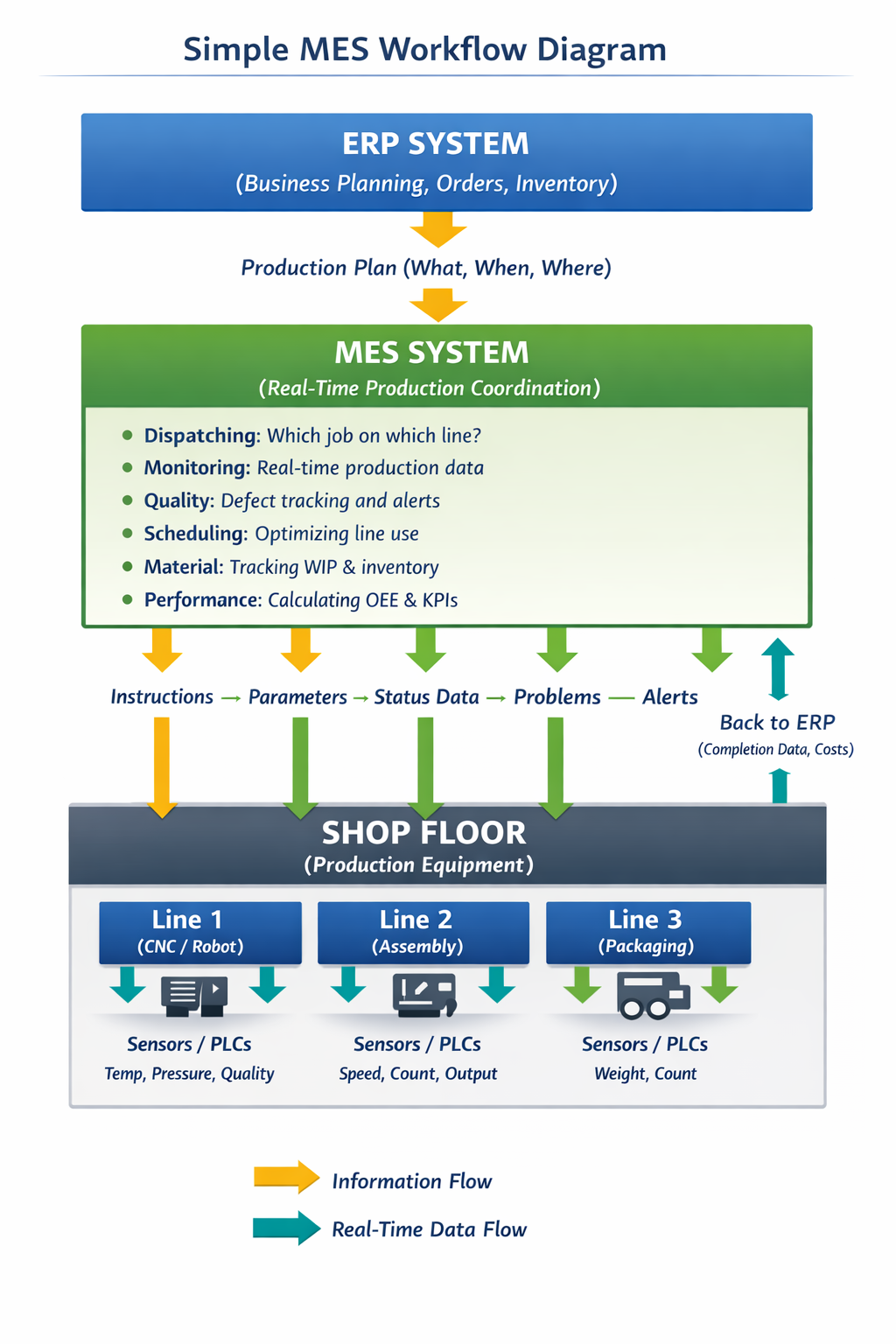
Final Thoughts
Manufacturing Execution Systems have evolved from nice-to-have to essential. If you’re manufacturing anything with complexity—multiple products, quality requirements, or growth aspirations—MES will improve your operation.
The key is choosing the right system for your specific situation, implementing it systematically, and then actually using the data it generates to make better decisions. Do those things, and you’ll get the ROI and the competitive advantages that MES delivers.
Your factory floor will finally have the real-time nervous system that connects planning to execution. That’s powerful.
